The ASUS RS520-E8-RS8 V2 and RS520-E8-RS12-EV2 are 1U barebone server systems built around the ASUS Z10PR-D16 Server Board, designed to support Intel® Xeon® E5-2600 Processor v3 family. These servers integrate advanced technologies and offer robust features for various computing environments.
Function Description:
These servers are designed for high-performance computing, offering extensive expandability and management capabilities. They serve as a foundation for building powerful server solutions, suitable for data centers, enterprise applications, and other demanding workloads. The systems support a range of storage configurations, multiple expansion cards, and advanced power management features.
Important Technical Specifications:
- Processor Support: Both models support two Socket R3 LGA 2011-3 Intel® Xeon® E5-2600 v3 Processors, with QPI speeds of 6.4, 8.0, or 9.6 GT/s.
- Core Logic: Intel® C612 PCH Chipset.
- Memory:
- Total Slots: 16 (4 Channels per CPU, 8 DIMMs per CPU).
- Capacity: Maximum up to 1024 GB.
- Memory Type: DDR4 2133 / 1866 / 1600 / 1333 RDIMM / LR-DIMM / NVDIMM.
- Memory Size: Supports 32GB, 16GB, 8GB, and 4GB (RDIMM), and 64GB, 32GB (LRDIMM). Refer to www.asus.com for the latest memory AVL update.
- Expansion Slots (Low-profile):
- 3+1 Total PCI/PCI-E Slots.
- 1 x PCI-E Gen3 x16 (x8 link).
- 2 x PCI-E Gen3 x8 (x8 link).
- 1 x PCI-E Gen3 x8 (x8 Gen3 link) for OCP Mezzanine* (Optional support for MCB-10G series 10 Gigabit/s Ethernet LAN card).
- Storage:
- SATA Controller (Intel® C612): 9 x SATA 6 Gbps ports (8 x 2 mini-SAS connectors), 1 x discrete M.2 socket. Supports Intel® RSTe (for Windows only; software RAID 0, 1, 10, 5) and LSI® MegaRAID driver (for Linux and Windows; RAID 0, 1, 10).
- SAS Controller: ASUS PIKE II 3008 8-port SAS HBA card or ASUS PIKE II 3108 8-port SAS HW card (default with ASUS HBA/RAID card). Optional items include ASUS PIKE II 3008 8-port SAS HBA card and ASUS PIKE II 3108 8-port SAS HW RAID card.
- HDD Bays:
- RS520-E8-RS12-EV2: 12 x Hot-swap 3.5-inch HDD Bays, 2 x Hot-swap 2.5-inch SSD Bays.
- RS520-E8-RS8 V2: 8 x Hot-swap 3.5-inch HDD Bays.
- System Fans: 4 x System Fan (80 mm x 38 mm).
- Networking:
- RS520-E8-RS12-EV2: 2 x Intel® I210T + 1 x Management LAN, 1 x Mezzanine 10G dual port LAN card.
- RS520-E8-RS8 V2: 2 x RJ-45 GbE port, 1 x RJ-45 management port.
- Graphic: Aspeed AST2400 32MB.
- Onboard I/O Connectors / LED indicators: 2 x USB 3.0 ports, 1 x VGA port, 1 x PS/2 keyboard/mouse combo port.
- OS Support: Windows® Server 2012 R2, Windows® Server 2012, Windows® Server 2008 R2, RedHat® Enterprise Linux, CentOS, Ubuntu, VMWare, Citrix XenServer. Support versions are subject to change without notice.
- Management Solution: ASWM Enterprise (Software), ASMB8-iKVM for KVM-over-Internet (Out of Band Remote Management).
- Dimension (HH x WW x DD): 615 mm x 444 mm x 88 mm.
- Net Weight (CPU, DRAM & HDD not included): 23 Kg.
- Power Supply: 1+1 redundant 770W 80PLUS Gold Power Supply.
- Power Rating: 100-127/200-240VAC, 10A/5A, 50-60Hz, Class I.
- Environment: Operating temperature: 10°C – 35°C. Non-operation temperature: -40°C – 70°C. Non-operation humidity: 20% – 90% (Non condensing).
Usage Features:
- Front Panel Features: Simple and stylish front panel with easily accessible power and reset buttons, LED indicators, and USB ports.
- RS520-E8-RS8 V2: Includes a slim optical drive (optional), VGA port, 2 x USB 3.0 ports, and HDD bays.
- RS520-E8-RS12-EV2: Includes USB 2.0 ports and HDD bays.
- Rear Panel Features: Expansion slots, system power sockets, rear fans, and I/O shields for motherboard connectors. Includes PS/2 keyboard/mouse combo port, LAN ports, VGA port, serial port (optional), USB 3.0 ports, DM management LAN port*, and Mezzanine 10G dual-port LAN card (optional).
- The DM management LAN port is for ASUS ASMB8-iKVM controller and for technicians only.
- Asset Tag: A pull-out tag on the front panel for writing down important server information.
- LED Information: Comprehensive LED indicators for Power, HDD Access, Message, LAN activity, and Location, providing quick status updates and troubleshooting assistance.
- BIOS Setup Program: A menu-driven program for configuring system settings, including CPU, memory, power management, and security. Supports ASUS CrashFree BIOS 3, ASUS EZ Flash 2 Utility, and BUPDATER utility for BIOS management and updates.
- RAID Configuration: Supports RAID 0, 1, 10, and 5 using Intel® Rapid Storage Technology enterprise Option ROM Utility and LSI Software RAID Configuration Utility. Provides tools for creating, viewing, adding, deleting, rebuilding, and checking consistency of RAID sets.
- Driver Installation: Includes a Support DVD with necessary drivers for various system components, compatible with Linux® and Windows® Operating Systems.
Maintenance Features:
- Chassis Cover Removal: Easy removal of the rear cover by loosening two thumbscrews, allowing access to internal components.
- CPU Installation/Removal: Detailed steps for installing and removing CPUs, including handling the load levers and applying thermal interface material. Caution is advised to prevent damage to socket contacts.
- DIMM Installation/Removal: Instructions for installing and removing DDR4 DIMMs, emphasizing correct orientation and proper force application to prevent damage.
- Hard Disk Drive Installation: Step-by-step guide for installing 3.5-inch HDDs and 2.5-inch SSDs (RS520-E8-RS12-EV2 only) into hot-swap trays.
- Expansion Card Installation: Procedures for installing Low-Profile PCI Express expansion cards, ASUS PIKE II cards (RS520-E8-RS8 V2 only), M.2 expansion cards, and Mezzanine cards. Includes instructions for securing cards and connecting necessary cables.
- System Fan Replacement: Easy removal and reinstallation of system fans by holding levers, with an emphasis on correct airflow direction.
- Slim Optical Drive (optional) Installation/Removal (RS520-E8-RS8 V2 only): Instructions for securing and placing the optical drive into the expansion bay, and removal by pressing an eject latch.
- Redundant Power Supply Module Replacement: Steps for replacing a failed redundant power supply module by pressing a secure tab and pulling the module out.
- Onboard LEDs: Provide visual cues for system status, including standby power, Baseboard Management Controller (BMC) heartbeat, CPU warnings, location identification, memory errors, CATT errors, and message alerts, aiding in quick diagnosis of issues.
- BIOS Update Utilities: ASUS CrashFree BIOS 3 for recovery from corrupted BIOS, ASUS EZ Flash 2 Utility for in-BIOS updates via USB, and BUPDATER utility for DOS-based updates. These tools ensure the system's firmware can be maintained and recovered.
- Tool-less Friction Rail Kit: Simplifies server rack installation and removal without additional tools, enhancing maintenance efficiency.
- Cable Connections: Pre-connected system cables for ease of setup, with guidance on disconnection only when necessary for additional device installation. Detailed information on motherboard connectors is provided.

 Need help?
 General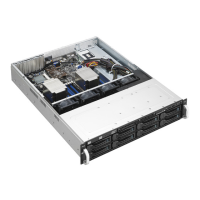

 To Next Page