11
MAC OS
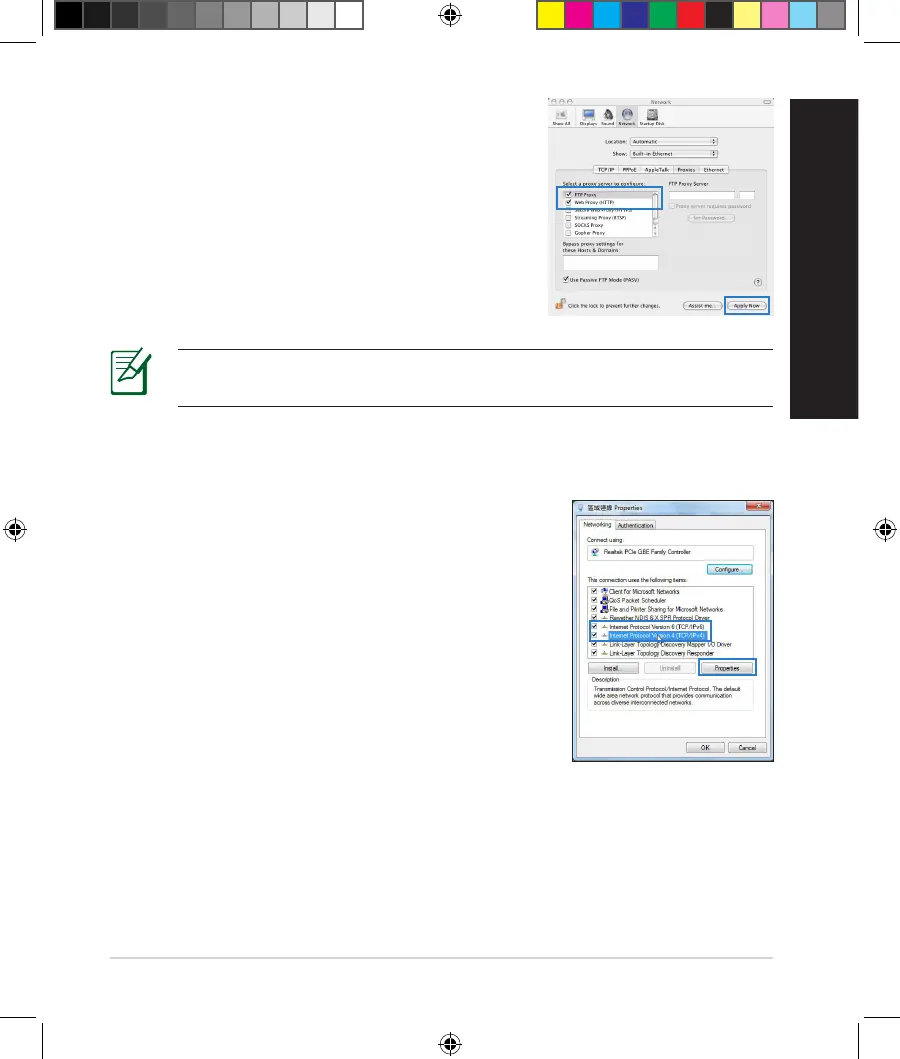
1. FromyourSafaribrowser,clickSafari > Prefer-
ences > Advanced > Change Settings...
2. FromtheNetworkscreen,deselectFTP Proxy
and Web Proxy (HTTP).
3. CllickApply Nowwhendone.
NOTE:Refertoyourbrowser'shelpfeaturefordetailsondisablingthe
proxyserver.
B. Set the TCP/IP settings to automatically obtain an IP address.
Windows® 7
1. ClickStart > Control Panel > Network and
Internet > Network and Sharing Center >
Manage network connections.
2. SelectInternet Protocol Version 4 (TCP/IPv4),
thenclickProperties.
NA11363_RT-AC1750_QSG.indb 11 2016-02-22 16:25:07


 To Next Page