7
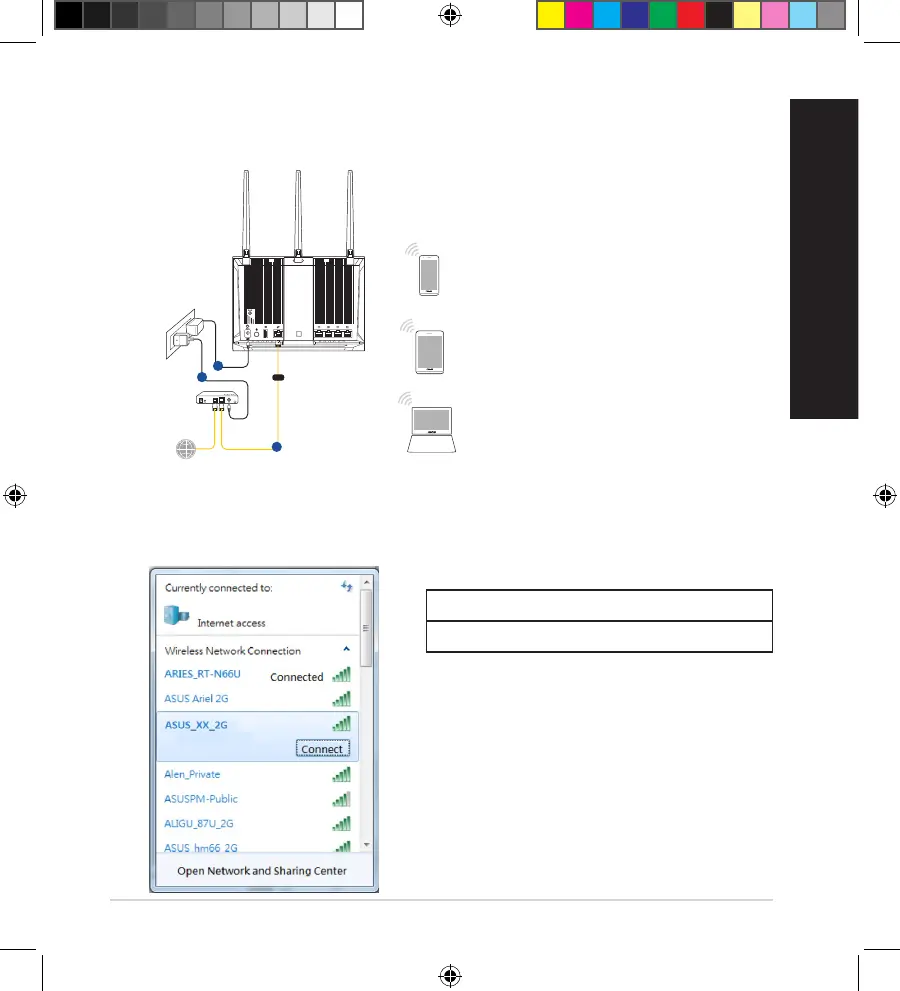
B. Wireless connection
1. Plug your router into a power outlet and power it on.
2. Connect to the network with SSID shown on the product label on the back side
of the router. For better network security, change to a unique SSID and assign
a password.
ASUS router
2.4G Wi-Fi Name (SSID): ASUS_XX_2G
5G Wi-Fi Name (SSID): ASUS_XX_5G
* XX refers to the last two digits of 2.4GHz
MACaddress.Youcannditonthelabel
on the back of your router.
Tablet
Smart phone
1
Internet
Modem
3
2
WAN
WEU14865_RT-AC85P_Booklet_QSG.indb 7 2018/10/12 10:52:58



 To Next Page