Home
Asus
Laptop
TP401MA
Page 29
Asus TP401MA - Page 29
104 pages
Manual
Save Page as PDF
To Next Page
To Next Page
To Previous Page
To Previous Page
Loading...
Notebook PC E-Manual
29
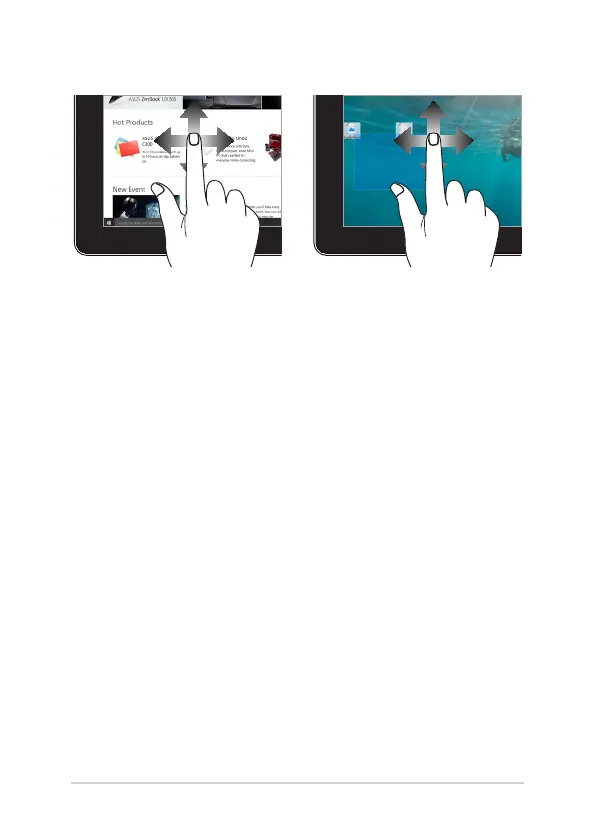
Finger slide
Drag
Slide your nger to scroll up and
down and slide your nger to pan
the screen left or right.
•
Dragtocreateaselection
box around multiple items
.
•
Draganddropanitemto
move it to a new location.
28
30
Table of Contents
Main Page
default chapter
3
Table of Contents
3
About this Manual
7
Conventions Used in this Manual
8
Icons
8
Typography
8
Safety Precautions
9
Using Your Notebook PC
9
Caring for Your Notebook PC
10
Proper Disposal
11
Chapter 1: Hardware Setup
13
Getting to Know Your Notebook PC
14
Top View
14
Bottom
17
Right Side
18
Left Side
20
Chapter 2: Using Your Notebook PC
23
Getting Started
24
Charge Your Notebook PC
24
Lift to Open the Display Panel
26
Press the Power Button
26
Gestures for the Touch Screen Panel and Touchpad
27
Using Touch Screen Panel Gestures
27
Using the Touchpad
30
Setting up Your Fingerprint Account
37
Using the Keyboard
38
Function Keys
38
Windows® 10 Keys
39
Rotating the Display Panel
40
Chapter 3: Working with Windows
43
Starting for the First Time
44
Start Menu
45
Windows® Apps
47
Working with Windows® Apps
48
Customizing Windows® Apps
48
Task View
51
Snap Feature
52
Snap Hotspots
52
Action Center
54
Other Keyboard Shortcuts
55
Connecting to Wireless Networks
57
Wi-Fi
57
Bluetooth
58
Airplane Mode
59
Turning Your Notebook PC off
60
Putting Your Notebook PC to Sleep
61
Chapter 4: Power-On Self-Test (POST)
63
The Power-On Self-Test (POST)
64
Using POST to Access BIOS and Troubleshoot
64
Bios
64
Accessing BIOS
64
BIOS Settings
65
Recovering Your System
72
Performing a Recovery Option
73
Tips and Faqs
75
Useful Tips for Your Notebook PC
76
Hardware Faqs
77
Software Faqs
80
Appendices
83
DVD-ROM Drive Information
84
Blu-Ray ROM Drive Information
86
Internal Modem Compliancy
86
Overview
87
Network Compatibility Declaration
87
Non-Voice Equipment
87
Federal Communications Commission Interference Statement
89
FCC Radio Frequency (RF) Exposure Caution Statement
90
RF Exposure Information (SAR)
91
IC Radiation Exposure Statement for Canada
91
Déclaration D'industrie Canada Relative à L'exposition aux Ondes Radio
92
Radio Frequency (RF) Exposure Information
93
Informations Concernant L'exposition aux Fréquences Radio (RF)
93
Wireless Operation Channel for Different Domains
93
UL Safety Notices
94
Power Safety Requirement
95
TV Notices
95
Reach
95
Macrovision Corporation Product Notice
95
Prevention of Hearing Loss
95
Nordic Lithium Cautions (for Lithium-Ion Batteries)
96
CTR 21 Approval (for Notebook PC with Built-In Modem)
97
ENERGY STAR Complied Product
99
Global Environmental Regulation Compliance and Declaration
99
ASUS Recycling/Takeback Services
100
Rechargeable Battery Recycling Service in North America
100
Coating Notice
100
Regional Notice for California
100
Regional Notice for Singapore
101
Regional Notice for India
101
Notices for Removable Batteries
101
Avis Concernant les Batteries Remplaçables
101
National Telecommunications Commission of the Philippines
101
Simplified EU Declaration of Conformity
102
RED RF Output Table
103
Related product manuals
Asus TP401MA Series
28 pages
Asus TP412UA
104 pages
Asus TP470 Series
37 pages
Asus VivoBook Flip TP412FA
104 pages
Asus VivoBook Flip TP410 Series
108 pages
VivoBook Flip 14 TP410UA-EC658R
108 pages
Asus TP550L
118 pages
Asus TP300LA
124 pages
Asus VivoBook TP202NA
96 pages
Asus VivoBook Flip TP201SA
102 pages
Transformer Book Flip TP200SA
104 pages
Asus T100 Series
106 pages






 To Next Page