Charging your ASUS Phone
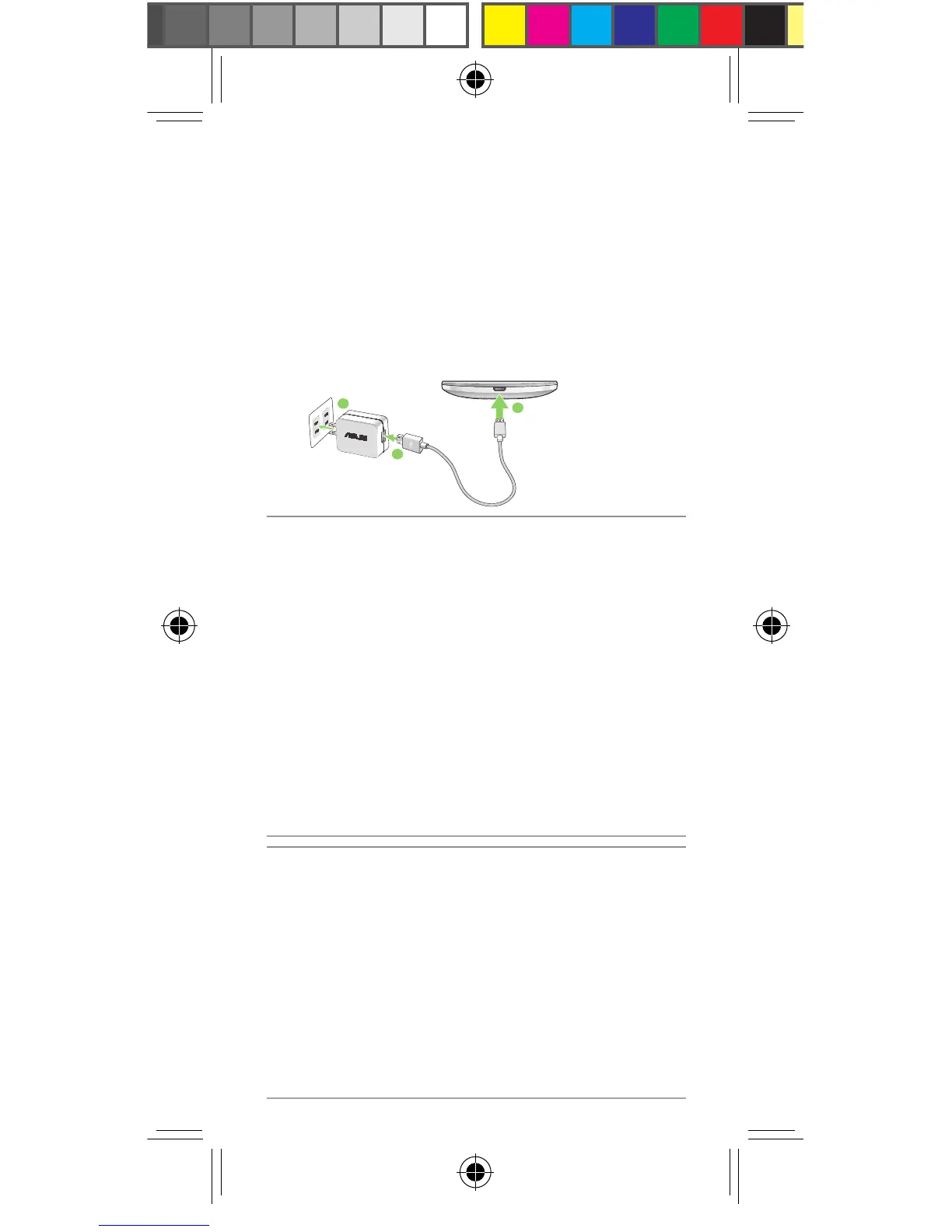
To charge your ASUS Phone:
1. ConnecttheUSBconnectorintothepower
adapter’s USB port.
2. ConnecttheotherendofthemicroUSBcable
to your ASUS Phone.
3. Plug the power adapter into a wall socket.
NOTES:
• Useonlythepoweradapterthatcamewithyour
device. Using a different power adapter may
damage your device.
• UsingthebundledpoweradapterandASUSPhone
signal cable to connect your ASUS Phone to a
power outlet is the best way to charge your ASUS
Phone.
• Theinputvoltagerangebetweenthewalloutletand
thisadapterisAC100V-240V.Theoutputvoltage
ofthemicroUSBcableisDC5.2V,1A.
IMPORTANT!
• YourASUSPhonecomespartiallychargedbutyou
mustchargeitfullybeforeusingitforthersttime.
Readtheimportantnoticesandcautionsbefore
charging your device.
• WhenusingyourASUSPhonewhileitispluggedto
a power outlet, the grounded power outlet must be
near to the unit and easily accessible.
• WhenchargingyourASUSPhonethroughyour
computer, ensure that you plug the micro USB
cable to your computer’s USB 2.0 / USB 3.0 port.
• AvoidchargingyourASUSPhoneinan
environment with ambient temperature of above
35
o
C(95
o
F).


 To Next Page