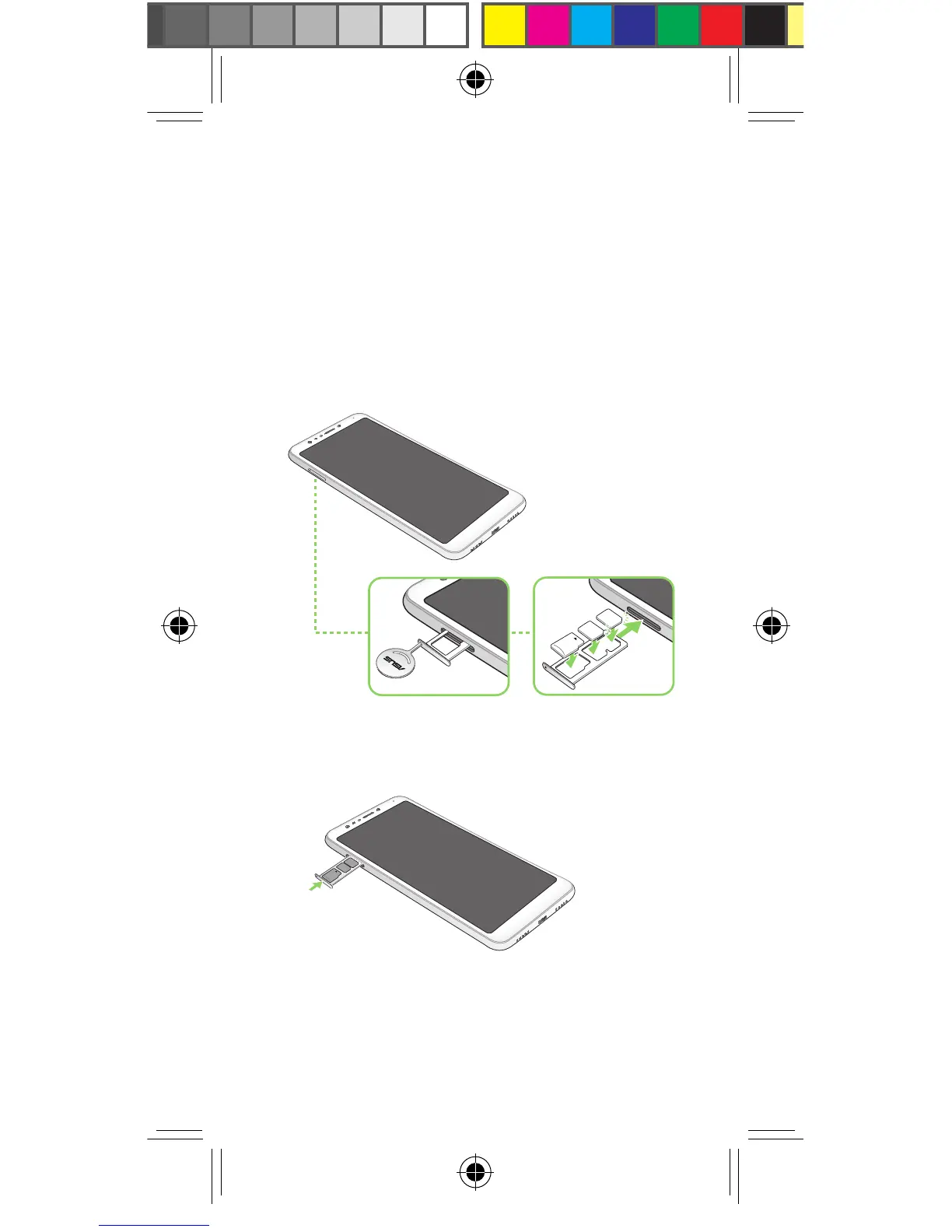
Installing a Nano SIM/ microSD
card
To install a Nano SIM/ microSD card:
3. Push the tray to close it.
IMPORTANT! When two SIM cards are inserted, only
oneSIMcardslotsupports4G/3G/2Gservice.Theother
SIM card slot only supports 2G/3G service.
CAUTION!
• Donotusesharptoolsorsolventonyourdeviceto
avoid scratches on it.
• UseonlyastandardNanoSIMcardonyourASUS
Phone.
1. Push the bundled eject pin into the hole on the
card slot to eject the tray out.
2. InserttheNanoSIMormicroSDcardintothe
appropriate slot.
NOTES:
• TheNanoSIMcardslotssupportGSM,WCDMA,
FDD-LTE,andTDD-LTEnetworkbands.
• ThemicroSDcardslotsupportsmicroSDand
microSDXC card formats.
E13370_ZC600KL_UM_Booklet_EU.indd 6



 To Next Page