EasyManua.ls Logo

AT&T S30 - User Manual

AT&T S30
16 pages
Print Icon
To Next Page IconTo Next Page
Loading...
Page 1
Users Manual
Protable Wireless Speaker
COM 803 / S30

Questions and Answers

Summary

Safety Information

Warning!

General safety warnings regarding electrical shock and liquid exposure, with explanations of warning symbols.

Important Safety Instructions

Detailed safety guidelines covering cleaning, attachments, placement, ventilation, power source, and battery care.

Getting Started

Location of Main Unit Controls

Identifies and explains the buttons and interface elements on the speaker unit.

Operational Instructions

Pairing a Bluetooth Device for the First Time

Step-by-step instructions on how to pair a Bluetooth device with the S30.

Troubleshooting

Specifications

Overview

This document is a user manual for the AT&T COM 803 / S30 Portable Wireless Speaker.

Function Description:

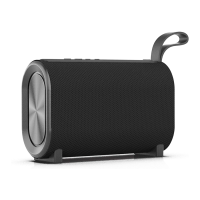
The AT&T S30 is a high-powered wireless speaker designed for audio streaming from Bluetooth-enabled devices. It features a built-in microphone for call functionality and an auxiliary input for connecting non-Bluetooth devices. The speaker automatically connects to previously paired devices for convenience. It also supports TWS (True Wireless Stereo) pairing, allowing two S30 speakers to be connected together for a stereo audio experience.

Important Technical Specifications:

  • Power Output: 5W x 1
  • Impedance: 4Ω5W
  • Rechargeable Battery: 3.7V/1200mAh (Built-In Lithium-ion)
  • Play Time: Up to 4 hours
  • Battery Charging Time: 2 hours
  • Connectivity: Bluetooth, 3.5mm Aux input
  • Charging Port: Micro USB

Usage Features:

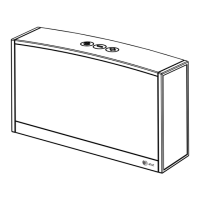
The speaker's controls are located on the top panel and include:

  • Power button: To turn the speaker ON/OFF.
  • Play/Pause Music & Answer/End Call/TWS function button: Controls music playback, manages calls, and initiates/cancels TWS pairing.
  • Decrease Volume - | Skip to previous track button: Decreases volume when pressed and held, skips to the previous track when pressed.
  • Increase Volume + | Skip to next track button: Increases volume when pressed and held, skips to the next track when pressed.

LED Status Indicator:

  • Blinking Blue LED: Indicates wireless is ON and ready to pair (no connection).
  • Solid Blue LED: Indicates wireless is paired and connected.
  • Red LED (during charging): Indicates the speaker is charging.
  • LED OFF (after charging): Indicates the speaker is fully charged.

Charging the S30:

The speaker is charged via a Micro USB cable. Connect the Micro USB end to the speaker's charging port and the USB end to a computer's USB port or an AC USB adapter. The LED indicator will turn red during charging and turn off when fully charged.

Powering ON/OFF:

Press and hold the power button. An ascending audible tone indicates power ON, and the Wireless LED light will blink. A descending audible tone indicates power OFF, and the Wireless LED light will turn off.

Bluetooth Pairing:

  1. Turn on the S30. The blue LED will flash, indicating it's ready to pair.
  2. On your Bluetooth device, navigate to the Bluetooth manager, search for devices, and select 'S30'.
  3. Once paired, the S30 will beep, and the Bluetooth LED will turn solid blue.

TWS Pairing Operation (for two speakers):

  1. Turn on both S30 wireless speakers.
  2. Press and hold the |►| button on both speakers simultaneously.
  3. Both S30 speakers will beep once connected.
  4. To cancel TWS pairing, press and hold the |►| button again.

Auxiliary Input Connection (3.5mm):

  1. Use a standard 3.5mm stereo Aux cable to connect the audio line-out of an external device (e.g., MP3 player, smartphone) to the aux-in jack of the speaker.
  2. Turn on both the speaker and the external device.
  3. Ensure the speaker is not connected to any Bluetooth devices.
  4. Start playback on the external device and adjust the volume using the speaker's |+| or |-| buttons.
  5. Remember to switch off the speaker when finished.

Call Function:

  • Answer incoming calls: Press the |►| button.
  • End calls: Press the |►| button.
  • Reject calls: Press and hold the |►| button.
  • Redial last called number: Double-click the |►| button.

Maintenance Features:

  • Cleaning: Unplug the unit before cleaning. Use a damp cloth; avoid liquid or aerosol cleaners.
  • Troubleshooting: The manual provides solutions for common issues like no music streaming, no power, or battery not charging. If problems persist, disconnecting and reconnecting the DC IN plug can reset the unit to factory default settings. For persistent issues, refer to warranty information for service.
  • Built-in Battery Care: The device contains a rechargeable Lithium-ion battery. Unplug the charger when not in use to prevent overcharging, which can shorten battery life. Avoid leaving the product in hot or cold places as this can reduce battery capacity and lifetime.
  • Safety Instructions: Emphasizes important safety measures including avoiding exposure to liquids, proper placement for ventilation, unplugging during non-use or lightning storms, and proper power source connection. It also advises against user servicing beyond what's described in the manual and recommends qualified personnel for repairs.
  • Recycling: Information is provided for recycling the spent battery, including contacting local recycling centers or calling 1-800-8-BATTERY.

AT&T S30 Specifications

General IconGeneral
BrandAT&T
ModelS30
CategorySpeakers
LanguageEnglish