EasyManua.ls Logo

Atel AGP-KW125 - User Manual

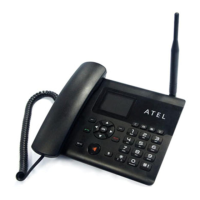
Atel AGP-KW125
79 pages
Print Icon
To Next Page IconTo Next Page
Loading...
1
Asiatelco Technologies Co.
WCDMA / 3G Fixed Wireless Terminal
Atel AGP-KW125 User Manual
Download electronic copy from www.sstelecoms.com
Question and Answer IconNeed help?

Do you have a question about the Atel AGP-KW125 and is the answer not in the manual?

Summary

Safety and Maintenance

Using the phone

Safety guidelines for using the phone.

Using the battery

Guidelines for safe and proper battery usage.

Using the battery charger

Instructions for using the battery charger safely.

Your Phone

Appearance

Visual overview and components of the phone.

Key descriptions

Detailed explanation of each button and its function.

State icons

Meanings of various icons displayed on the phone screen.

Screen background light

How to adjust screen backlight brightness and duration.

Adjust the volume

How to control audio volume during calls and media playback.

Instructions before Use

Procedures for powering on/off, security, PIN, and PUK codes.

Basic Functions

Core operations like making, answering, and ending calls.

Talk options

Features for managing calls, like holding and conferencing.

Messaging

Write Message

How to compose and send SMS and MMS messages.

Inbox

Where received SMS and MMS messages are stored.

Drafts

Messages not yet sent.

Outbox

Storage for failed SMS/MMS.

Sent messages

Messages that have been sent successfully.

Archive

Moving messages to an archive.

Broadcast message

Options for receiving and managing broadcast messages.

Message settings

Configuration options for message services.

File Manager

Phonebook

Phonebook settings

Customizing phonebook features like preferred storage and speed dial.

Fun & Games

Call history

Call settings

Configuring call-related options like Caller ID and call waiting.

Multimedia

Image Viewer

Viewing and managing image files.

Media Player

Playing music and video files.

Sound Recorder

Recording and managing audio files.

FM Radio

Listening to and managing FM radio stations.

Organizer

Calendar

Setting reminders, meetings, and events.

Tasks

Creating and managing to-do lists.

Alarm

Setting and customizing alarms.

World clock

Checking time in different countries.

Notes

Creating and managing notes.

Settings

Phone settings

Adjusting time, date, language, and input methods.

Display

Customizing wallpaper, date/time display, and LCD backlight.

Network settings

Configuring network selection and preferences.

Security settings

Managing SIM security, PIN, and phone lock.

Restore Factory Settings

Resetting the phone to its original factory state.

User Profiles

Extra

Calculator

Performing basic arithmetic operations.

Unit Converter

Converting units of weight and length.

Currency Converter

Converting currency amounts.

Stopwatch

Using stopwatch features for timing.

EBook Reader

Reading electronic books.

Services

Connectivity

WLAN

Connecting to and managing Wi-Fi networks.

Bluetooth

Pairing and using Bluetooth devices.

Connection management

Viewing and managing active data connections.

Data account

Setting up and managing internet data accounts.

Internet tethering

Sharing the phone's internet connection via Wi-Fi or USB.

Data Service

Enabling or disabling data connectivity.

Frequently Asked Questions

Summary

Safety and Maintenance

Using the phone

Safety guidelines for using the phone.

Using the battery

Guidelines for safe and proper battery usage.

Using the battery charger

Instructions for using the battery charger safely.

Your Phone

Appearance

Visual overview and components of the phone.

Key descriptions

Detailed explanation of each button and its function.

State icons

Meanings of various icons displayed on the phone screen.

Screen background light

How to adjust screen backlight brightness and duration.

Adjust the volume

How to control audio volume during calls and media playback.

Instructions before Use

Procedures for powering on/off, security, PIN, and PUK codes.

Basic Functions

Core operations like making, answering, and ending calls.

Talk options

Features for managing calls, like holding and conferencing.

Messaging

Write Message

How to compose and send SMS and MMS messages.

Inbox

Where received SMS and MMS messages are stored.

Drafts

Messages not yet sent.

Outbox

Storage for failed SMS/MMS.

Sent messages

Messages that have been sent successfully.

Archive

Moving messages to an archive.

Broadcast message

Options for receiving and managing broadcast messages.

Message settings

Configuration options for message services.

File Manager

Phonebook

Phonebook settings

Customizing phonebook features like preferred storage and speed dial.

Fun & Games

Call history

Call settings

Configuring call-related options like Caller ID and call waiting.

Multimedia

Image Viewer

Viewing and managing image files.

Media Player

Playing music and video files.

Sound Recorder

Recording and managing audio files.

FM Radio

Listening to and managing FM radio stations.

Organizer

Calendar

Setting reminders, meetings, and events.

Tasks

Creating and managing to-do lists.

Alarm

Setting and customizing alarms.

World clock

Checking time in different countries.

Notes

Creating and managing notes.

Settings

Phone settings

Adjusting time, date, language, and input methods.

Display

Customizing wallpaper, date/time display, and LCD backlight.

Network settings

Configuring network selection and preferences.

Security settings

Managing SIM security, PIN, and phone lock.

Restore Factory Settings

Resetting the phone to its original factory state.

User Profiles

Extra

Calculator

Performing basic arithmetic operations.

Unit Converter

Converting units of weight and length.

Currency Converter

Converting currency amounts.

Stopwatch

Using stopwatch features for timing.

EBook Reader

Reading electronic books.

Services

Connectivity

WLAN

Connecting to and managing Wi-Fi networks.

Bluetooth

Pairing and using Bluetooth devices.

Connection management

Viewing and managing active data connections.

Data account

Setting up and managing internet data accounts.

Internet tethering

Sharing the phone's internet connection via Wi-Fi or USB.

Data Service

Enabling or disabling data connectivity.

Frequently Asked Questions

Atel AGP-KW125 Specifications

General IconGeneral
ProtocolsSIP
Ethernet Ports2x 10/100 Mbps
HandsetYes
SpeakerphoneYes
PoEIEEE 802.3af compliant
Supported CodecsG.711
Power Supply5V DC