Scan the QG code to nd the installation tutorial video.
- 14 -
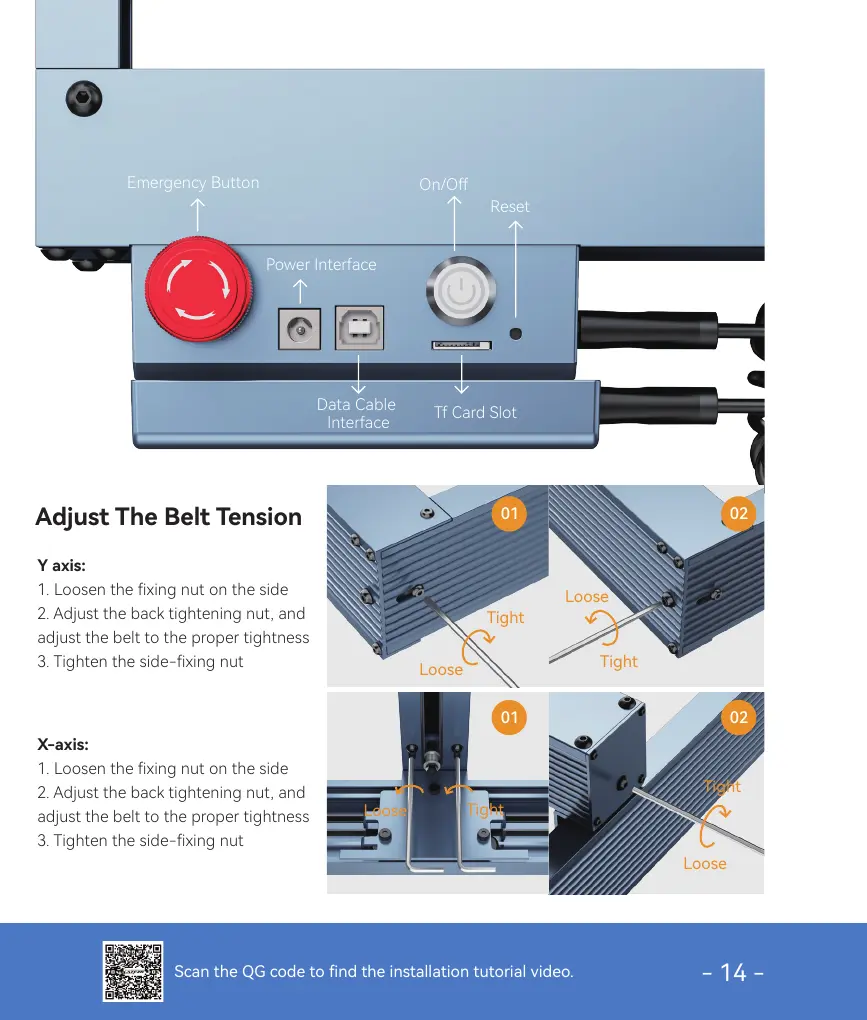
Emergency Button
Power Inteace
Data Cable
Inteace
Tf Card Slot
On/O
Reset
Y axis:
1. Loosen the xing nut on the side
2. Adjust the back tightening nut, and
adjust the belt to the proper tightness
3. Tighten the side-xing nut
Adjust The Belt Tension
X-axis:
1. Loosen the xing nut on the side
2. Adjust the back tightening nut, and
adjust the belt to the proper tightness
3. Tighten the side-xing nut
01 02
01 02
Loose
Loose
Loose
Tight
Tight
Tight
Loose
Tight



 To Next Page