
 Need help?
Do you have a question about the Atheros AR5B93 and is the answer not in the manual?
Introduces the Atheros Client Utility's profile management features.
Procedure to delete existing wireless configuration profiles.
Enabling and ordering automatic profile selection for networks.
How to switch between different saved wireless profiles.
Methods for saving and loading profile configurations.
Setting unique profile names and client identifiers.
Configuring the wireless network name (SSID) for connections.
Configuring transmit power level and power saving modes.
Setting network type (ad hoc/infrastructure) and 802.11b preamble.
Choosing the wireless adapter's authentication method.
Configuring WPA or WPA2 security using EAP or Passphrase.
Configuring 802.1x security, typically requiring IT administration.
Using pre-defined shared keys for static WEP encryption.
Steps to configure EAP-TLS for secure wireless network authentication.
Steps to configure EAP-TTLS for secure wireless network authentication.
Detailed steps for configuring PEAP (EAP-GTC) authentication.
Detailed steps for setting up PEAP-MSCHAP V2 authentication.
Detailed steps for setting up LEAP authentication, including user name and password.
Steps to define key entry, encryption keys, and WEP key size.
Procedure to replace an existing static WEP key with a new one.
How Windows XP Zero Configuration manages wireless connections.
Details on the Current Status tab and its displayed network information.
Lists specific checks like driver info and transmit/receive diagnostics.
Accessing adapter details like card name, MAC address, and driver version.
Lists various statistics for frames received or transmitted by the adapter.
Procedure to scan for infrastructure and ad hoc wireless networks.
Steps to select and activate a network connection, creating a profile if needed.
Setting display units for signal strength (percentage or dBm).
Adjusting the interval at which display data is refreshed.
Enabling or disabling the RF signal on Atheros station designs.
Running the optional troubleshooting utility for the adapter.
Manually logging in for LEAP authentication when prompted.
How the tray icon shows signal strength, profile name, and connection status.
Options available via the tray icon's context menu, like launching the utility or help.
Viewing detailed connection information like active profile, link quality, and SSID.
Settings for configuring a profile for ad hoc mode, including network name and power.
Settings for configuring a profile for access point mode, including power save and authentication.
Steps to remove previous NDIS driver versions before upgrading.
Information on MIC and TKIP for WEP security enhancement.
Details on network name, authentication type, and data encryption.
Information on signal strength, noise level, transmit/receive rates, and uptime.
Compliance with FCC RF exposure and Part 15 rules.
Compliance with Industry Canada RSS 210 and RF exposure limits.
CE marking indicates compliance with EU directives and standards.
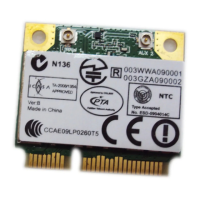
 General
| WLAN Standard | 802.11a/b/g/n |
|---|---|
| Frequency | 2.4 GHz / 5 GHz |
| Interface | Mini PCI Express |
| Maximum Data Rate | 300 Mbps |
| Security | WEP, WPA, WPA2 |
| Chipset | Atheros |

 To Next Page