5
TV Wall Mount
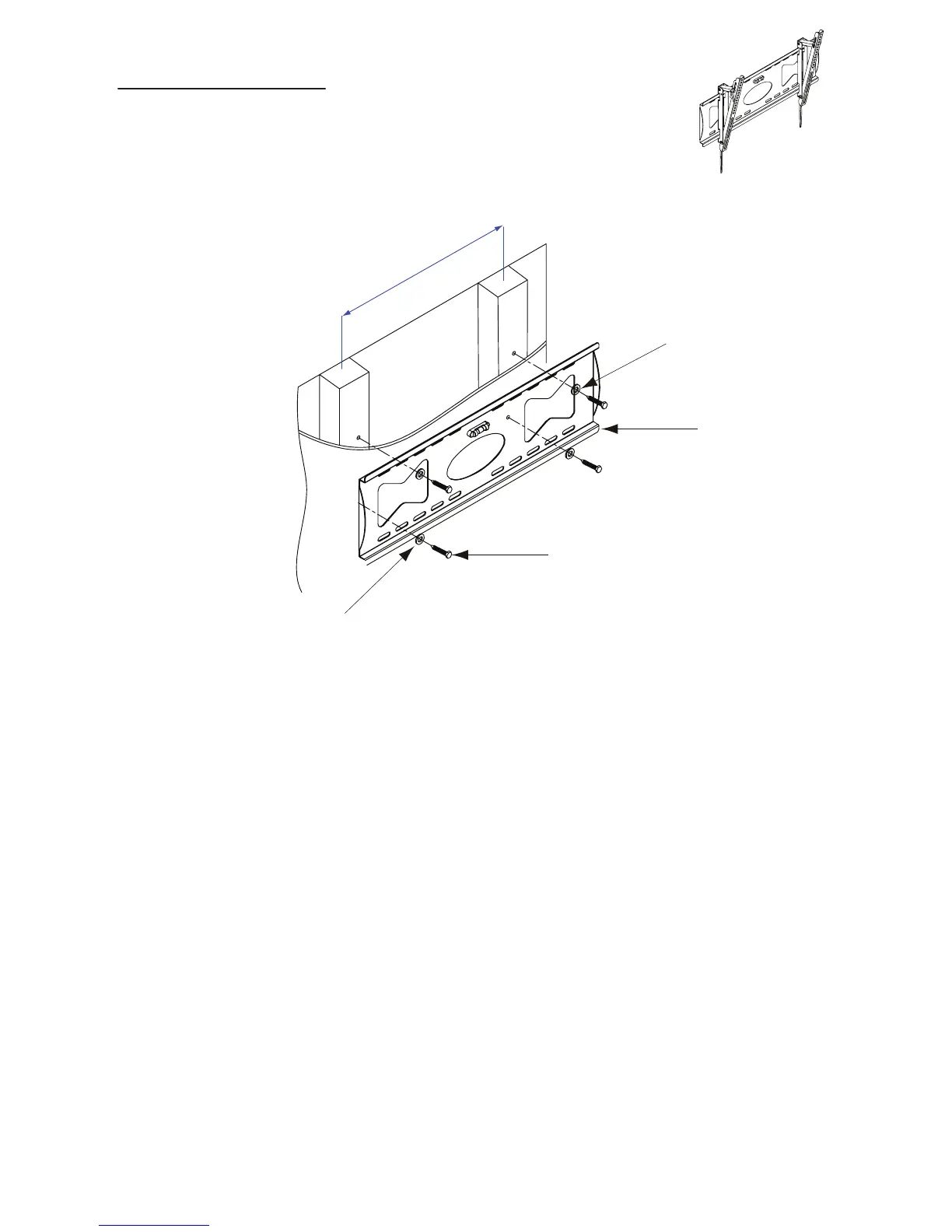
Step 1 Attaching Wall Plate (A)
Using a stud finder, locate center of wood studs in your wall, then hold wall plate (A)
against wall at your desired location. Next, use a pen or pencil to mark the location of where
the 4 mounting screws (E) will go into wall. Before marking, ensure that wall plate
is level using bubble level (already attached to mount.)
Pre-drill the marked 4 holes using 1/4in. (7mm) drill bit. Using a 14mm wrench, fasten wall
plate (A) to wall with screws (E) and washers (F). DO NOT MOUNT INTO DRYWALL.
MUST BE BOLTED TO STUDS.
See Figure 1
This mount is designed to be mounted into wood studs.
Included hardware is not designed to be used in hollow walls, cinder block, red brick, or
metal studs. Should you want to mount your TV mount into any surface other than wood
studs, Atlantic recommends that you seek the assistance of a professional installer.
16 in./406 mm
1 erugiF
E(x4)
F(x4)
A
In case the included hardware
is too long, use the spacers.


 To Next Page