6
TV Wall Mount
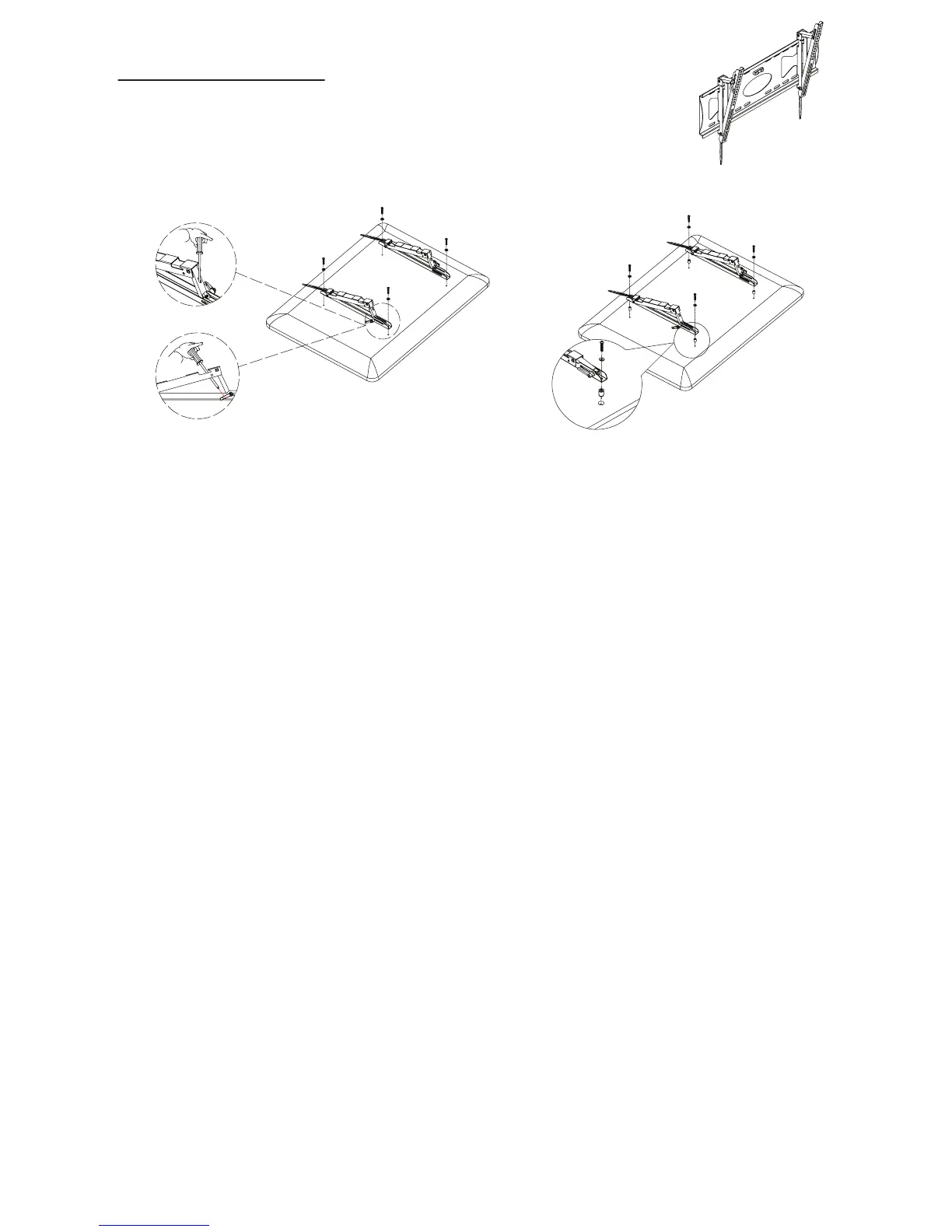
Carefully lay your TV down on rug or flat carton, then attach left bracket (B) and right
bracket (C) to back of TV, then fasten them using hardware included.
(Note - spacers are included in case screws provided are too long for screw holes) See
page 2 for list of spacers included.
TAKE EXTRA CARE AND ATTENTION WHEN YOU FASTEN TWO TV BRACKETS TO THE
Assembly Tip: When attaching the brackets, hand tighten the screws until the brackets are
attached, alighned and tighten snugly.
TV PANEL IN STEP 2. MAKE SURE THE APPROPRIATE MOUNT HARDWARE
IS BEING USED.
Select correct mounting hardware according to the screw hole size of your TV, you may
need spacers on some TV models.
Carefully lay your TV on its face on a non-abrasive surface, making sure to lay padding
underneath it so as not to damage the screen.
Place left mount and right mount in the appropriate position, making sure CENTERED
on the back of TV and level with eachother.
1.
2.
3.
Step 2 Installation of Supports


 To Next Page