Package Contents
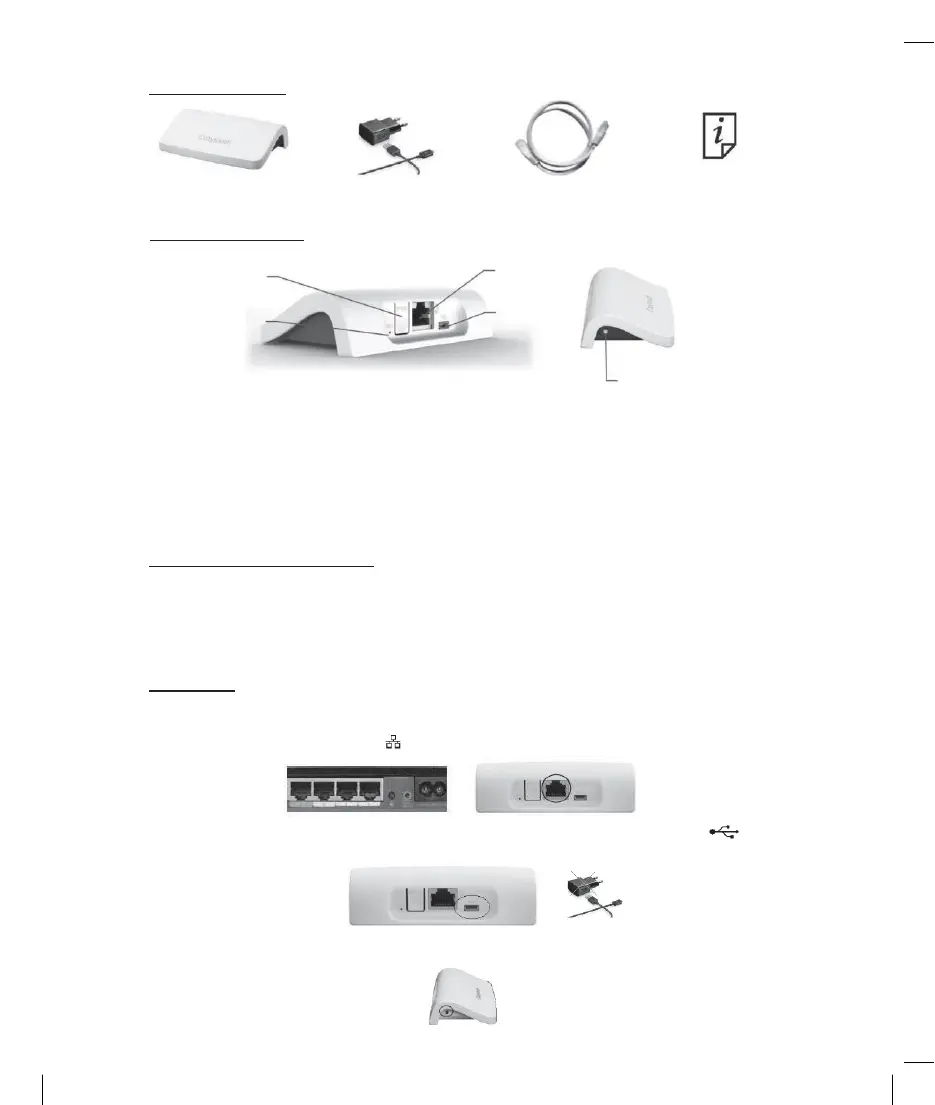
1 x Bridge 1 x Power Supply 1 x Ethernet Cable 1 x manual
Product Description
PROG button
RESET button
RJ45 Ethernet
connector
Supply
LED
The LED indicates the operating mode of the bridge:
-
Green light: established internet connection
-
Red light: no internet connection
-
Flashing LED (green, orange or red): connection in progress
PROG and RESET buttons have no action for the moment in Cozytouch App.
Requirements for installation
An internet connection is required - DSL box equipped with an Ethernet port. Place the bridge
at a minimum distance of 30cm from the internet modem. Do not place the bridge on a metal
surface.
Installation
Connect the bridge to your DSL box, by plugging the Ethernet cable on the Ethernet
connector represented by the logo .
Connect the included power supply to the connector. The USB can be directly connected to
an internet box where compatible for the power supply.
Then the LED will light up by changing color for a few tens of seconds and finally will stay
green.


 To Next Page