Need help?
Do you have a question about the Atlantic Cozytouch Bridge and is the answer not in the manual?
Read installation and safety instructions before use. Follow instructions precisely.
List of safety guidelines for operating the Cozytouch bridge safely.
Details the LED's operating modes and notes on PROG/RESET button actions.
Requires internet, DSL box with Ethernet, and specific placement away from metal.
Connect the bridge to the DSL box via Ethernet and plug in the power supply.
The LED will change colour during startup and eventually display a steady green light.
Account creation and bridge connection are managed via the Cozytouch application.
The bridge's PIN number, found on the sticker, is required for account creation.
Details Cozybridge IP rating, operating conditions, dimensions, and radio frequencies.
Details the input voltage, frequency, and output specifications of the power supply.
Guidelines for proper disposal and statement of compliance with Directive 1999/5/EC.
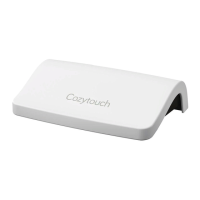
The Cozytouch Bridge is a device designed to allow users to control their connected Atlantic products remotely. It serves as a central hub, enabling communication between Atlantic appliances and the Cozytouch application, which is available for free download on both Apple Store and Google Play. This bridge facilitates smart home integration, providing users with convenient control over their Atlantic devices from a smartphone or tablet.
The primary function of the Cozytouch Bridge is to establish and maintain a connection between compatible Atlantic products and the Cozytouch mobile application. By doing so, it enables remote management and monitoring of these connected devices. This bridge acts as an intermediary, translating commands from the user's smartphone into signals that Atlantic products can understand and execute, and vice versa. This allows for features such as adjusting settings, scheduling operations, and receiving status updates from connected appliances, all through a user-friendly interface on the Cozytouch app. The bridge is essential for unlocking the full smart capabilities of Atlantic's connected product ecosystem.
To use the Cozytouch Bridge, an internet connection is required, specifically a DSL box equipped with an Ethernet port. The installation process involves connecting the bridge to the DSL box using the provided Ethernet cable. The Ethernet cable should be plugged into the Ethernet connector on the bridge, which is typically marked with an Ethernet logo. Following this, the included power supply needs to be connected to the bridge's power input, also indicated by a specific logo. In some regions, a USB connection directly to an internet box might be used for power instead of the converter.
Once properly connected, the LED indicator on the bridge will illuminate, cycling through various colors for a few tens of seconds before settling on a steady green light. This green light signifies that an internet connection has been successfully established. A red light indicates no internet connection, while a flashing LED (green, orange, or red) suggests that a connection is in progress.
The actual configuration and connection of the bridge with your Atlantic products are managed through the Cozytouch application. Users will need to download the Cozytouch app to their smartphone or tablet. Within the app, an account must be created, and the bridge needs to be registered. A crucial step in this process involves entering the bridge's unique PIN number, which can be found on a sticker located on the underside of the device. This PIN is essential for linking the physical bridge to the user's digital account within the application.
For detailed instructions on configuring and utilizing the Cozytouch application, users are advised to refer to the manuals provided with their specific Atlantic devices and the instructions within the COZYTOUCH application itself. The PROG and RESET buttons on the bridge currently have no active function within the Cozytouch App.
The Cozytouch Bridge is designed for straightforward operation with minimal maintenance requirements. Users are advised to avoid attempting to open the bridge, as this could damage the device and void any warranties. It is important to handle the bridge with care to prevent shocks and falls, which could also lead to damage. The device should never be immersed in liquid. For cleaning, only non-abrasive materials and solvents should be used to prevent damage to the product's surface and internal components. The bridge is intended for indoor use only and should not be used outdoors. Any unauthorized modifications or uses of the equipment not explicitly outlined in the manual could pose a risk to the user.
For optimal performance, the bridge should be placed at a minimum distance of 30 cm from the internet modem. It is also recommended not to place the bridge on a metal surface, as this could potentially interfere with its wireless communication capabilities. The device's power supply is designed to be disconnected by unplugging the power plug when necessary. However, it's crucial to remember that the Ethernet interface should never be connected directly to a phone outlet; it must always be connected to a DSL box, network switch, or Ethernet hub.
The Cozytouch Bridge is also designed with environmental considerations in mind. Devices bearing the designated symbol should not be disposed of with regular household waste. Instead, they must be collected separately and recycled in accordance with local provisions and ordinances, such as DEEE 2002/96/CE. This ensures responsible end-of-life management for the product. The manufacturer declares that the device complies with the essential requirements and other relevant provisions of Directive 1999/5/EC, affirming its adherence to European safety and environmental standards.
 Operating Environment
| operating temperature | 5 °C to 35 °C |
|---|---|
| maximum operating altitude | <2000 m |
| operating humidity | 30% to 85% |
 Power
Power| power consumption | DC 5V 120mA |
|---|---|
| power supply AC adapter | 230V ~ 50Hz |
| power supply DC | 5V 0.5A |
Radio Specifications| radio frequency | 868.25MHz, 868.95MHz, 869.85MHz |
|---|
 Weight and Dimensions
| dimensions | 110 x 71.25 x 28.13 mm |
|---|

 To Next Page