Power outlet
Leave the battery charger plugged in
so that the batteries in your stairlift are
always charged.
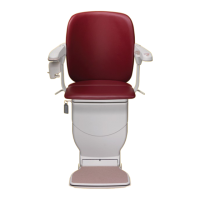
Safety key and safety switch
For your stairlift to work, the safety
key must be inserted and turned to
the ON position.
A
rmrest switch and light
The armrest light only comes on
when the safety key is inserted and
switched ON. To turn your stairlift
ON, press down the I symbol on
the armrest switch. Press down
the O to turn it OFF.
Footrest fold button Raises or
lowers the footrest.
Battery charger
Located near the outlet, this unit
charges your stairlift batteries.
The batteries typically last three to
five years and any problems will
be identified by Atlas during
annual servicing.
5
Getting to know your stairlift
Safety edges
Located around the footrest
and lower part of your chair.
They stop your stairlift if
they come into contact with
any obstacles that might get
trapped while your stairlift is
being used.
Arm control
To move your stairlift, press
the control on the end of the
armrest in the direction you
want to go. Your stairlift will
start moving after a slight delay.
Swivel seat levers
Located on either side of the
seat. Lift a swivel lever to swivel
the seat to make it easier to get
on and off.
Seatbelt
Provides security when your
stairlift is moving.
Wall controls
Located at the top and bottom
of your staircase. Used to call
your stairlift if it’s at the opposite
end of the staircase to you.
User display panel
Located on the side of the
stairlift, it allows you to see
the status of your stairlift for
easier troubleshooting.
1
6
7
8
9
10
11
2
3
4
5
Getting to know your stairlift
IMPORTANT: Remove the
safety key if you want to stop
others from using the stairlift



 To Next Page