5
QR Code for Cardboard App
RECOMMENDED OPTIONAL FEATURES
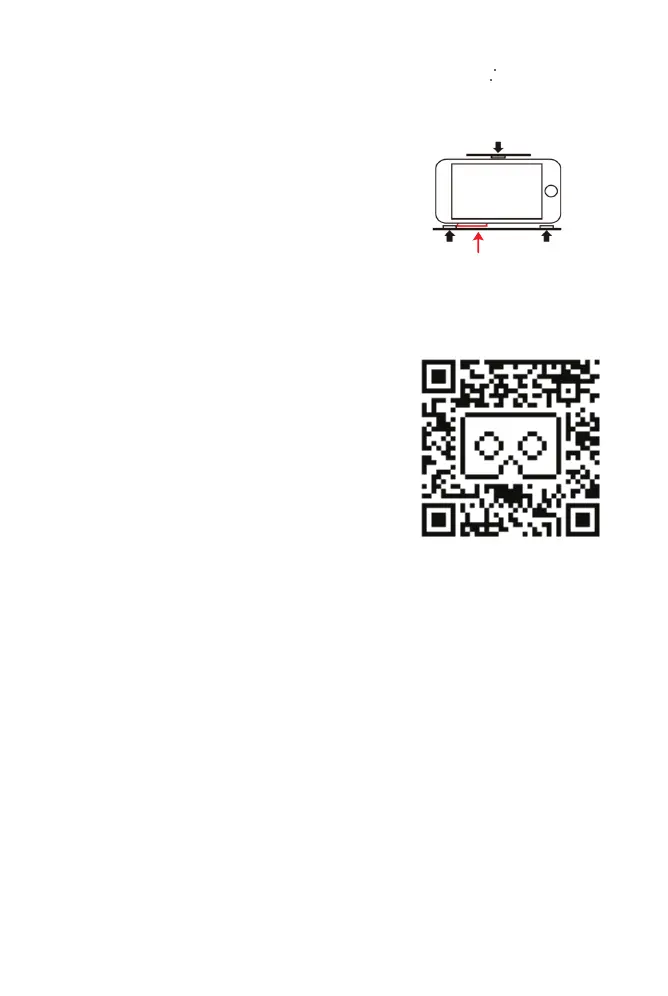
1. Foam Square Pads
- The foam square pads prevent
unwanted pressing of side buttons
against the phone holder plastic. Stick
the foam square pads to create a gap for
the buttons as shown in Figure 6.
- The foam square pads can also prevent
the smartphone from sliding and to
obtain a better vertical alignment of the
image.
2. Cardboard App – For better Virtual
Reality performance
Cardboard App (Google) is an App that
connects�automatically to many VR apps,
and also allows you to set it up to work
specifically with the ATLASONIX VR Headset,
for better performance.
Here are the steps to use it:
1. Download "Cardboard" app by Google
2. Run it
3. Tap the settings, the 3 buttons on the
top right corner
4. Tap “viewer”
5. Scan the ATLASONIX QR code
PAD PAD
BUTTON
PAD
FIGURE 6


 To Next Page