
 Need help?
Do you have a question about the Atmovac DIABLO10 and is the answer not in the manual?
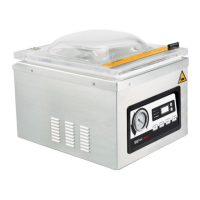
Turns the appliance on/off. Shows last setting. Press to stop ongoing processes.
Initiates the vacuum and seal process after closing the lid.
Stops vacuum cycle and seals the bag instantly to prevent crushing items.
Activates vacuum, seal, and marinate time settings for adjustment.
Displays the real-time vacuum level inside the chamber.
Indicates status, including time adjustment and latest settings.
Shows vacuum, seal, and marinate times; indicates 'CLO' when closed.
Buttons (^") used to adjust vacuum, seal, and marinate times.
Requires oiling for first use, low levels, performance degradation, or after 6 months.
Access pump via back cover, open cap, fill to 1/2-3/4, tighten cap, reinstall cover.
Place container under port, unscrew cap with spanner to drain, then screw cap back.
Package fresh foods only, refrigerate/freeze after packaging, blanch vegetables.
Select the correct size pouch with 1-2 inches of headspace for a quality seal.
Connect the appliance to a grounded outlet; the LED will show "OFF".
Press ON/OFF to show last settings or stop processes. Close lid to start automatically.
Set vacuum, seal, and marinate times using SET, ^, and V buttons.
Place pouches with liquids below seal bar; ensure opening crosses seal bar.
Appliance automatically vacuums and seals after closing the lid. Air returns to chamber.
Appliance enters vacuum/marinate mode. One cycle includes vacuuming and maintaining vacuum.
Check vacuum quality and seal integrity. Adjust time based on inspection results.
Press SEAL and SET simultaneously for 3 seconds to reset to factory defaults.
Check power connection, cord condition, and ensure ON/OFF button is pressed.
Adjust vacuum/seal time, ensure pouch opening is correctly placed and clean.
Check for punctures from sharp items; cover sharp edges with paper towel.
Increase seal time, ensure seal area is clean and pouch is correctly positioned.
Pressure switch issue during vacuuming. Check lid, gasket, and pump system.
Microswitch issue during sealing. Check lid closure and microswitch system.
Appliance loses power during operation. Check power supply and connections.
 General
| Brand | Atmovac |
|---|---|
| Model | DIABLO10 |
| Category | Kitchen Appliances |
| Language | English |

 To Next Page