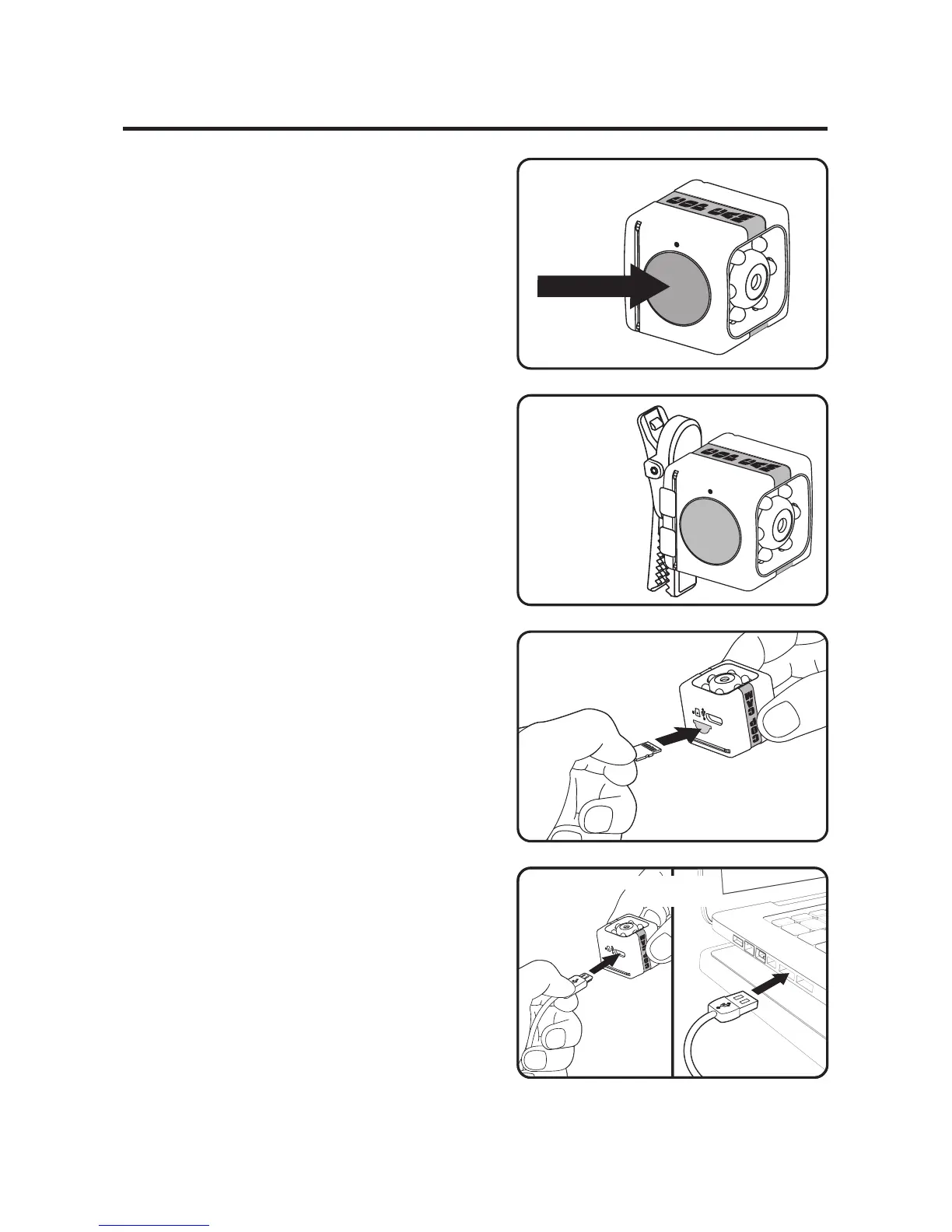
STEP 1: To turn on press and hold
POWER/RECORD button for 4
seconds. (Figure A) LED light will
illuminate solid red. Cop Cam
™
will
start recording video when motion
is detected. Ensure Cop Cam
™
is
oriented as shown so video is
upright. (Figure B)
STEP 2: To switch to photo mode
press and hold the POWER/
RECORD button for 2 seconds. LED
light will illuminate solid green. To
take a photo quickly press the
POWER/RECORD button once.
STEP 3: To retrieve footage,
remove memory card by pressing
inward to release, then pull out of
slot. (Figure C) Use included USB
cable to connect Cop Cam
™
to your
Computer/Laptop. Access footage
following prompts. (Figure D)
STEP 4: To charge Cop Cam
™
, plug
into computer/laptop. LED light will
alternately flash red and green.
(Figure D)
See instruction manual for additional camera use information
& how to use wall mount/table stand & swivel clip.


 To Previous Page