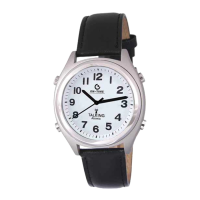
Press the 2 o’clock button repeatedly until you reach the correct time zone then you will hear
it say:
USA, Pacific
USA, Mountain
USA, Central
USA, Eastern
5. Press the 8 o’clock button to confirm after making your selection
6. After confirmation, the watch hands will spin automatically until they reach the local
time of the selected time zone.
7. When switching between “Daylight Saving Time” and “Standard Time” the time will be
corrected after signal reception has been updated overnight. This usually takes place
between 2:00 AM and 4:00 AM Eastern.
8. The watch will synchronize with the USA atomic clock automatically every night.
Talking Functions:
Time:
Push the 2 o’clock button to hear the Hour and Minute.
Date:
Push the 4 o’clock button to hear the Day, Month, Date, and Year
Note: There is no Date Talking function after a new battery is installed until it receives a signal
for the first time.
Reception Status Check:
1. Push the 8 o’clock button once while the watch is running normally.
2. if the reception was successful, the watch will say “USA Time Updated”
3. if the reception failed, the watch will say “USA Time Not Updated”
Alarm Time:
1. Push the 10 o’clock button once and you will hear if the Alarm Time has been set
2. If the Alarm is turned Off, the watch will say “Alarm is Off”
3. If the Alarm Is turned On, the watch will say “The alarm time is” (followed by the alarm
time)
Alarm Settings:
Set Daily Alarm Time:
1. Hold the 8 o’clock button while the watch is in real time mode for more than 5 seconds
until the watch says “Set Alarm, Press 10 o’clock button to set.”


 To Next Page
 Loading...