

EasyManua.ls Logo

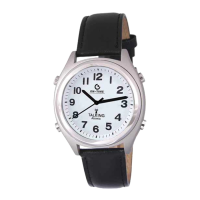
Atomic TALKING WATCH - User Manual

Atomic TALKING WATCH
7 pages
Print Icon
To Next Page IconTo Next Page
Loading...
Independent Living Aids
ILA Item: 756504
TALKING ATOMIC WATCH INSTRUCTIONS
Your Analog Talking Watch is a Multi-Band Radio Controlled watch. The National Institute of
Standards and Technology (NIST) radio station, WWVB, located in Ft. Collins, Colorado,
continuously broadcasts the time signal at 60 KHz. This signal can be received up to 2,000 miles
away, anywhere in the continental USA where long wave (AM) radio reception is possible. The
WWVB station derives its signal from the NIST Atomic Clock in Boulder, CO. Your Atomic
Watch automatically adjusts for daylight saving time.
BEFORE YOUR FIRST TIME USING IT, SET YOUR TIME ZONE!
AFTER YOU HAVE SET YOUR TIME ZONE FOR THE FIRST TIME, Please wait WHILE
the clock hands are automatically spinning. The watch is setting the correct time. Your watch
will resume running with the correct time automatically when the second hand stops spinning
fast. You will not be able to use any other function while the watch is setting itself. THE TIME
FRAME THAT THIS MIGHT TAKE CAN NOT BE CONSISTENTLY DETERMINED. This
process could take as long as 20 minutes, but depending on your location in the United States, it
could be either shorter or longer.
Time Zone Setting:
To receive the correct time you first need to set your Time Zone:
1. Hold THE BUTTON POSITIONED AT 8 o’clock for more than 5 seconds until the
watch says “Set Alarm, Press THE 10 o’clock button to set”
2. PUSH THE button at the 8:00 position, another 3 times in a row, until the watch says
“Time Zone Setting. Press THE button at the 10 o’clock position, to set”
3. Press THE button at the 10 o’clock position, once
4. After you press the button at the 10 o’clock position, the watch will say “Press 2 o’clock
button to set, 8 o’clock button to confirm”
Question and Answer IconNeed help?

Do you have a question about the Atomic TALKING WATCH and is the answer not in the manual?

Summary

Time Zone Setting

Time Zone Setting

Set the watch's time zone for accurate atomic signal reception.

Talking Functions

Time

Hear the current hour and minute by pressing the 2 o'clock button.

Date

Hear the day, month, date, and year by pressing the 4 o'clock button.

Reception Status Check

Reception Status Check

Verify if the watch successfully updated its time signal.

Alarm Settings

Set Daily Alarm Time

Step-by-step guide to setting a daily alarm time using watch buttons.

Alarm ON;OFF

Instructions to enable or disable the daily alarm function.

Hourly Chime Settings

Hourly Announcement (Chime) ON;OFF

How to turn the hourly chime announcement on or off.

Manual Operations

Manual Signal Reception

Manually initiate a radio signal search for time updates.

Manual Time Setting

Guide for manually setting the time when radio signals are unavailable.

Troubleshooting

Re-calibrate the shifted second-hand

Steps to re-align the second-hand if it becomes inaccurate.

Watch Signal Issues

Watch Not Receiving Time Signal

Reasons why the watch might not receive the time signal.

Battery Replacement

Battery Replacement

Instructions for replacing the watch battery.

Post-Replacement Initialization

Re-initialize watch hands after battery replacement for proper operation.

Overview

This document describes the Talking Atomic Watch, a multi-band radio-controlled analog watch designed for users who benefit from audible time announcements and automatic time synchronization.

Function Description:

The Talking Atomic Watch is an analog timepiece that automatically synchronizes with the National Institute of Standards and Technology (NIST) radio station WWVB, located in Ft. Collins, Colorado. This station broadcasts a 60 KHz time signal, derived from the NIST Atomic Clock, which can be received up to 2,000 miles away across the continental USA, provided there is good long-wave (AM) radio reception. The watch automatically adjusts for Daylight Saving Time.

Important Technical Specifications:

  • Time Signal Source: NIST radio station WWVB (60 KHz).
  • Reception Range: Up to 2,000 miles in continental USA.
  • Battery Type: CR2025 (replacement by trained jewelers or watch specialists is recommended).

Usage Features:

Initial Setup (Time Zone Setting):

Before first use, the time zone must be set.

  1. Hold the 8 o'clock button for more than 5 seconds until the watch says "Set Alarm, Press THE 10 o'clock button to set."
  2. Push the 8 o'clock button three more times until the watch says "Time Zone Setting. Press THE button at the 10 o'clock position, to set."
  3. Press the 10 o'clock button once.
  4. The watch will say "Press 2 o'clock button to set, 8 o'clock button to confirm."
  5. Press the 2 o'clock button repeatedly to cycle through time zones (USA, Pacific; USA, Mountain; USA, Central; USA, Eastern) until the correct one is announced.
  6. Press the 8 o'clock button to confirm the selection.
  7. After confirmation, the watch hands will automatically spin to the local time of the selected zone. This process can take up to 20 minutes.
  8. The watch will automatically synchronize with the USA atomic clock every night, typically between 2:00 AM and 4:00 AM Eastern, and correct for Daylight Saving Time changes.

Talking Functions:

  • Time Announcement: Push the 2 o'clock button to hear the hour and minute.
  • Date Announcement: Push the 4 o'clock button to hear the day, month, date, and year. Note: The date talking function is not available immediately after a new battery installation until the watch receives a signal for the first time.

Reception Status Check:

  1. Push the 8 o'clock button once during normal operation.
  2. The watch will announce "USA Time Updated" if reception was successful, or "USA Time Not Updated" if it failed.

Alarm Time:

  • Check Alarm Time: Push the 10 o'clock button once. The watch will announce "Alarm is Off" if the alarm is disabled, or "The alarm time is" followed by the set alarm time if it's enabled.

Alarm Settings (Set Daily Alarm Time):

  1. Hold the 8 o'clock button for more than 5 seconds in real-time mode until the watch says "Set Alarm, Press 10 o'clock button to set."
  2. Press the 10 o'clock button.
  3. The watch will say "Press 2 o'clock button to set Hour, 4 o'clock button for Minutes, 8 o'clock to confirm."
  4. Press the 2 o'clock button repeatedly to set the hour.
  5. Press the 4 o'clock button repeatedly to set the minute.
  6. Press the 8 o'clock button to confirm the alarm time.
  7. The watch will announce the set alarm time.
  8. The alarm is a daily alarm and will beep again the next day even if turned off.

Alarm ON/OFF:

  1. Hold the 8 o'clock button for more than 5 seconds in real-time mode until the watch says "Set Alarm, Press 10 o'clock to set."
  2. Push the 8 o'clock button one more time until the watch says "alarm ON/OFF, Press 10 o'clock button to set."
  3. Press the 10 o'clock button.
  4. The watch will say "Press 2 o'clock button to turn ON, 4 o'clock button to turn OFF, 8 o'clock button to confirm."
  5. Press the 2 o'clock button to turn ON the daily alarm, or the 4 o'clock button to turn OFF the daily alarm.
  6. Press the 8 o'clock button to confirm.
  7. Checking the alarm time with the 10 o'clock button will confirm if it's ON or OFF.

Hourly Chime Settings (Hourly Announcement ON/OFF):

When the chime is ON, the watch announces the hour every hour.

  1. Hold the 8 o'clock button for more than 5 seconds in real-time mode until the watch says "Set alarm, Press 10 o'clock button to set."
  2. Push the 8 o'clock button two more times until the watch says "Chime ON/OFF, Press 10 o'clock button to set."
  3. Press the 10 o'clock button.
  4. The watch will say "Press 2 o'clock button to turn ON, 4 o'clock button to turn OFF, 8 o'clock button to confirm."
  5. Press the 2 o'clock button to turn ON the Chime Alert, or the 4 o'clock button to turn OFF.
  6. Press the 8 o'clock button to confirm.
  7. If the Chime alert is ON, the watch will announce the hour every hour.

Manual Signal Reception:

This function allows the watch to search for the time signal immediately. Ensure the correct Time Zone is set first.

  1. While in normal running mode, press and hold the 10 o'clock button until the second hand stops at the 7 o'clock position.
  2. The watch will take 5 to 15 minutes to pick up the radio signal.
  3. After successful reception, the watch will show the correct time.
  4. Push the 8 o'clock button once to hear the reception status ("USA Time Updated" or "USA Time Not Updated").
  5. If reception fails, try moving the watch to a location with better reception (e.g., a west-facing window if east of Colorado, or an east-facing window if west of Colorado). Reception is generally better at night. Note: This process temporarily stops the watch from talking and may require sighted assistance.

Manual Time Setting:

This function is for use when traveling to countries without signal reception or when returning and needing to set the correct AM/PM and time zone.

  1. Hold the 8 o'clock button for more than 5 seconds until the watch says "Set Alarm, Press 10 o'clock button to set."
  2. Push the 8 o'clock button four more times until the watch says "Set time. Press 10 o'clock button to set."
  3. Press the 10 o'clock button.
  4. The watch will say "Press 2 o'clock button to set Hour, 4 o'clock button for minutes, 8 o'clock button to confirm."
  5. Press the 2 o'clock button repeatedly to set the hour, carefully ensuring the correct AM or PM is set (incorrect AM/PM will prevent signal pickup at 3:00 AM).
  6. Press the 4 o'clock button to set the minute.
  7. Press the 8 o'clock button to confirm the time.
  8. After confirmation, the watch will automatically run to the set time. Note: Day, Month, and Year cannot be manually set; this information is only provided after the first signal reception.

Maintenance Features:

Troubleshooting (Shifted Second-Hand):

If the watch hands move irregularly due to knocks or vibrations, displaying incorrect time despite the internal clock being accurate, the second-hand may need re-calibration. This is indicated if the second-hand does not pause exactly at the 7 o'clock reference point (half-second deviation is acceptable) during a manual signal reception attempt.

Re-calibrate the shifted second-hand:

  1. Ensure the watch is running normally.
  2. Hold the 8 o'clock button for more than 5 seconds until the watch says "Set alarm, Press 10 o'clock button to set."
  3. Push the 8 o'clock button five more times until the watch says "Second-Hand Alignment, Press 10 o'clock to set."
  4. Press the 10 o'clock button. The watch will say "Press 2 o'clock button to set, 8 o'clock button to confirm."
  5. Observe the second-hand as it moves. If it stops before the 6 o'clock position, immediately press the 2 o'clock button repeatedly until the second-hand points exactly down at the 6 o'clock position.
  6. Press the 8 o'clock button to confirm. The watch will pause briefly before resuming normal operation.
  7. If the second-hand stops advancing before reaching the 6 o'clock position, repeat steps 2-5 until it points exactly at 6 o'clock.
  8. The second-hand is now re-calibrated. Note: This process may require sighted assistance.

Battery Replacement:

The watch uses a CR2025 type battery. It is recommended that trained jewelers or watch specialists replace the battery to prevent damage.

  1. Carefully open and remove the back of the watch.
  2. Lift the battery spring on the right.
  3. Remove the old battery and insert a new one with the "+" polarity facing up.
  4. Push the battery spring down.
  5. Before replacing the case-back, ensure the seal is in place. The watch will not run after a new battery replacement until the following initiation steps are completed:

Set the hands and initialize the electronics (after battery change):

All hands (hour, minute, and second-hands) must be moved to the 12 o'clock position (12:00:00) to initialize the watch.

  1. Immediately after battery replacement, hold the 2 o'clock button until the hands move quickly. Press the 2 o'clock button again to stop the fast movement.
  2. Stop the fast movement before the second-hand reaches the 12 o'clock position (around 11:58:00) by pressing the 2 o'clock button.
  3. Adjust the second-hand one second at a time to move it precisely to the 12 o'clock position (12:00:00) by pressing the 2 o'clock button. (If you overshoot 12, restart this process).
  4. When all hands are aligned at the 12 o'clock position (12:00:00), PUSH the 10 o'clock button for 1 second to confirm.
  5. After confirmation, follow these steps: a. Set the watch to the correct Time Zone. b. Set the Local Time manually (refer to Manual Time Setting details). You don't need to set the exact minute and second, but ensure the HOUR and AM/PM are correct. This ensures the watch initiates signal reception around 3:00 AM local time. c. Place the watch in a location where reception is possible. The watch will automatically initiate reception at 3:00 AM. After receiving a valid time signal, the hands will move to the correct time.

Technical Assistance:

For any technical assistance, contact Independent Living Aids:
  • Phone: (800) 537-2118
  • E-Mail: techsupport@independentliving.com

Atomic TALKING WATCH Specifications

General IconGeneral
BrandAtomic
ModelTALKING WATCH
CategoryWatch
LanguageEnglish