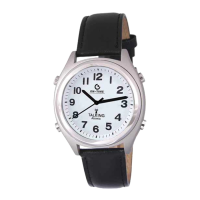
4. the watch says, “Press 2 o’clock button to set Hour, 4 o’clock button for minutes, 8
o’clock button to confirm”
5. Press 2 o’clock button to set Hour. Listen very carefully to watch to make sure the right
AM or PM has been set (if you set the wrong AM/PM your watch will not be able to pick
up signal at 3:00AM).
6. Press 4 o’clock button to set Minute.
7. Press 8 o’clock button to confirm after you have set the Time.
8. After confirmation, the watch will automatically run to the time you have set. Wait until
the watch stops running fast.
Your watch is not able to manually set Day, Month, and Year. The watch provides this
information only when a first signal reception is received.
Troubleshooting:
Your watch is a very delicate and precise instrument. Although uncommon, sometimes hard
knocks or vibrations can cause the hands to move irregularly, and therefore displays the incorrect
time, although the internal clock is keeping accurate time. If when doing a “manual signal
reception” (press and hold the 10 o’clock button until the second hand stops) the second-hand
does not pause exactly at the 7 o’clock reference point (half second deviation is acceptable), the
second-hand needs to be re-calibrated.
Re-calibrate the shifted second-hand:
1. Make sure the watch is running normally.
2. Hold 8 o’clock button for more than 5 seconds until the watch says “Set alarm, Press 10
o’clock button to set.”
3. Push 8 o’clock button 5 more times until the watch says “Second-Hand Alignment, Press
10 o’clock to set.”
4. Press the 10 o’clock button. Watch says, “Press 2 o’clock button to set, 8 o’clock button
to confirm.”
5. Keep an eye on the second-hand as it moves to a new position and stops somewhere
before 6 o’clock position then immediately press 2 o’clock button repeatedly until the
second-hand points exactly down at 6 o’clock position. Press 8 o’clock button to
confirm. (The watch will stop for a while. Just wait until the watch resumes normal
running).
6. If the second hand stops advancing before it reaches 6 o’clock position repeat steps 2
through 5 until the second-hand points to exactly 6 o’clock.
7. The second hand is re-calibrated.
Note: This process may require obtaining sighted assistance.


 To Next Page
 Loading...