8
1.Holdbutton3secondsintosettingmode.
2.Insettingmode.shortpressthebuttontochangeband.
3.Thenholdbutton3secondsintoCHsettingmode,shortpressbuttontochangeCH.
4.Holdbutton3secondtogetintoPowersettingmode,thereisshortbaronLED,short
presstoswitchpower,1barmeans25mW,2barmeans200mW,3barmeans500mW.
1.⻓按设置按键三秒,进⼊波段设置模式。
2.在设置模式下,短按按键切换波段。
3.再次⻓按按键三秒钟,进⼊频道切换模式,短按按键切换频道。
4.再次⻓按按键三秒钟,进⼊切换功率模式,短按按键切换功率,数码管⼀条为100mw,两条
为400mw,三条为800mw。
VTXSetting/图传设置
Voltageinput/电压输⼊范围:2~6SLipoPower/功率:100/200/800mwSwitchable
Powerconsumption/功耗:9V1.1AFrequency/频率:5.3~5.9Ghz
Tx800VTXUsermanual/TX800图传说明书
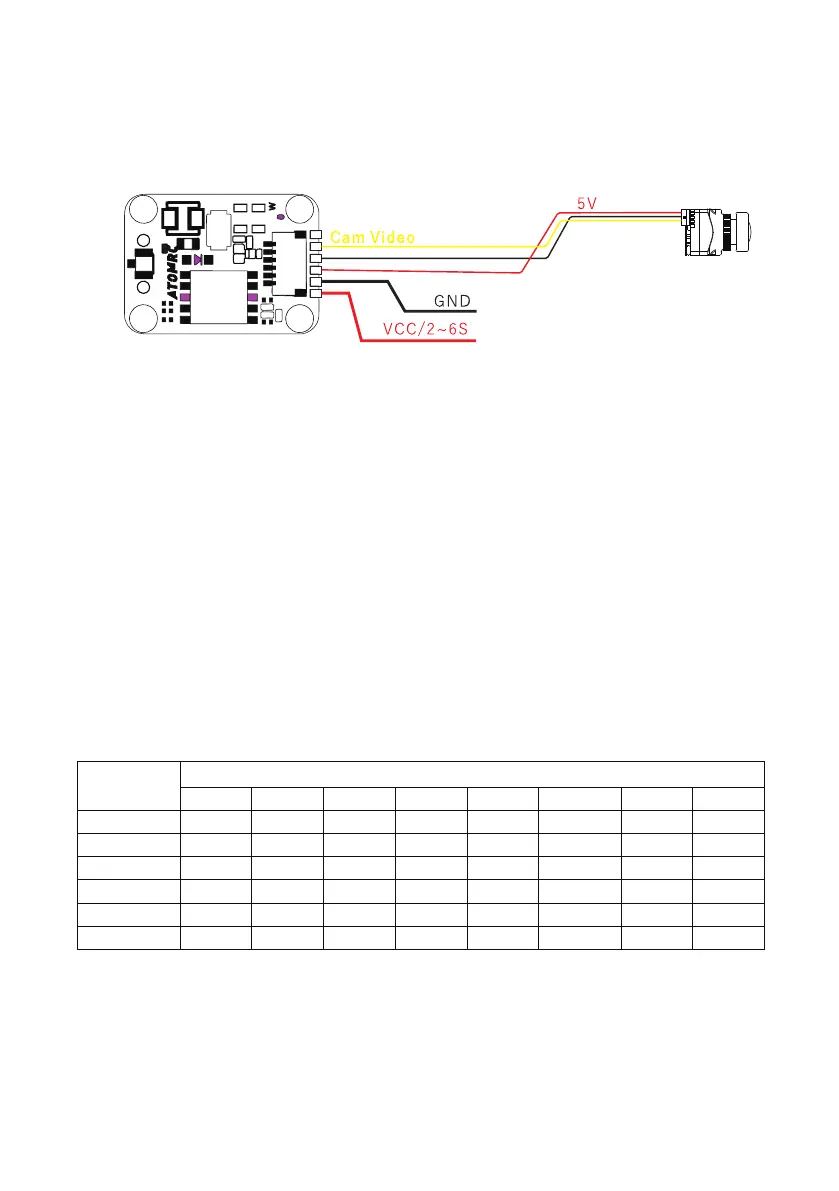
ATOMRCTx800VTXWiring /TX800图传接线图Diagram


 To Next Page