This document provides an instruction manual for ATOSA vertical coolers, covering both T Series and B Series Reach-Ins. It emphasizes the importance of warranty registration and provides contact information for service issues. Key warnings include frequent filter cleaning and not overloading the unit.
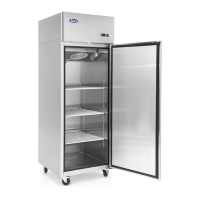
The device is a refrigerated unit designed for preserving fresh perishable foodstuffs. The T Series and B Series models are available as single-door, two-door, and three-door freezers and refrigerators, as well as half-door configurations.
Important Technical Specifications:
- Refrigeration Temperature Range (T Series): Between 33°F and 45°F at a room temperature of 109°F and 60% relative humidity.
- Frozen Food Maintenance Temperature Range (T Series): Between -8°F and -1°F at a room temperature of 109°F and 60% relative humidity.
- Refrigeration Temperature Range (B Series): Between 33°F and 45°F.
- Frozen Food Maintenance Temperature Range (B Series): Between -8°F and -1°F.
- Refrigerants: R134a for refrigerators and R404a for freezers.
- Power Source: Primarily 115V/60Hz/1Ph, with some three-door freezer models requiring 220V/60Hz/1Ph.
- Rated Current (A): Varies by model, ranging from 3.5A to 11.3A.
- Dimensions (in): Varies by model, e.g., 28.7x33.3x83.9 for single-door T Series, 27x31.5x84 for single-door B Series.
- Net Weight (lb): Varies by model, e.g., 265 lbs for single-door T Series freezer, 254 lbs for single-door B Series refrigerator.
- Refrigeration System: Ventilated system with the evaporator in a separate insulated box on top. All materials are suitable for use with foodstuffs.
Usage Features:
- Installation: The refrigerator should be placed in the coolest and best-ventilated part of the room, away from heat and direct sunlight. A thermomagnetic circuit breaker (not supplied) must be installed between the mains power point and the power supply cable. The mains voltage must correspond to the unit's voltage (115V/60Hz/1Ph or 220V/60Hz/1Ph) and remain within +/- 10% of the rated voltage.
- Handling: The unit arrives in PET film and a cardboard box on a wood pallet. It must be transported and handled with care. Never place the unit on its side or upside down, as this can damage the refrigerated unit.
- Initial Setup: Before use, new upright air-cooling refrigerators should be opened and ventilated. Users should clean the inside with warm water.
- Operation: After connecting to the power supply, press the "POWER" switch on the controller keyboard (indicated by a green light). The microcomputer controller automatically adjusts temperature ranges. If the temperature increases and reaches the set point plus differential, the compressor starts; it turns off when the temperature reaches the set point value again.
- Control Unit: The refrigerator is controlled by a "digital control unit" and a "main switch pilot light." The green pilot light indicates connection to electricity and operation. The digital control unit regulates parameters for correct operation. Users should consult the attachment manual for the digital control unit for detailed parameter information.
- Setpoint Adjustment: To change the setpoint, press the SET key for more than 2 seconds. The value will blink, and it can be adjusted using the up/down arrows. Press SET again or wait 10 seconds to save.
- Manual Defrost: A manual defrost can be initiated by pressing the DEF key for more than 2 seconds.
- Keyboard Lock/Unlock: The keyboard can be locked by pressing the up/down arrows together for more than 3 seconds (displays "OF"). To unlock, press them together again for more than 3 seconds (displays "on").
- Parameter Value Change: To change a parameter value, enter programming mode by pressing SET + up arrow for 3 seconds. Select the parameter, press SET to display its value, and use the up/down arrows to change it. Press SET to store and move to the next parameter, or SET + up arrow or wait 15 seconds to exit.
Maintenance Features:
- General Maintenance: Smooth operation and life of the equipment depend on correct and regular maintenance.
- Cleaning:
- Frequency: Regular cleaning of the refrigerator unit is strongly recommended each month.
- Safety: Disconnect the power supply cable before any cleaning operation.
- Surface: Clean the refrigerator surface with mild detergent and dry with a soft cloth. Do not use abrasive detergents.
- Inside: Clean the inside area at least once a month with a detergent suitable for use with foodstuffs.
- Condenser: For efficient operation, it is advisable to clean the condenser regularly (approximately every 4 months) with a dry brush or vacuum cleaner.
- Troubleshooting:
- Refrigerator stops working (light off): Check for power supply failure, ensure the plug is inserted properly, the switch is on, and the mains voltage powers the plug.
- Refrigerator temperature goes up: Check if the unit is too close to a heat source or if the condenser is dirty or blocked. Remedies include moving the unit away from heat and cleaning the condenser.
- Technical Service: For technical service, contact the dealer's technical department and provide the serial number and date of purchase.
- Microcomputer Parameters: Products are modified precisely before leaving the factory. Users must not modify the microcomputer parameters privately to avoid damaging the compressor unit or causing other malfunctions.
- Registration: Register warranty online at www.atosausa.com.
- Two-Year Parts & Labor Warranty: Covers defects in materials or workmanship for refrigerated components, cabinet, and all parts for two years from the date of original installation or 27 months after shipment from Atosa (whichever comes first). Includes standard straight-time labor and reasonable travel time.
- Additional Three-Year Compressor Warranty: Extends coverage for the sealed compressor for an additional three years (totaling five years) from the date of original installation. This covers defects in material and workmanship under normal use. Replacement compressors must be obtained through Atosa. This extended warranty applies only to sealed parts of the compressor and excludes other components like the cabinet, paint finish, temperature control, refrigerant, etc.
- 404A/134a Compressor Warranty: Void if specific procedures are not followed: contains R404A or R134a refrigerant and lubricant with rapid moisture-absorbing qualities. Drier replacement is critical when the system is opened. Micron-level vacuums must be achieved. Compressor must be obtained through Atosa.
- Exclusions: Does not cover economic loss, profit loss, or consequential damages (including product spoilage). Warranty is not transferable. Excludes alteration, neglect, abuse, misuse, accident, damage during transit or installation, fire, flood, or acts of God. Excludes issues from improper electrical connections, power failure, extension cords, low voltage, or voltage drops.
- Geographic Limitation: Warranty does not apply to areas outside the continental United States.
- Restocking Fee: A 25% restocking fee may apply for returned items.
- Product Modifications: Atosa reserves the right to modify equipment to ensure a superior product and interprets all public materials.
The manual concludes with official approvals and rules, stating that the products conform to UL STD.471 and are certified to CSA STD.C22.2 NO.120 and NSF/ANSI STD.7.

 Need help?
 General

 To Next Page