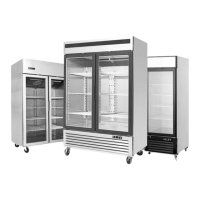
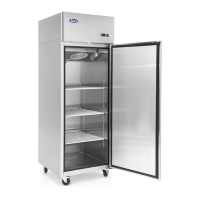
This document serves as an instruction manual for ATOSA Display Fridges, providing comprehensive information regarding their function, technical specifications, usage, and maintenance.
Function Description
The ATOSA Display Fridges are designed for preserving fresh perishable foodstuffs. They are equipped with an in-built refrigerated unit and operate as a ventilated system. The evaporator is located in a separate insulated box on the top of the unit. The refrigerating circuit uses R290 gas and complies with current normative standards. The appliance is intended for commercial use only.
The refrigeration cycle involves the compression, liquefaction, and subsequent evaporation of gas in the ventilated evaporator. This process absorbs heat from the refrigerator compartment, cooling its contents. The heat produced is then dissipated to the outside environment by a condenser unit situated on the top of the refrigerator.
Important Technical Specifications
The manual provides detailed technical specifications for various models, categorized under "Top Mount Series Reach-Ins" and "Bottom Mount Series Reach-Ins." Key specifications include:
- Power Source (V): Primarily 115V, with some models also supporting 115/208-230V.
- Rating Frequency (Hz): 60 Hz for all listed models.
- Input Power (W): Varies significantly by model, ranging from 250W to 1360W.
- Rated Current (A): Ranges from 2.1A to 8.6A.
- Temperature Range (°F):
- For many models (e.g., MCF8601GR, MCF8701GR), the range is -8°F to -1°F.
- For other models (e.g., MCF8604GR, MCF8704GR), the range is +33°F to +45°F.
- Refrigerant: R290 for all models.
- Refrigerant Amount (oz): Varies by model, from 3.2 oz to 6.2 oz.
- Dimensions (in): Provided as Length × Width × Height. For example, 27×31.5×84 inches for smaller units and 81.9×31.5×84 inches for larger units.
- Volume (cu.ft): Ranges from 8.3 cu.ft to 69.54 cu.ft, depending on the model.
- Max. Load of Shelf: 176 LBS.
The products are certified to UL STD.471, CSA STD.C22.2 NO.120, and NSF/ANSI STD. 7, ensuring compliance with safety and sanitation standards.
Usage Features
The display fridges are designed for user-friendly operation with a microcomputer controller.
- Temperature Control: The microcomputer controller automatically adjusts temperature ranges. The compressor starts when the temperature increases and reaches a set point plus differential, and turns off when the temperature reaches the set point value again.
- Setting Temperature: Users can set the desired temperature by pressing the SET button, adjusting with UP or DOWN arrows, and confirming.
- ON/OFF Function: The device can be switched ON/OFF by pressing the UP button for more than 3 seconds.
- Manual Defrost: A manual defrost can be initiated by pressing the DOWN button for more than 3 seconds, provided temperature conditions are valid.
- Continuous Cycle: A continuous cycle can be activated by pressing UP and DOWN together for more than 3 seconds.
- Lock/Unlock Keyboard: The keyboard can be locked or unlocked by pressing SET and the UP/DOWN arrows simultaneously.
- Parameter Adjustment: The controller allows for adjustment of various parameters, accessible through a programming mode.
- Alarm System: The system includes an alarm table that indicates various issues such as probe errors, open door, low/high temperature, unit parameter error, defrost errors, and condenser dirty alarms.
- Installation: The refrigerator should be placed in the coolest and best-ventilated part of the room, away from direct sunlight. It requires a dedicated power supply with a thermomagnetic circuit breaker.
- Initial Setup: Before use, new upright air-cooling refrigerators should be opened and ventilated. Users should clean the inside with warm water.
Maintenance Features
Regular maintenance is crucial for the longevity and efficient operation of the display fridge.
- General Cleaning: The equipment should be cleaned regularly. Regular cleaning of the refrigerator unit is strongly recommended each month.
- Refrigerator Surface Cleaning: Clean the refrigerator with mild detergent and dry it with a soft cloth. Do not use abrasive detergents.
- Inside Cleaning: Clean the inside area monthly with a detergent suitable for use with foodstuffs.
- Condenser Cleaning: For efficient operation, the condenser should be cleaned regularly, approximately every 4 months, using a dry brush or vacuum cleaner.
- Lamp Replacement: To replace the lamp, turn off the power, remove the screw of the lampshade with a screwdriver, and replace the broken bulb with a new one which applies the same electrical parameter.
- Troubleshooting: The manual includes a troubleshooting section to address common issues such as power supply failure, incorrect plug insertion, switch on/off problems, mains voltage issues, and high temperature.
- Warranty: ATOSA provides a 2-year warranty on parts and labor for defects in materials or workmanship. An additional 3-year compressor warranty is also provided. The warranty covers replacement of parts, subject to additional limitations. It does not cover damages resulting from alteration, neglect, abuse, misuse, accident, damage during transit or installation, fire, flood, or act of God. Improper electrical connections and the use of extension cords are also not covered. A 25% restocking fee may be charged to a buyer for returned items.
- Safety Instructions: Emphasizes important safety precautions, including:
- Reducing the risk of fire, electric shock, or injury.
- Ensuring proper installation and location in accordance with the instruction manual.
- Verifying correct rated voltage and power plug suitability.
- Avoiding overheating or burning.
- Ensuring children do not play with the appliance.
- Cleaning and user maintenance should be done by children without supervision.
- Replacing damaged supply cords by the manufacturer or service agent.
- Connecting to properly grounded outlets only.
- Always unplugging the appliance when not in use and before cleaning, adjusting, or maintaining.
- Not disconnecting by pulling on the cord.
- Not pulling out the cord or touching the power plug with wet hands.
- Not using outdoors or splashing water on the appliance.
- Not disassembling, repairing, or altering the appliance.
- Avoiding touching cold surfaces in the freezer compartment with damp or wet hands.
- Not placing glass products in the freezer.
- Proper disposal procedures for refrigerant and insulation blowing gas.
- Not storing explosive substances.
- Keeping ventilation openings clear.
- Not using mechanical devices to accelerate defrosting other than recommended by the manufacturer.
- Not damaging the refrigerant circuit.
- Not using electrical appliances inside food storage compartments unless recommended by the manufacturer.

 Need help?
 General

 To Next Page