To store telephone numbers, follow these steps:
MAKE SURE to press the key Before and
After each phone number is entered.
Press 1 phone number to store 1
st
number
Press 2 phone number to store 2
nd
number
Press 3 phone number to store 3
rd
number
NOTE: If you make a mistake, simply repeat the
process above.
*If storing only one number you must program
that same number in all three memory locations
or unit will stop dialing after the first call.
* If you need to change a number just re-program
the number and the system will overwrite the old
number in the same position with the new number.
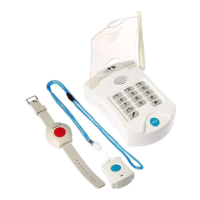
Pairing the Pendants to the Base: If the base does
not beep when the pendant is pressed, or you purchase
a replacement pendant it may need to be ‘re-paired’ to
the Base.
Follow the instructions below to pair both pendants to
the Base.
1. Turn power Off. (on Base Unit)
3. Within 4 seconds, press and hold the Big Blue
Help Button on the Base Unit.
4. Then while still holding down the Big Blue Help
Button on the Base Unit, press the Panic Button on
the Necklace Pendant or the Wrist Pendant. (In one
second, you will hear a small beep) This means the
5. If you have more than one pendant you should
7.Turn Base Unit On. Wait for Red LED on top right
8. Press a Pendant to Activate Alarm. (This is to test
The ‘1’ means the first contact to call
The ‘2’ means the second contact to call
The ‘3’ means the third contact to call


 To Previous Page
 Loading...