EasyManua.ls Logo

ATS Help Dialer 700 - User Manual

ATS Help Dialer 700
4 pages
Print Icon
To Next Page IconTo Next Page
Loading...
BATTERY PRECAUTION
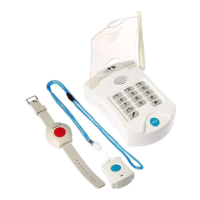
Necklace Panic Button Battery: (1)A23S Battery
Wrist Panic Button Battery: (2) CR2016 Batteries
When red LED is on (base unit), the backup batteries
are low.
If the LED on Necklace Panic Button turns red when
Necklace Panic Button is pressed, it is time to change
the battery.
If the LED on the Wrist Panic Button dims when the
Wrist Panic Button is pressed and held, it is time to
change the battery.
To test your panic button battery, press and Hold the
panic button on the Necklace or the Wrist button for
10 seconds if the light DOES NOT stay lit for the
entire 10 seconds the battery is weak and should be
replaced.
Assistive Technology Services
“Our mission is to provide evaluation, consultation,
spiritual
guidance and assistive devices to make
the quality of life better
for those that need a little help.”
Visit our website: AtsCares.com
HELP DIALER 700
MANUAL
email: Questions@AtsCares.com
Phone: 615-562-0043 v04302121
Question and Answer IconNeed help?

Do you have a question about the ATS Help Dialer 700 and is the answer not in the manual?

Summary

Battery Precautions and Indicators

Panic Button Battery Status

Details on panic button battery types, low battery indicators (red LED), and testing procedures for battery life.

Power and Telephone Connection

Connecting Power and Telephone

Instructions for connecting the base unit to AC power and the telephone line using provided adapters and cables.

Backup Battery Installation

Guidance on inserting AAA batteries for backup power in the unit's battery compartment.

Powering On and Initial Status

Steps to turn on the unit and understand the initial LED indicators signifying readiness.

Personalizing Emergency Message

Recording and Playback

How to record a personal emergency message and play it back using the keypad.

Emergency Operation and Contact Management

Emergency Dialing and Call Handling

Process of initiating an emergency call, dial sequence, call duration, and handling unanswered calls.

Two-Way Communication and Call Termination

Managing two-way conversations, extending call time, and properly ending an emergency call.

Storing Emergency Contact Numbers

Procedure for manually entering and storing up to three emergency contact phone numbers.

Advanced Setup and Testing

Storing Multiple Phone Numbers

Detailed steps for storing the first, second, and third contact numbers, including required key presses.

Pairing Pendants to Base Unit

Instructions for re-pairing panic button pendants to the base unit if they are not responding.

ATS Help Dialer 700 Specifications

General IconGeneral
BrandATS
ModelHelp Dialer 700
CategorySafety Equipment
LanguageEnglish