Maintenance
SuperTrak™ GEN3 System Operation and Maintenance Manual 249
Rev. 9 (12-2021)
Replace a Power Supply Filter
The power supply filter prevents particles from entering the power supply through
the cooling fans. Particulate build-up on the power supply filter impedes air flow
and may cause the power supply to overheat.
Power supply filter replacement frequency depends on the SuperTrak conveyance
platform environment. Regularly inspect the power supply filter and replace it
when it is dirty.
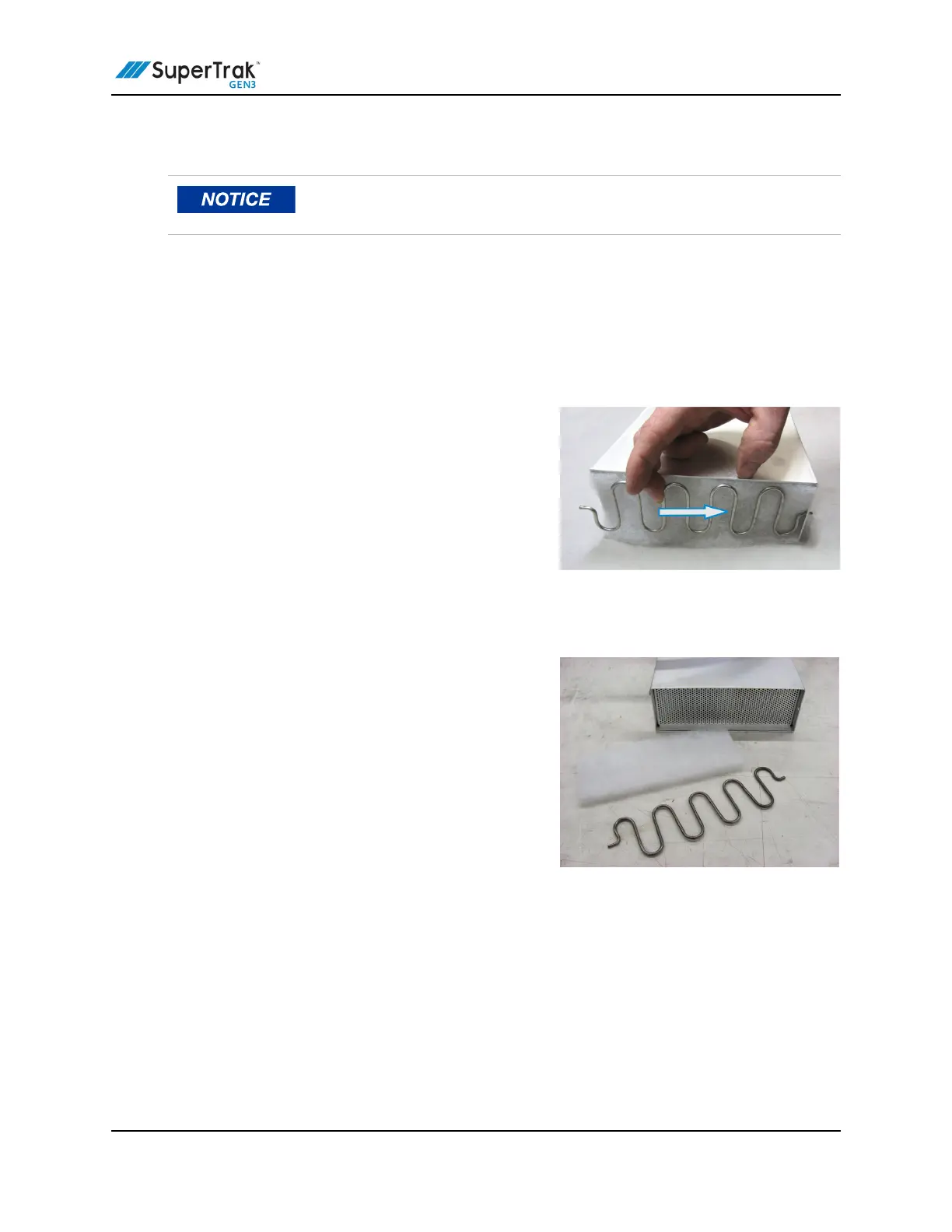
1. Carefully compress one end of the filter
retention clip until one end releases from
the power supply cabinet tab.
2. Remove the filter retention clip.
3. Remove the old filter.
4. Clean away any excess grit or dirt in and
around the power supply fans.
5. Position a new filter into the base of the power supply.
The filter is not directional, so it can be positioned with either side facing either
direction.
6. Place one end of the filter retention clip into the power supply cabinet tab, and
then carefully compress the filter retention clip to secure the opposite end into
the cabinet tab on the opposite side.
Be careful not to bend the power supply filter retention clip out of shape
when removing it.


 To Next Page