Need help?
Do you have a question about the Audibax BMG20 and is the answer not in the manual?
Overview of gooseneck microphones, their suitability for boardrooms, and key features like aesthetic design and response range.
Step-by-step guide on connecting the microphone, setting up the amplifier volume, and optimal pickup distance.
Important reminders to avoid howling, feedback, and battery corrosion by proper microphone placement and battery removal.
Details on capsule type, frequency response, polar pattern, impedance, sensitivity, power supply, cable, and included accessories.
This document describes a professional condenser microphone, specifically designed for conference settings. It is presented as an instruction manual, providing guidance on operation, features, and maintenance.
The microphone is primarily intended for use in boardrooms and other environments where a professional aesthetic is important. Its core function is to capture sound with high sensitivity and a broad frequency range, making it suitable for both recording and sound reinforcement applications. The condenser capsule type ensures clear and detailed audio capture, which is crucial for effective communication in conference settings. The design focuses on delivering reliable audio performance for professional use.
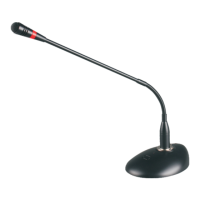
The microphone boasts a low-profile and aesthetic design, ensuring it blends seamlessly into professional environments without being obtrusive. A key visual feature is the choice of either a red color indicator or a light ring, which likely provides visual feedback on the microphone's status, such as being active or muted.
Operation is straightforward, beginning with the correct installation of batteries, following the indicated positive and negative signs, and connecting the audio output line. For optimal sound management, users are instructed to set the amplifier volume to "0" initially. This prevents sudden loud noises when the amplifier and microphone are turned on. The volume should then be adjusted slowly to achieve the best sound quality.
The manual highlights that the best pickup effect is achieved when the microphone head is approximately 30cm away from the sound source. This guidance helps users position the microphone correctly for clear audio capture. The microphone is equipped with an electronic touch switch, providing a modern and convenient way to control its on/off status.
The included cable is a 7-meter dual-core type, featuring a female XLR connector and a public XLR connector, ensuring compatibility with standard audio equipment. The microphone also offers flexible power supply options, automatically converting between DC3V and Phantom 48V, which adds to its versatility in different setups. The reference sound-receiving distance is specified as 50cm, providing a benchmark for effective sound capture.
The microphone's output direction is balanced, and it includes seat lamp and tube lights, which may serve as additional indicators or features for specific conference setups. The overall configuration includes the microphone unit, the necessary cable, a wind sponge to minimize unwanted noise, and a conversion plug, ensuring it is ready for various applications right out of the box.
Proper maintenance is crucial for the longevity and optimal performance of the microphone. The manual provides several important notes to guide users in this regard.
Firstly, users are advised to avoid pointing the microphone head towards speakers. This is a critical instruction to prevent acoustic feedback, commonly known as "howling," which can be disruptive and potentially damaging to audio equipment.
Secondly, the manual cautions against adjusting the volume too high. Excessive volume can also lead to feedback howling, indicating that careful volume management is essential for a smooth audio experience.
Lastly, for periods of extended disuse, it is strongly recommended to remove the batteries from the microphone. This preventative measure is vital to protect the microphone from potential damage caused by battery fluid corrosion. Battery leakage can severely impair the microphone's internal components, rendering it inoperable. By removing the batteries, users can significantly extend the lifespan of their device.
The complete package includes a manual, a certificate, and a warranty card, providing users with all necessary documentation for product information, authenticity, and after-sales support. This comprehensive approach to documentation underscores the manufacturer's commitment to user satisfaction and product reliability.
 General
| Polar Pattern | Cardioid |
|---|---|
| Frequency Response | 20Hz - 20kHz |
| Connector | XLR |
| Color | Black |
| Impedance | 100 ohms |
| Sensitivity | -34dB±2dB (0dB=1V/Pa at 1kHz) |
| Load Impedance | 1000 ohms |
| Power Requirements | 48V Phantom Power |

 To Next Page