
 Need help?
Do you have a question about the Audibel Arc AI and is the answer not in the manual?
Details on illuminating LEDs for premium chargers without external power and preserving battery life.
Instructions for cleaning hearing aids using a brush or cloth, avoiding liquids and checking components.
Guidelines for cleaning charging ports, keeping the lid closed, and storing the charger in a dry location.
Step-by-step guide for replacing disposable earwax protection guards in RIC hearing aids.
Information on downloading and connecting the Thrive Hearing Control app to compatible hearing aids.
Details on defects in workmanship and materials covered by the Audibel limited warranty.
Explanation of warranty duration limitations imposed by state law.
Instructions for delivering hearing aids for service to an authorized professional or via website.
Exclusions from warranty coverage, including damage from misuse, neglect, or accidents.
Purchaser's inability to recover consequential or incidental damages from Audibel for defects.
Information on warranty enforcement, legal rights, and limitations within the United States.
Technical M/T ratings for RIC Rechargeable and BTE Rechargeable hearing aid models.
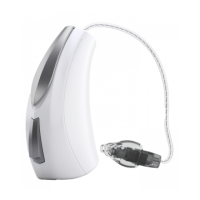
This document is a Quick Start Guide for Audibel Arc AI RIC (Receiver-In-Canal) Rechargeable and BTE (Behind-The-Ear) Rechargeable hearing aids. It provides essential information on how to use, charge, and maintain the devices, as well as details about the accompanying mobile application and warranty.
The Audibel Arc AI hearing aids are designed to provide a complete line of innovative hearing solutions, handcrafted with advanced technology for clear sound and seamless connection to daily life. These devices are rechargeable, offering convenience and ease of use. They are equipped with integrated sensors and artificial intelligence features to enhance the listening experience. The hearing aids support automatic and custom memories, geotags, and tinnitus management. They also include a "Find My Hearing Aids" feature and provide alerts. The Arc AI hearing aids are compatible with the Thrive Hearing Control app, which allows users to control and adjust their devices via a compatible Apple or Android device.
To charge the hearing aids, place them in the charger with the earbuds or earmolds resting inside the reservoir. The hearing aids will automatically turn off and begin charging once the charger is powered. The LEDs on the charger indicate the charging status: glowing green means charging, solid green means fully charged, and blinking red indicates a fault state. If a fault occurs, remove the hearing aids, wait for the LED to turn off, and then re-insert them. If the fault persists, contact a hearing professional. Charging typically takes under 3.5 hours for a full charge. It is safe to store fully charged hearing aids in the charger. When removed from the charger, the hearing aids will automatically power on.
For premium chargers with an on-board battery, LEDs can be illuminated by removing a hearing aid for three seconds and then re-inserting it; the LEDs will illuminate for 10 seconds before turning off. When charging without the charger cord, the LEDs turn off once the hearing aids are fully charged to preserve the on-board battery. Audibel also offers a pocket-sized Mini Turbo Charger that provides a 3.5-hour charge in just seven minutes.
The Thrive Hearing Control app facilitates control and adjustment of the 2.4 GHz rechargeable hearing aids using a compatible Apple or Android device. The app provides access to integrated sensors, artificial intelligence features, automatic and custom memories, geotags, tinnitus management, a "Find My Hearing Aids" function, and alerts. Users can refer to the Thrive Hearing Control app User Guide or visit audibel.com/thrivesupport for detailed information on downloading, connecting, and utilizing the app's features, including iOS/Android compatibility.
RIC hearing aids incorporate disposable Hear Clear earwax protection to prevent earwax accumulation in the receiver. To replace wax guards:
Maintaining the cleanliness of the hearing aids is crucial for optimal performance. Heat, moisture, and foreign substances can negatively impact their function.
The charger also requires proper care to prevent poor performance due to heat, moisture, or foreign materials.
To ensure the longest life for both the rechargeable hearing aid batteries and the batteries in the premium charger:
When not in use, store the hearing aid in its storage container in a dry, safe place, away from direct sunlight and heat to prevent extreme temperature exposure. Ensure it is stored where it can be easily found and safely out of reach of children and pets.
The Limited Warranty covers defects in workmanship and materials. The warranty period is 36 months for Arc AI 2400/2000/1600 models and chargers, and 24 months for Arc AI 1200 models. To obtain warranty service, deliver the hearing aid to an authorized Audibel hearing professional. The warranty does not cover batteries, earmolds, accessories, or damage caused by misuse, neglect, accident, unauthorized alteration, or failure to provide reasonable maintenance. The document also includes disclaimers regarding consequential and incidental damages. For product specifications, hearing professionals can visit AudibelPro.com/Arc-AI.
 General
| Category | Hearing Aid |
|---|---|
| Manufacturer | Audibel |
| Noise Reduction | Yes |
| Feedback Cancellation | Yes |
| Directional Microphones | Yes |
| Bluetooth Connectivity | Yes |
| Tinnitus Masking | Yes |
| Warranty | 3 years |
| Style | Behind-the-Ear (BTE), Receiver-in-Canal (RIC), In-the-Ear (ITE), In-the-Canal (ITC), Completely-in-Canal (CIC) |
| Rechargeable | Yes |
| Water Resistance | IP68 |
| Remote Control | Yes |
| Smartphone App | Yes |

 To Next Page