RIIA amplifier
may be needed.
INPUTS
LINEBT
TVWIFIOPT
INPUTS
LINEBT
TVWIFIOPT
INPUTS
LINEBT
TVWIFIOPT
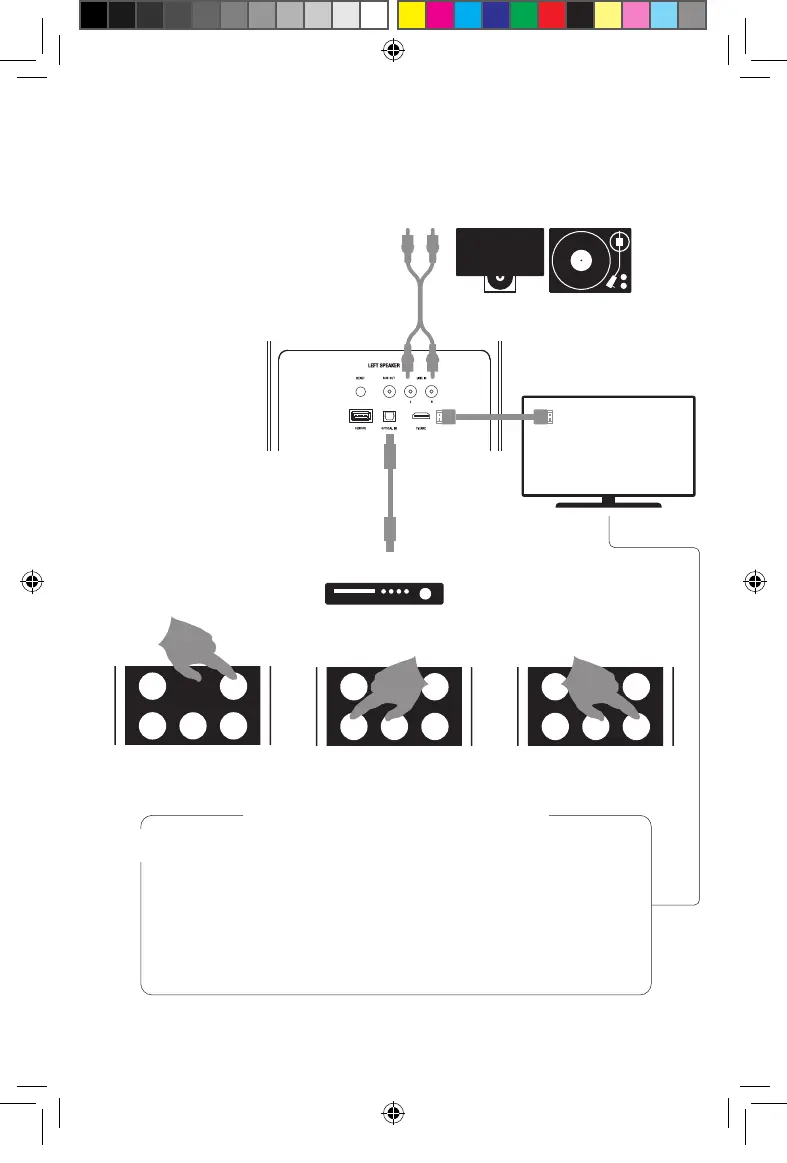
TV (ARC)
LINE IN
OPTICAL
1.
2.
!
ARC AUDIO RETURN CHANNEL
SPELA ANSLUTNA ENHETER PLAYING FROM CONNECTED
DEVICES VON VERBUNDENEN GERÄTEN ABSPIELEN
AFSPELEN VANAF VERBONDEN APPARATEN
Anslut med kabel.
Connect using a cable.
Mit einem Kabel verbinden.
Maak verbinding via een kabel.
Kontrollera TV-ljudet med din vanliga
TV-fjärrkontroll. Om din TV stödjer ARC, bero-
ende av tillverkare, kan du behöva aktivera
denna funktion i din TV:s inställningar.
Control TV audio with your regular TV-re-
mote. If your TV supports ARC, depending on
brand you may have to activate this feature
in your TV settings.
Steuern Sie die Audioausgabe des Fernsehers
mit einer gewöhnlichen TV-Fernbedienung.
Falls Ihr Fernseher ARC unterstützt, müssen
Sie gegebenenfalls, je nach Marke, diese
Funktion in Ihren TV-Einstellungen aktivieren.
Regel het geluid van uw TV met de afstands-
bediening van uw TV. Als uw TV ARC onder-
steunt, moet u deze functie afhankelijk van
het merk in uw TV-instellingen van activeren.
A48_manual_118x178_SE_EN_DE_NL_FR_IT_ES_FI.indd 14A48_manual_118x178_SE_EN_DE_NL_FR_IT_ES_FI.indd 14 2022-01-03 16:082022-01-03 16:08


 To Next Page