10
(+)
(-)
(+)
(-)
INSTALLATION
Connecting the speakers
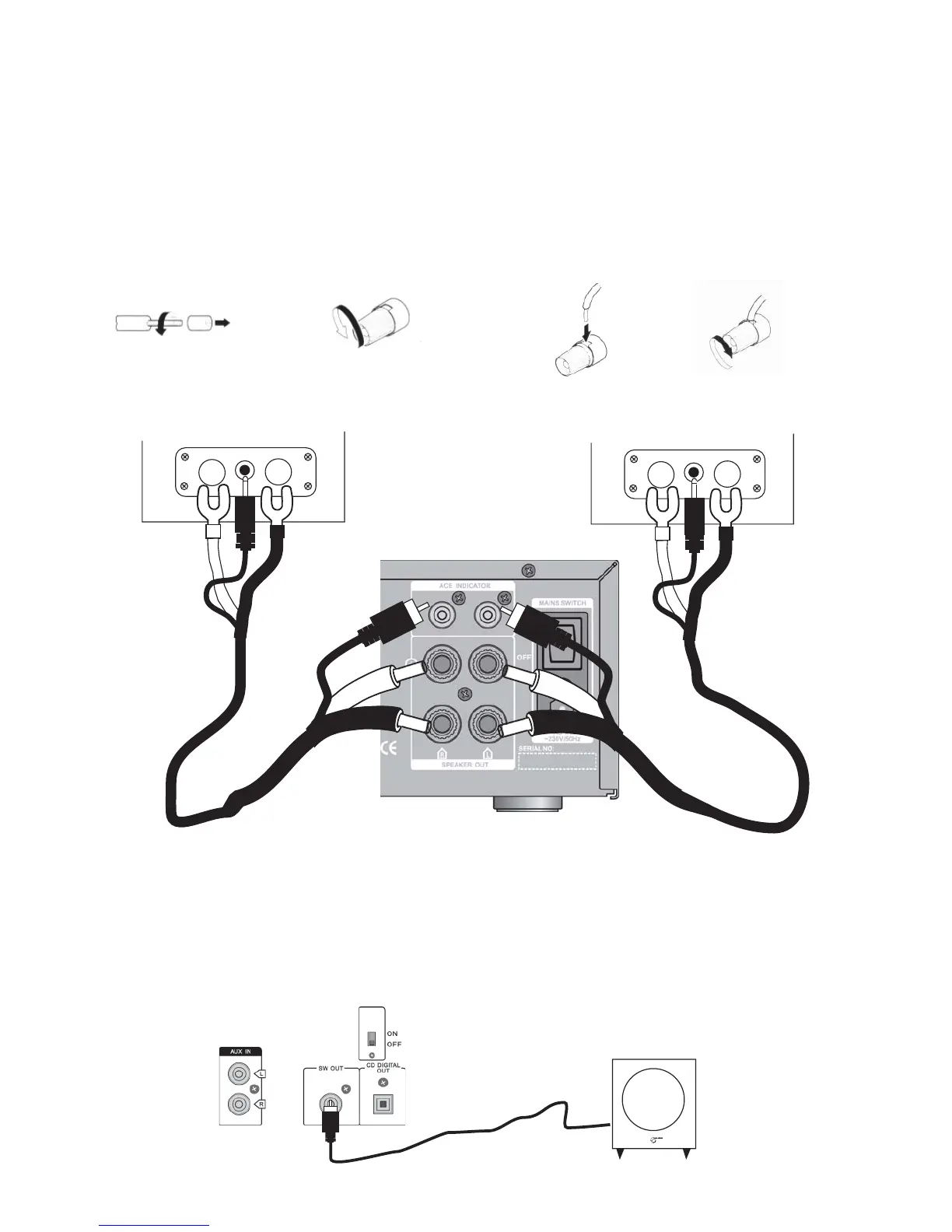
Connect the included speaker cables according to the drawing below. The two ends of the cables are different.
Connect the cable ends with the 3.5 mm [1/8 inch] plugs and forked crimp terminals to the respective speak-
ers. Connect the other ends of the cables to the amplifier, following directions 1-4 below. Connect red to (+) and
black to (-). This also applies to the connections to the speakers. Connect the RCA plugs to the ACE INDICATOR
inputs.
Each cable is 5 meters [ca. 16 feet] long and must not be replaced with any other cable of any length.
Amplifier’s rear panel
4) Tighten
3) Insert the wire into the
speaker terminal
2) Open the speaker
terminal
1)Remove the sheath from
the end of the wire
Left speaker
Right speaker
Connecting the subwoofer (extra accessory)
An active subwoofer will substantially improve the bass reproduction. Connect a line cable between the SW OUT
and LINE IN input on the subwoofer. Generally, a line cable is delivered with a subwoofer.



 To Next Page