08
15
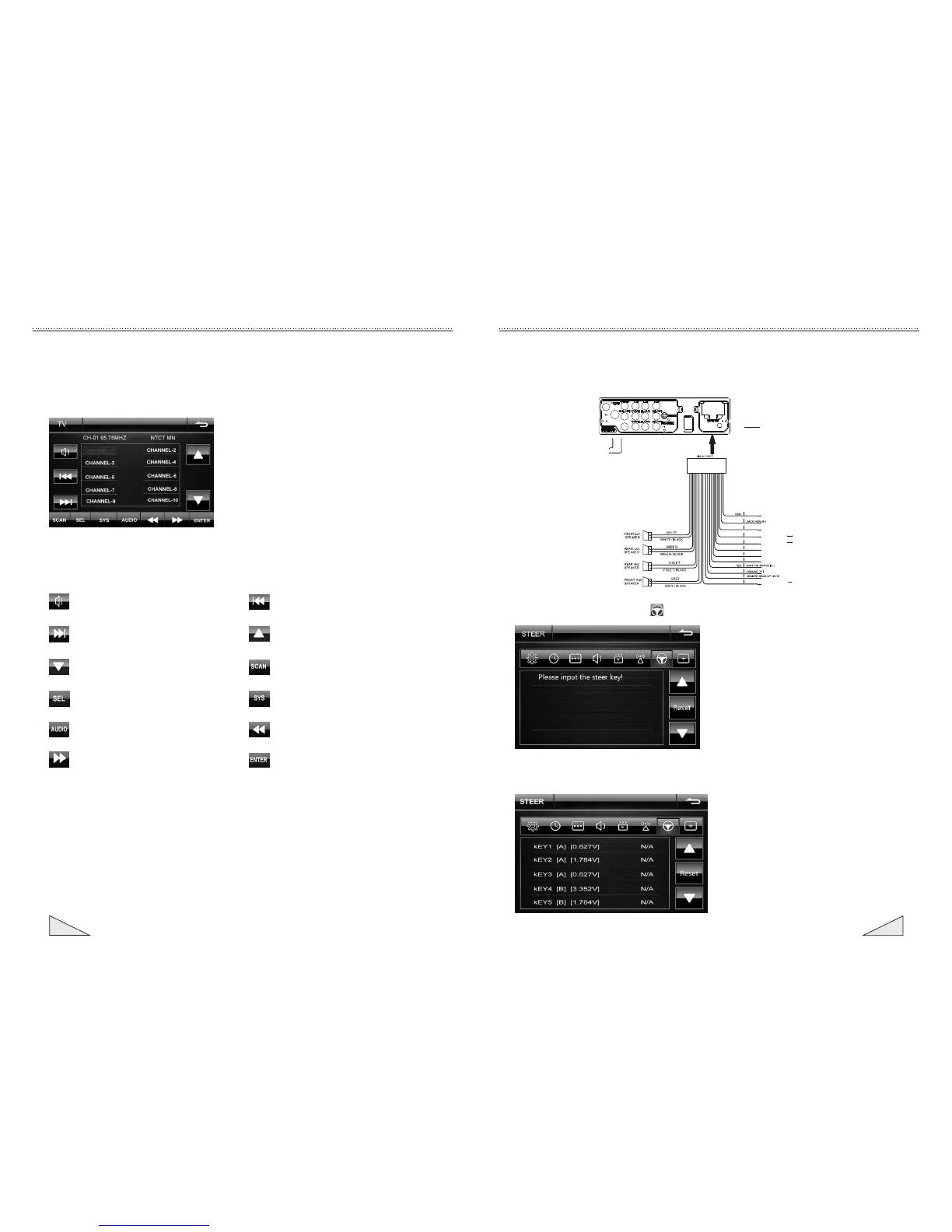
:Mute switching
:Next page
:Select the pre-set channel downwards
:Audio and video setting
:Switching of sound system
:Channel increasing scanning
:Previous page
:Select the pre-set channel upwards
:Scanning and automatic
storage channel
:TV system switching
:Channel decreasing scanning
:Confirm the selected setting
9. Instruction for the TV operation
Description of the button function
Instruction for the operation of touch screen
In the main menu, touch the TV icon to enter the TV menu to playing. When need
to change the program, press the left and right zone by TFT screen to adjust
CH-/Ch+; the following menu will appear if the central zone of the screen is
pressed.
4.7.2 Ensure to connect. On the main menu by pressing [SETUP] icon to enter the setup
interface, Select the option of ,Under this option appears in the following interface:
4.7.3 The steering wheel controller input to the will be setting's button, Click the
button to be set, The steering wheel interface will be display the key settings,
As shown below:
Instruction for the operation of touch screen
4.7 Setting for steering wheel
4.7.1
control of the system and resets the steering wheel control button
It mainly conducts setting for the button on the steering wheel and the function
.
Ste ering wh eel con troll er's K EY1
Ste ering wh eel con troll er's K EY2
Stee ring wh eel con troll er's G ND
BLUE
BLUE/BLACK
AMP CONTROL
POWER ANTENNA
ILLAMNINATION CONTROL
BROWN
BROWN/BLACK
STEERING WHEEL CONTROL1
STEERING WHEEL CONTROL2
STEERING WHEEL CONTROL(-)
YELLOW
BLACK
BLACK
ORA NGE/B LACK
BRA KE
BLU E/WHI TE
MUT E
ORA NGE
A
B
TV ANTENNA
RADIO ANTENNA
CONNECTOR
C
A
B
C
GPS
D
D


 To Next Page
 Loading...