EasyManua.ls Logo

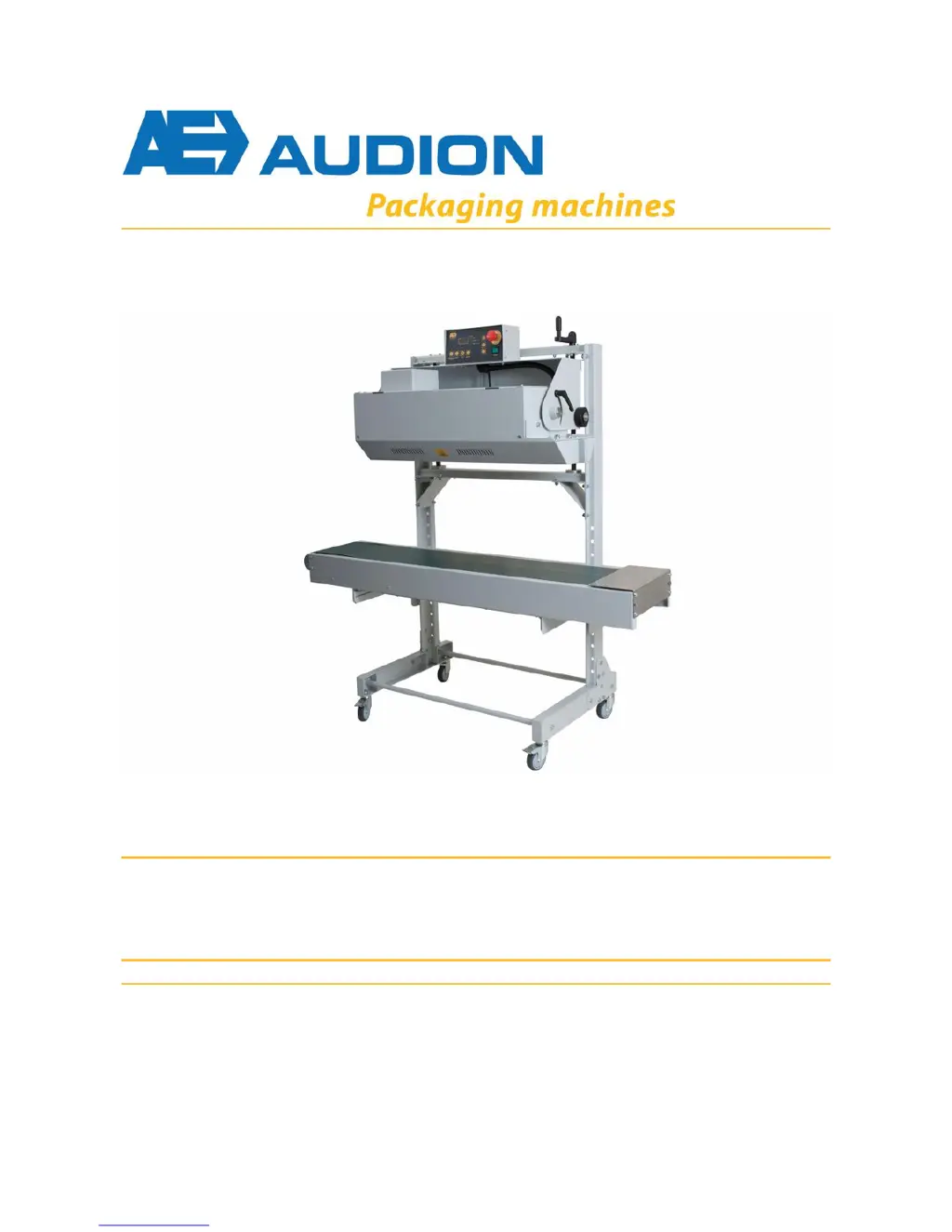
Audion D 552 AVT - User Manual

Audion D 552 AVT
58 pages
Print Icon
To Next Page IconTo Next Page
Loading...
User Manual
Al l - I n Se a l er
v e r
D 552 AVT / D 552 AVTS
User Manual
www.audion.com
All-In Sealer
D 552 AVT / D 552 AVTS
D 552 AVT(S) ENG Rev.04

Table of Contents

Questions and Answers

  • M
    megan11Aug 1, 2025
    Why is my Audion D 552 AVT Food Saver not working?
    • M
      mirandachristopherAug 1, 2025
      If your Audion Food Saver isn't doing anything, it could be due to several reasons. First, ensure that the main switch is turned on. Next, verify the plug is correctly inserted into the wall socket. Also, check your power supply to make sure there isn't a power cut. Another possibility is that the emergency stop button has been activated; if so, reset it. If none of these solutions work, it may be an internal fault, and you should contact your dealer or Audion.
  • I
    ihunterAug 5, 2025
    How to fix a seal that is not neat and tidy on my Audion Food Saver?
    • A
      Amy CortezAug 5, 2025
      If the seal on your Audion Food Saver is not neat and tidy, several factors could be the cause. First, readjust the sealing temperature. Next, readjust the conveyor belt speed. Ensure that the heating blocks and/or the PTFE belts are clean. Check if the cooling is switched on. Also, verify that the heating block, cooling plate, and/or press rollers are in the lowest position. Finally, if the PTFE belts are worn, replace them.
  • S
    samuel73Aug 9, 2025
    What to do if the conveyor belt is not moving on my Audion D 552 AVT?
    • P
      Peter SimsAug 9, 2025
      If the conveyor belt on your Audion Food Saver is not moving, it might be because the speed is set to '0'. Try increasing the speed setting. If the conveyor belt still does not move, it could indicate an internal fault, and you should contact your dealer or Audion.
  • J
    joseph64Aug 14, 2025
    Why is the cooling not working on my Audion Food Saver?
    • J
      Jessica DownsAug 14, 2025
      If the cooling is not working on your Audion Food Saver, check if the fan is switched on. If it is, ensure that the cooling plate position is correctly adjusted. If the issue persists, it may indicate an internal fault, and you should contact your dealer or Audion.
  • R
    richardsontonyaAug 17, 2025
    How to fix error code E1 on Audion Food Saver?
    • H
      Hailey ReynoldsAug 17, 2025
      To address error code E1 on your Audion Food Saver, check the main frequency setting and ensure the PCB jumpers are correctly set.
  • S
    sgreenAug 22, 2025
    What to do for error code E2 on Audion Food Saver?
    • P
      Patricia PhillipsAug 22, 2025
      To resolve error code E2 on your Audion Food Saver, check the connections in the temperature sensor wiring (Pt100) for any loose wires.
  • N
    Nathan WhiteAug 27, 2025
    How to troubleshoot error code E3 on Audion D 552 AVT?
    • R
      Rachel RogersAug 27, 2025
      To resolve error code E3 on your Audion Food Saver, replace the temperature sensor (Pt100).

Summary

Safety

General Safety Instructions

Lists essential safety guidelines for operation and use.

Installation

Sealer Adjustments

Outlines how to adjust the sealing unit and conveyor belt positions.

Description of the Sealer

Function and Specifications

Describes the sealer's function and suitability for various materials.

Control Panel Operation

Details each button and display element on the sealer's control panel.

Operation

Preparation for Production

Steps for switching on, setting temperature, and conveyor speed.

Switching on the Sealer

Steps to power on the sealer and reset the emergency stop.

Starting and Sealing Process

Steps to start the sealer and place bags for sealing.

Stopping and Emergency Procedures

Procedures for stopping the sealer and initiating an emergency stop.

Troubleshooting

Maintenance

Maintenance Schedule Overview

Outlines daily, weekly, and annual maintenance tasks.

Replacing PTFE Belts

Detailed instructions for replacing the PTFE belts.

Replacing Heating Elements

Step-by-step guide for replacing heating elements.

Electrical Diagram

Spare Parts

Audion D 552 AVT Specifications

General IconGeneral
BrandAudion
ModelD 552 AVT
CategoryFood Saver
LanguageEnglish