The AudioRange OTE 1000 is a set of wireless TV headphones designed to provide an easy setup and enhanced audio experience for television viewing. This device allows users to listen to TV audio wirelessly, offering both digital and analog connection options to accommodate various television setups. The system includes a pair of wireless headphones and a charging dock that also serves as the transmitter.
Function Description
The primary function of the AudioRange OTE 1000 is to transmit TV audio wirelessly to the headphones, allowing users to listen to their television programs without disturbing others. The system supports both digital (optical) and analog (RCA or 3.5mm headphone jack) audio inputs, making it compatible with a wide range of televisions. The charging dock acts as the central hub, receiving audio from the TV and transmitting it to the headphones. The headphones feature on-board controls for power, volume adjustment, and muting. A unique feature is the 3.5mm headphone sharing jack on the headphones, allowing another person to plug in their wired headphones and share the audio.
Important Technical Specifications
- Operating Voltage: Transmitter 5V
- Frequency Response: 20 Hz-20 KHz
- Charge Time: 1.5-2.0 hours
- Signal-to-Noise Ratio: 85dB
- Range: Up to 100ft indoors; 200ft in open field
- Carrier Frequency: 2.4 GHz
- Usage Time: Up to 10 hours
- Battery: Lithium-ion (in headphones)
Usage Features
Setup Preparations:
The setup process involves plugging the AC adapter into the dock and placing the headphones on the dock to begin charging. Users need to locate the audio connections on their TV. The dock has a switch to select between ANALOG and DIGITAL input modes.
Connecting to TV:
- Analog Connections (RCA or 3.5mm):
- Option 1 (RCA to TV, 3.5mm to Dock): Plug red/white RCA cables into matching TV ports, then plug the 3.5mm in-line jack into the dock.
- Option 2 (3.5mm to TV, RCA to Dock): Plug the 3.5mm in-line jack into the TV, then plug red/white RCA cables into matching ports on the dock.
- After connecting, slide the switch on the dock to "ANALOG."
- Digital Connections (Optical):
- Plug the optical cable into the TV and dock (remembering to remove plastic protective tips from the cord).
- After connecting, slide the switch on the dock to "DIGITAL."
Headphone Operation:
- Turning On/Off: Press and hold the POWER button for three seconds until the blue LED indicator turns on/off.
- Volume Control: Press the (+) button to increase volume, and the (-) button to decrease volume.
- Mute: Press the middle button with a dot (•) for 2 seconds to mute; press again to unmute.
- Adjusting Fit: The headphone band can be adjusted to provide a comfortable fit.
Charging the Headphones:
Headphones can be charged in two ways:
- Via Dock: Slide the headphones onto the dock, ensuring the charging pins align. The dock will show a red light when charging. A small click indicates correct positioning.
- Remotely: Lift the rubber cover on the headphones and insert the USB charging adapter into the port.
LED Light Indicators:
- Headset: A blue light illuminates when turned on.
- Dock (Top Light):
- Flashing Yellow: Standby mode, headphones not charging.
- Solid Red: Headphones are charging.
- Solid Green: Headphones are fully charged.
- Dock (Bottom Light):
- Solid Blue: Transmitting audio to headphones.
- Solid Orange: Headphones are muted.
- Solid Green & Blue: Normal operating mode.
Troubleshooting:
The manual provides guidance for common issues:
- No Sound/Low Sound: Check volume, cable connections, dock switch (ANALOG/DIGITAL), TV audio settings (external speakers), and headphone charge. Resetting the dock (unplugging for 60 seconds, then plugging back in and turning on headphones) is also suggested.
- Distorted Sound: Move headphones closer to the dock, ensure the dock is not blocked or near other electronic devices (except the paired TV), and check headphone battery level.
- Can't Charge Headphones: Verify AC adapter connection to the dock, proper placement of headphones on the dock (red charge indicator should light up), try plugging the AC adapter directly into the headphones (micro-USB port), and clean contact pins on both the headphone and dock with a dry cotton swab.
Maintenance Features
- Cleaning:
- Unplug the dock from the TV and power outlet.
- Wipe the device down with a soft cloth and mild soap.
- Dry with a paper towel.
- Do not use harsh cleaning chemicals such as bleach or alcohol.
Safety Instructions:
- Consult a doctor if you have a pacemaker before using.
- Intended for home and personal use only.
- Keep the device dry and away from water.
- Do not open the unit or battery; this voids the warranty.
- The device uses a lithium-ion battery; do not burn or dispose of in household trash.
- Do not pull on the cord to unplug.
- Do not use if damaged or malfunctioning.
- Unplug the device when cleaning.
The AudioRange OTE 1000 comes with a 1-year limited warranty covering manufacturer defects from the original purchase date. The warranty is valid only if purchased from AudioRange or an authorized reseller. A 30-day money-back guarantee is also offered. Warranty registration is available online.

 Need help?
 General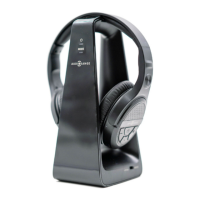

 To Next Page