4
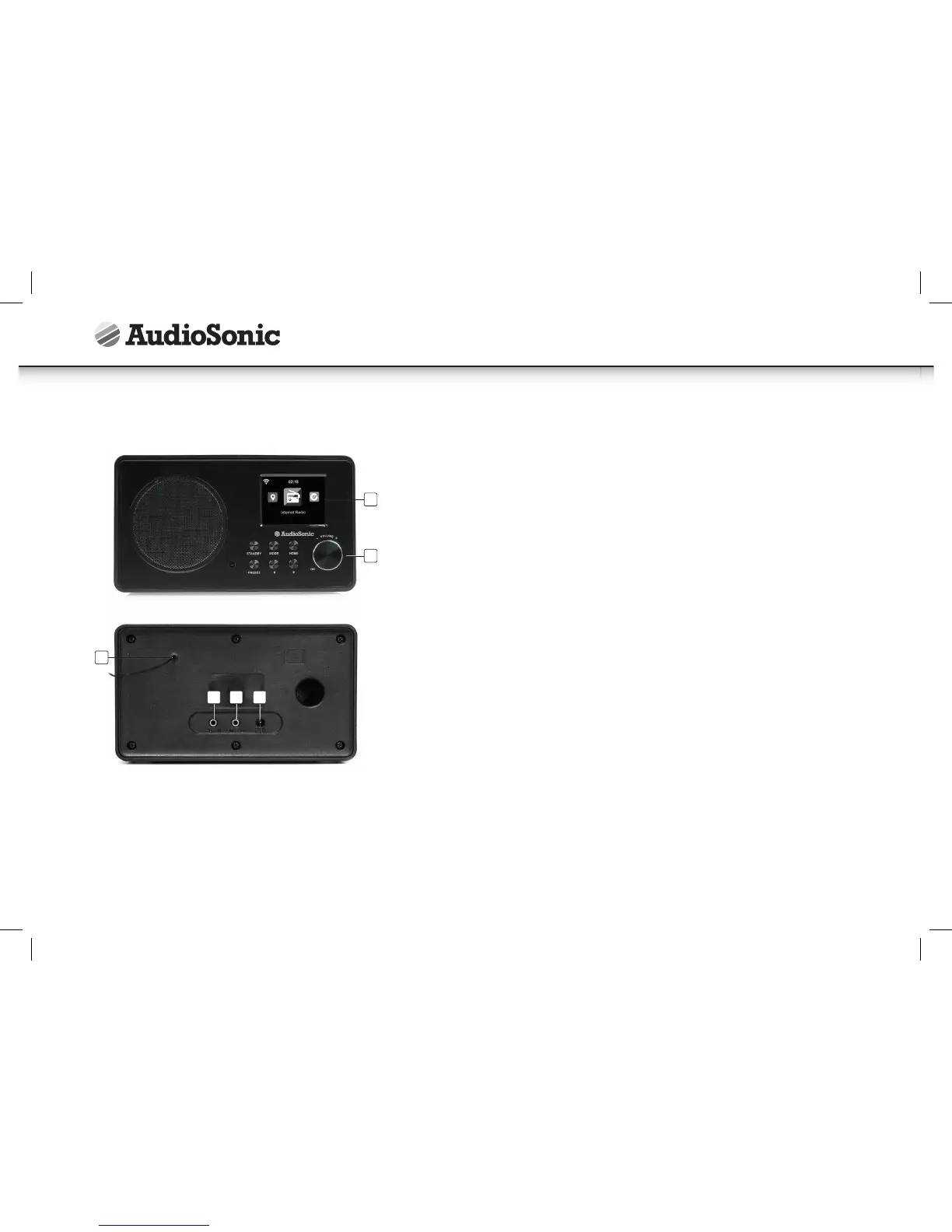
APPEARANCE AND PARTS DESCRIPTION
1. 2.4” TFT Screen
Display
2. Buttons and Reel
Control the OS operations
3. Antenna
Enhance FM reception
4. DC IN
Power supply
5. Aux in
3.5 mm aux in jack
6. Line out
3.5mm line out jack
GETTING STARTED
The packaging box contains the following items:
• Main unit
• Remote Control
• Power adaptor
• User Manual
Connect the power adaptor to the back of the device and plug into power socket.
Connect the adapter plug at the back of the device. Remember to pull out the clear
plastic tab from the battery compartment before using the remote.
NETWORK REQUIREMENTS
Before using the device, the following requirements are needed:
• A broadband connection in combination with a wired/wireless access point,
router or similar network device.
• The network device needs to support WiFi (802.11b/g/n) wireless connection.
• For streaming local media: a PC or smart phone with a network connection. This
network has to be the same one as the device is connected with.
• When you operate the radio for the first time, the system will ask you to set
Language and Network Configurations.
• You may setup the network connection immediately, or set it later.
Instruction Manual
1
2
3
6
5 4



 To Next Page