EasyManua.ls Logo

AUDIOVECTOR K Series - User Manual

AUDIOVECTOR K Series
2 pages
Print Icon
To Next Page IconTo Next Page
Loading...
θ

     
  
 
  
 ! "
#  $ %
"& '"
(  ! 
)*+ ! !  "
($,-! ! .  
"#   /
01 *2 3 4/
5-! 67$"( 
 ."*
 -! ! ! 
"
5849 2 4: ; '/
(. .!  
$"&". <=> ?@
$ .  <=> ?"

)> 4/
!  . ! "4 .
  
"( -  "# 
 !  "
   
"
+ 1 1 (
(  + 4*1 # <=> ?".
! !  
.<=> ?")"

Question and Answer IconNeed help?

Do you have a question about the AUDIOVECTOR K Series and is the answer not in the manual?

Overview

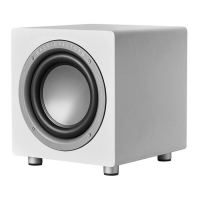
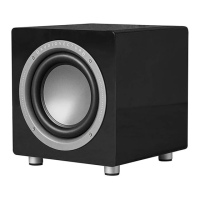
The Audiovector K-Sub series comprises three active subwoofers: the K-Sub, K-Sub Super, and K-Sub Signature. These subwoofers are designed to enhance the low-frequency response of a home audio system, particularly when integrated with a surround sound processor, amplifier, or receiver.

Function Description:

The primary function of the K-Sub subwoofers is to reproduce low-frequency sounds (bass) to complement the main speakers in an audio setup. Being active subwoofers, they incorporate their own amplification and require only a signal input from a "sub-output" or "pre-output" on a surround processor or receiver. For optimal performance and a 3 dB increase in Sound Pressure Level (SPL), it is recommended to connect both the left and right inputs of the K-Sub. If the surround processor lacks stereo outputs, a Y-split cable can be used to achieve this dual input connection.

Important Technical Specifications:

Model Frequency Response (+0/-3dB) Amplifier Power RMS Maximum SPL Drive Unit Bass Enhancement Dimensions (DxWxH) mm Weight (kilos)
K-Sub 27-160 Hz 300 W 108 dB 10" long-throw ARU (Acoustic Resistance Unit) 370 x 340 x 374 19 kg
K-Sub Super 25-160 Hz 350 W 110 dB 10" long-throw ARU (Acoustic Resistance Unit) 370 x 340 x 374 20 kg
K-Sub Signature 18-180 Hz 350 W 112 dB 10" XXLS driver ARU (Acoustic Resistance Unit) 370 x 340 x 374 21 kg

All models feature an Acoustic Resistance Unit (ARU) for bass enhancement, contributing to their low-frequency performance.

Usage Features:

The K-Sub subwoofers offer four adjustable knobs for fine-tuning their performance: Volume, Frequency Response, Boost, and Phase.

  • Volume: Initially, the volume should be set to the 12 o'clock position to ensure sufficient low-frequency response for the initial setup. Subsequent adjustments to the sub-level can be made via the bass management system of the surround processor.
  • Frequency Response: This control allows users to set the crossover frequency, determining the point at which the K-Sub begins to support the front speakers. For example, if set to 50 Hz, the subwoofer will only reproduce frequencies below 50 Hz.
  • Phase: Proper phase adjustment is crucial for seamless integration with front speakers, especially in the low-frequency range where room acoustics play a significant role. The phase should be adjusted with the assistance of a second person. One person should be positioned away from the subwoofer while the other operates the phase control. The correct phase setting is achieved when the subwoofer produces the loudest sound pressure level, indicating it is playing "with" rather than "against" the front speakers.
  • Boost: The boost function is designed to increase the sub-level specifically for frequencies below 50 Hz. If deeper bass is desired beyond the subwoofer's un-boosted performance, activating this function will enhance frequencies up to 50 Hz. Users are encouraged to listen and adjust according to their preference.

Power Management:

The K-Sub subwoofers offer flexible power management options:

  • Auto On (Mid Position): The subwoofer can automatically turn on when it detects an audio signal. This is achieved by setting the power switch to the mid position.
  • Always On (On Position): For continuous operation, the power switch can be set to the "on" position, ensuring the subwoofer is always active.
  • Off (Off Position): To completely disconnect the subwoofer and power it down, the switch should be set to the "off" position.

Maintenance Features:

The manual does not explicitly detail maintenance features. However, as with most electronic audio equipment, it is generally recommended to keep the device clean, free from dust, and ensure proper ventilation to prevent overheating. Regular checks of cable connections can also help maintain optimal performance.

AUDIOVECTOR K Series Specifications

General IconGeneral
BrandAUDIOVECTOR
ModelK Series
CategorySubwoofer
LanguageEnglish

Related product manuals