- 17 -
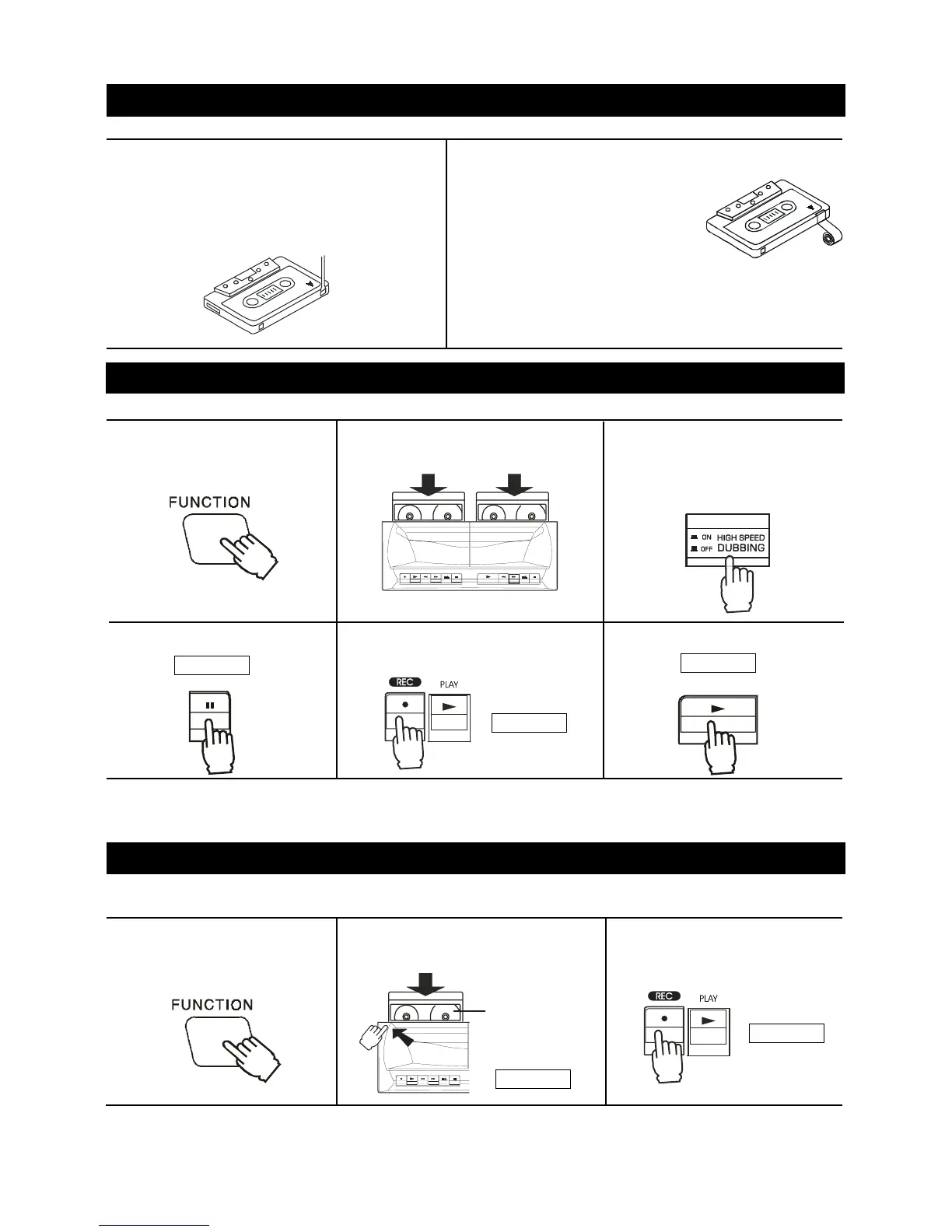
1. Cassette tapes have two erase-protection tabs
- one for each side. To protect a recording
from being accidentally recorded over or
erased, use a screwdriver to remove one or
both of the cassette tape's erase-protection
tabs.
4. Press the PAUSE button.
6. Press the PLAY button.
2. If you want to record on a tape side after you have
removed the erase protection
tab, place a piece of strong
plastic tape over that side's er
ase-protection hole.
Notes:
1) Be sure you cover only the hole originally covered by
the erase-protection tab.
2) Removing the erase-protection tabs does not prevent
a bulk eraser from erasing a cassette tape.
Note: If a whistling noise is heard whilst recording from an AM station, move the AM loop antenna to a position
where noise is no longer heard from the unit.
If a whistle is heard (beat) it may be reduced by Beat cut is selected. The Beat cut function by press the DUBBING
button in tuner mode.
TAPE CARE TIPS
DUBBING ---- FROM DECK B TO DECK A
2. Insert a tape into the cassette
compartment.
3. Press the RECORD button which
also engages the PLAY button.
RECORDING ---- DECK A ONLY
2. Insert the recorded tape into Deck
B and the blank tape into Deck A.
1. Press the FUNCTION button
to TAPE.
3. Press the DUBBING button to
selector according to the
desired dubbing speed:
NORMAL or HIGH.
5. Press the RECORD button which
also engages the PLAY button.
Preventing accidental erasure
Use only normal (type I) tapes for recording and playback.
To stop dubbing
Press the STOP/EJECT buttons of Deck A and Deck B.
Note : Do not change the dubbing speed when dubbing is in progress.
Use only normal (type I) tapes for recording.
RECORDING FROM THE BUILT-IN TUNER
1. Press the FUNCTION button
to TUNER and tune into a
desired station. (see page 12)
DECK A
DECK A
DECK B
DECK A
DECK A DECK B
DECK A
This side
you want
to record
Side A Tab
Side B Tab
PAU SE
PLA Y


 To Next Page
 Loading...

