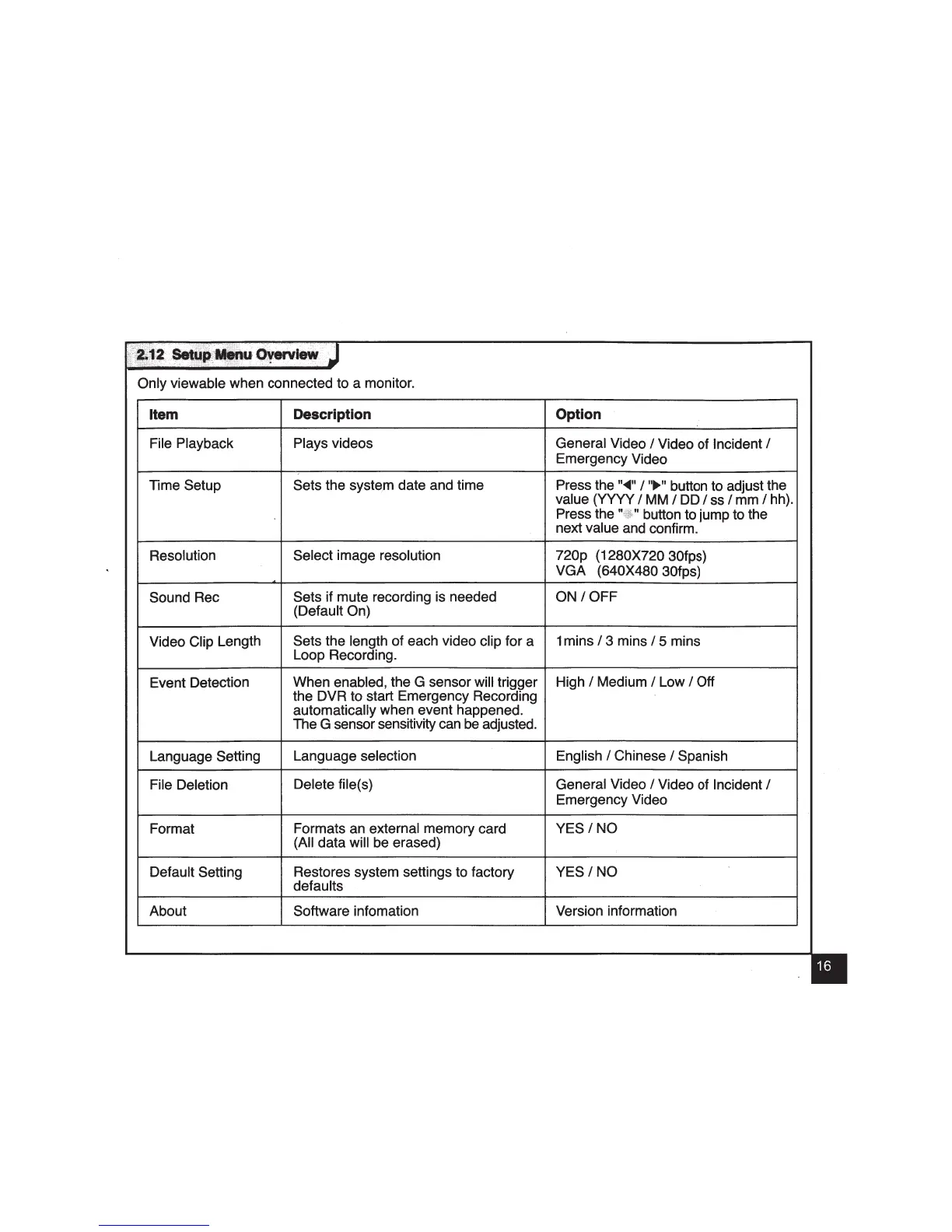
Only viewable when connected to a monitor.
Item
Description Option
File Playback
Plays videos
General Video
I Video of Incident I
Emergency Video
Time Setup Sets the system date and time
Press the
..
..._
..
I
..
.,.
..
button to adjust the
value (YYYY
I
MM
I DD
Iss
I mm I hh).
Press the
button to jump to the
next value and confirm.
Resolution
Select image resolution
720p (1280X720 30fps)
VGA (640X480 30fps)
Sound Rec
Sets if mute recording is needed ON
/OFF
(Default On)
Video Clip Length
Sets the length of each video clip for a
Loop Recording.
1 mins
I 3 mins I 5 mins
Event Detection
When enabled, the G sensor will trigger
High
I Medium I Low I Oft
the DVR to start Emergency Recording
automatically when event happened.
The G sensor sensitivity can
be
adjusted.
Language Setting
Language selection English
I Chinese I Spanish
File Deletion
Delete file(s)
General Video
I Video of Incident I
Emergency Video
Format
Formats an external memory card
YES/NO
(All data will be erased)
Default Setting
Restores system settings to factory
YES/NO
defaults
About Software infomation
Version information


 To Next Page
 Loading...