1. Introduction
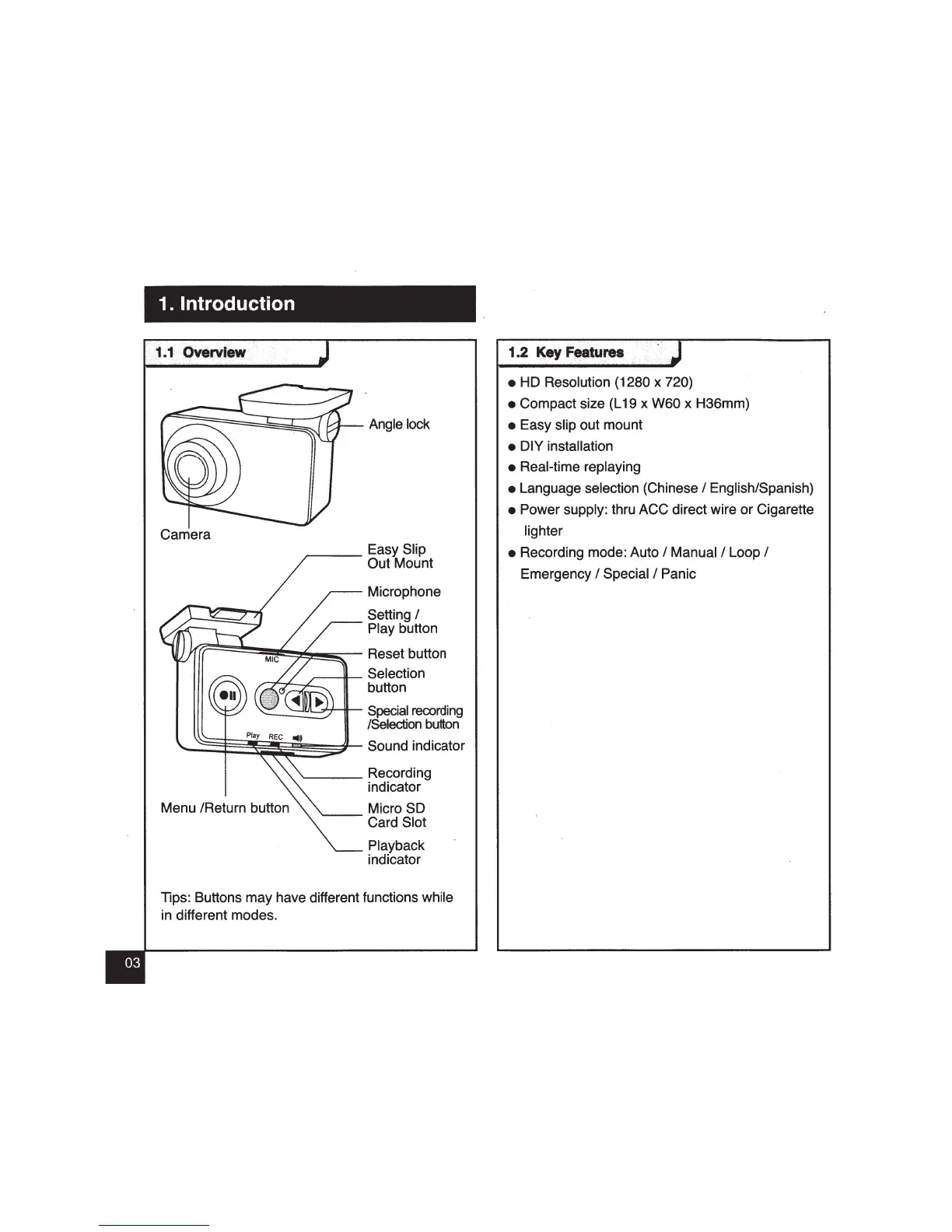
Camera
~--
Easy Slip
Out Mount
Microphone
Setting
I
Play button
((F======~~~~~~-
Reset button
,----11--
Selection
,.....--,--r-..,c____
button
----.J!JrL...,;,'"+-ilt--
Special
recording
/Selection
button
~::§:~~~~~~~'--
Sound indicator
Menu /Return button
'-----
Recording
indicator
Micro
SO
~-Card
Slot
Playback
indicator
Tips: Buttons may have different functions while
in different modes.
1
••.
2 ·
~·r
,._
..
,.._
.J
• HD Resolution (1280 x 720)
• Compact size (L 19 x W60 x H36mm)
• Easy slip out mount
• DIY installation
• Real-time replaying
• Language selection (Chinese
I English/Spanish)
• Power supply: thru ACC direct wire or Cigarette
lighter
• Recording mode: Auto
I Manual I Loop I
Emergency I Special I Panic



 To Next Page