
 Need help?
Do you have a question about the Audizio Prato and is the answer not in the manual?
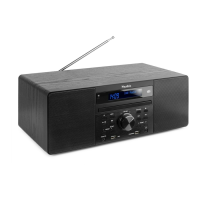
Details the controls, display, and indicators on the front panel of the Audizio Prato Music System.
Details the connections and ports available on the back panel of the Audizio Prato Music System.
Instructions for setting the timer for automatic power on/off and the sleep timer.
How to adjust the equalizer settings for different sound profiles.
Procedure to perform a factory reset on the unit, including data deletion.
Procedure for performing a full scan of DAB+ stations and saving found channels.
How to manually search for and select DAB+ stations.
Adjusting the compression level for sound differences between radio stations.
Instructions for saving radio stations using the memory function.
Details on information shown on the DAB display, such as signal strength and program type.
Configure scan settings to search for all stations or only strong signal stations.
Manually set the audio output to stereo or mono mode.
Procedure for storing up to 20 stations in DAB+ and FM modes.
Information displayed on the FM radio screen, including radio text and signal strength.
Instructions for playing, pausing, stopping, and skipping tracks on a CD.
How to play CD tracks in a random sequence.
Connecting a mobile device via Bluetooth to play audio wirelessly.
Playing audio files from a USB stick.
Connecting external audio devices via the AUX input.
Using the USB port to charge external devices.
 General
| Type | Home audio micro system |
|---|---|
| Product color | Black |
| Optical disc player | Yes |
| Impedance | 4 Ω |
| RMS rated power | 60 W |
| Number of speakers | 2 |
| Power source | AC |
| Input voltage | 100/240 V |
| Input frequency | 50/60 Hz |
| Display type | LCD |
| Backlight color | Blue |
| Wi-Fi | No |
| Bluetooth version | 4.0 |
 Weight and Dimensions
| Depth | 370 mm |
|---|---|
| Width | 207 mm |
| Height | 135 mm |
| Weight | 3300 g |

 To Next Page
