Indication LED Status
Power On Both LED Flashing blue 3 times
Power Off Both LED Flashing red once, then tum off
Pairing Left LED Flashing blue and red,
Paired Left LED off, Right LED Flashing blue once
Repairing Both LED off
Low Battery Right LED flashing blue and red
Charging LED Red/ Battery Indicator turn on
Fully Charged LED off/ Battery Indicator indicate four bars
Operation
First Use
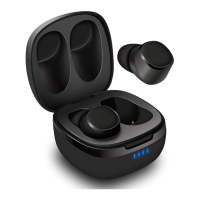
Take out both earbuds then re-insert them back into the case to activate the earbuds. Charge the both earbuds fully before first use (for
details, please refer 6) ..
If earbuds fail to be charged, please charge the charging case (for details, please refer’ 5.2 Charging’). Take out both earbuds then re-
insert them back into the case to activate the earbuds, The EP810 will automatically pair with each other and enter connection mode
after power on, and the left status LED will flashes blue and red.
Charging
Please fully charge the EP800 before first use or if left unused for a long period of time.
To charge earbuds, put earbuds into the charging case. While charging, two status LED lights red and turns off once fully charged.
To charge the charging case, plug the Type-C charging cable to the battery case port to start charging. The battery indicator will show
the current power ratio, and all the four indicators will be on after fully charged.
Switch On/ Off
Both earbuds will turn on automatically when the charging case is opened or when the Multi-function Button has been pressed for 3-5
seconds. Both LEDs will flash blue 3 times.
The both earbuds will turn off automatically when placed back into the charging case and the charging case is closed or when the Multi-
function Button has been pressed for 3-5 seconds. Both LEDs will flash red once.
Bluetooth Connections
The EP810 will enter reconnection mode when on. When connected to the same smartphone or Bluetooth Device, the EP810 will
automatically activate. For first connection, please refer ‘5.1 First use’. To pair to a new device, insert earbuds back into the charging
case, then disconnect the EP800 from your old device. Both status LEDs will flash blue once, and the left status LED will flash blue and
red alternately which indicate that the EP810 is in pairing mode.
– Twin earbuds pairing
Open the cover of charging case or take the both earbuds out of the charging case. The earbuds will automatically pair with each other.
The EP810 will enter pairing mode automatically, the LED of the left earbuds flashes blue and red. Look for the Bluetooth name “EP81
O” on your device and select it. Once successfully paired, the left LED will turn off and the Right LED Flashing blue once.
– Single earbud pairing
When using a single earbud, press the Multi-function Button for 3-5
seconds to turn on an ear bud and the blue indicator will flash 3 times. Then, double click the Multi-function Button to enter into paring
mode, the LED will flash blue and red. Look for the Bluetooth name ‘EP810’ on your device. Select it and complete pairing with the
single earbud.
Earbuds Operation



 To Next Page