EasyManua.ls Logo

August VGB100 - Introduction to August VGB100; Product Overview; Key Features; System Requirements

August VGB100
13 pages
Print Icon
To Next Page IconTo Next Page
To Previous Page IconTo Previous Page
Loading...
1.
Introduction
1.1
Overview
The
VGBIO0
video
capture
stick
seats
digital
videos
on
sour
Ifa
Drive,
With.
Video
an
RGB
In,
youcan
Saptute
and
edit
footage
from
your
camcorder,
VR,
DVD
player
and
other
video
devices
The
egclosed
software
cas
Convert
the
rsorded
file
to
MPEG],
MPEG2,
AVI,
WMV,
ASE,
MP4
and
QTMOV
in
720x576
pixels
1.2
Features
Transfer
video
fiom
VHS
0
your
PC
5
Create
files
n
tiple
formate
+
Create
DVDs
fom
your
favourite
chips
4
Capture
sil
mages
Irom
fostage
*
Eailyshate
videos
on
YouTube
+
3-Phomo
Composite)
and
S-Video
input
+
Compatibie
with
PALINTSCISECAM
formats
+
UStipowered,
no
extemal
power
needed
1.3
System
Requirements
©
Operating
System:
Windows
§/7/
10/11/
Vista/XP
©
CRU Pal
aGitzorhigker
RAM.2S¢i8
or
bugher
‘Graphics
Card:
12M
or
higher
MistosoteDiestX9
0
or
higher
Sound
Card,
CD
or
DVD
drive,
USB2.0
port,
TG
ee
harddisk
space
14
Package
Contents
+
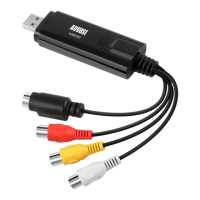
vonio0
AV
Muli-Cable
Sonate
co
Scare
Adaptor
4
Installation
Guide
2,
Hardware
Connections
3.
Driver
and
Software
Installation
ups/augutintcomenowaloasoN
hil
Inger
the
VGB100,
Please
ensure
your
Antivis
is
switched
‘and
tat
You
downlaad
"Driver
*VHS
to
DVD
OSE"
Selet
the
relevant
Language
\V6Bi00
v5
t0DYD
x
(fesse
eed
Enokh
z

Other manuals for August VGB100