EasyManua.ls Logo

August VGB100 - User Manual

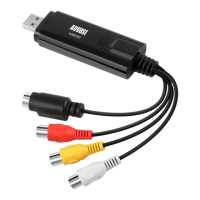
August VGB100
13 pages
Print Icon
To Next Page IconTo Next Page
Loading...
VGB100
AUSUST
USB
2.0
Video
Capture
Stick
Clé
de
Capture
Vidéo
USB
2.0
USB
2.0
Video
Capture
Stick
[il
Video
Capture
Stick
USB
2.0
Grabador
de
video
USB
2.0
HEBBB

Other manuals for August VGB100

Question and Answer IconNeed help?

Do you have a question about the August VGB100 and is the answer not in the manual?

Summary

Introduction to August VGB100

Product Overview

Details the VGB100's function in creating digital videos from analog sources.

Key Features

Highlights functionalities like VHS transfer, multiple format creation, and YouTube sharing.

System Requirements

Lists the necessary hardware and operating system specifications for the VGB100.

Package Contents

Enumerate all items included in the VGB100 product box.

Hardware Connections Guide

Driver and Software Installation Procedures

Online Download Installation

Steps for installing Honestech software via online download.

Software Installation from Disk

Instructions for installing the provided software using the CD-ROM.

Using Honestech Software

License Key and Software Options

Guide on inserting the license key and configuring software options.

Video and Audio Settings

How to select video/audio devices and adjust capture settings.

Cable Type Selection

Instructions for choosing between Composite and S-Video inputs.

Changing Capture Location

Procedure for modifying the default save location for captured videos.

Troubleshooting Common Issues

No Video in Preview Screen

Solutions for when no video feed is displayed in the preview.

Blue Screen or Load Errors

Troubleshooting steps for blue screen issues and loading problems.

Poor Video Quality

Tips for improving video quality during capture.

USB Stick Not Recognized

Steps to resolve issues where the PC does not detect the USB capture stick.

Device Cannot Be Used

Guidance for when the capture device is not recognized or usable.

License Key Problems

How to troubleshoot issues with the software license key.

Product Warranty Information

Summary

Introduction to August VGB100

Product Overview

Details the VGB100's function in creating digital videos from analog sources.

Key Features

Highlights functionalities like VHS transfer, multiple format creation, and YouTube sharing.

System Requirements

Lists the necessary hardware and operating system specifications for the VGB100.

Package Contents

Enumerate all items included in the VGB100 product box.

Hardware Connections Guide

Driver and Software Installation Procedures

Online Download Installation

Steps for installing Honestech software via online download.

Software Installation from Disk

Instructions for installing the provided software using the CD-ROM.

Using Honestech Software

License Key and Software Options

Guide on inserting the license key and configuring software options.

Video and Audio Settings

How to select video/audio devices and adjust capture settings.

Cable Type Selection

Instructions for choosing between Composite and S-Video inputs.

Changing Capture Location

Procedure for modifying the default save location for captured videos.

Troubleshooting Common Issues

No Video in Preview Screen

Solutions for when no video feed is displayed in the preview.

Blue Screen or Load Errors

Troubleshooting steps for blue screen issues and loading problems.

Poor Video Quality

Tips for improving video quality during capture.

USB Stick Not Recognized

Steps to resolve issues where the PC does not detect the USB capture stick.

Device Cannot Be Used

Guidance for when the capture device is not recognized or usable.

License Key Problems

How to troubleshoot issues with the software license key.

Product Warranty Information

August VGB100 Specifications

General IconGeneral
InterfaceUSB 2.0
ModelVGB100
CategoryAdapter
PowerUSB Powered
CertificationsCE, FCC, RoHS
Supported StandardsNTSC, PAL
Input Voltage5V
CompatibilityWindows, Mac