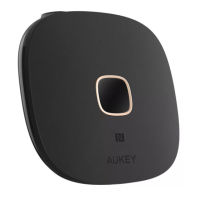
Connect one end of the included 3.5mm audio cable or Toslink optical cable to
the 3.5mm audio input or optical input of BR-O8. Connect the other end to your
audio source device (TV, computer, DVD player, CD player, or MP3 player) that
doesn’t have wireless function
Connect the BR-O8 to a power source with the micro-USB cable
Slide the RX/TX switch to “TX” position. Then slide the Power/Mode switch to “BT”
position
Tap and hold for 3 seconds, and the BR-O8 will enter pairing mode with the
square connection status indicator flashing green rapidly
Activate the pairing function of your wireless-compatible audio device (like
wireless headphones or speaker). Keep your device close to the BR-O8 and they
will pair automatically
1.
2.
3.
4.
5.
If your speaker or stereo system has left & right channel RCA inputs (colored white
and red respectively), you can use the included RCA cable to connect instead
When simultaneously connected with two devices, the BR-O8 can only accept
audio input from one device at a time
●
●
- 05 -
Notes for Receiver Mode
Transmitter Mode (TX Mode)


 To Next Page