EasyManua.ls Logo

Aukey CB-H18 - Getting Started

Aukey CB-H18
27 pages
Print Icon
To Next Page IconTo Next Page
To Previous Page IconTo Previous Page
Loading...
Getting
Started
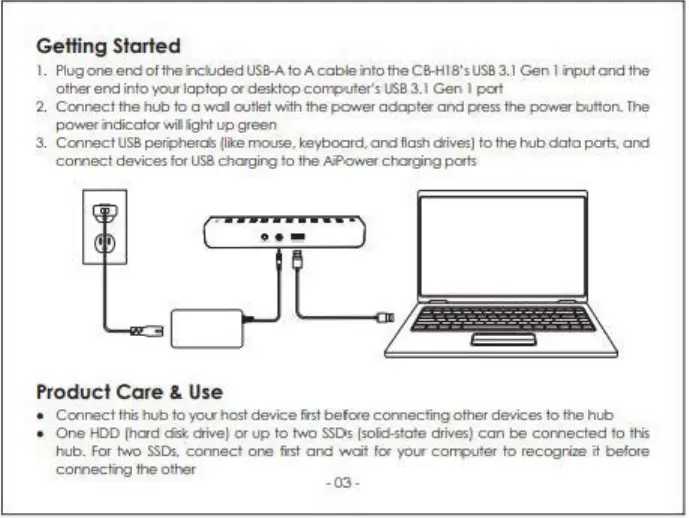
I. Plug
one
endofthei"lclJded
USS-A
to
A
cobfe
i"ll
o the CS-Hl8'sUS83. l
Gen
1
i,putond
the
ot
her
encl
into
your
lop
top
a
desktop
con-pouter's
USS
3.
1
Gen
J
port
2.
Connect
the
hub
too
wol
oo
t
let
'Nith the
po.var
adop
t
er
and
press the po'\"181"
butt
on.
The
powe,
f"I
CicotOlwilightupgreen
3.
Connect
U
SB
~d5
(
lb
mouse, keyboard,
and
flash
aives)
to
the
hub
data
ports.
and
comect
devices t
Of
USS
chorgirg
to
the~
chaging
ports
L
Product
Care
&
Use
Connect
this
hub
loyotr
host
device
rtst
before
connecting
other
devices
to
the
hub
One
HOD
(had
disk aivet
or
up
to
two
SSDs
(solic:klofe drives)
con
be
comeded
lo t
tis
hub.
For
two
SSOs
.
connect
one
mt
and
wot
foe
yo11
col11Xlfet
to
recogrue
it
before
comectng
the
other
.03.

Related product manuals