- 04 -
2. Turn on the pairing function of the device you want to pair with the earbuds
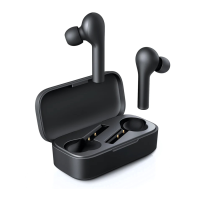
3. In the list of available devices, find and select “AUKEY EP-B40”
4. If a code or pin is required for pairing, enter “0000”
Simultaneous Pairing with Two Devices
1. Follow the instructions in the “Pairing” section to pair the earbuds with
Device A
2. Once paired, disable wireless function on Device A and turn off the
earbuds
3. Follow the instructions in the “Pairing” section to pair with Device B
4. Once paired with Device B, reactivate wireless function on Device A
and select “AUKEY EP-B40” in the list of paired devices
5. You can now make and receive calls from either of the two paired devices
Notes
● To reset the earbuds, power on the earbuds and then hold volume +,
volume -, and multi-function button simultaneously until the LED indicator
flashes red for 2 seconds. Once the pairing list is cleared, you will hear
a tone; and when you turn on the earbuds next time, the earbuds will
automatically enter into pairing mode
● The earbuds will automatically shut down after 5 minutes in pairing
mode if no devices are paired
● If your paired device is turned off or manually disconnected, the
earbuds LED indicator will flash blue once every 8 seconds and the
earbuds will shut down after 5 minutes
● The maximum wireless operating range is 33ft (10m). If you exceed this
range, the earbuds will disconnect from your paired devices and you
will hear a tone. The connection will be re-established once you re-enter
the wireless range within 15 minutes. The earbuds will automatically
reconnect to the last-paired device. To connect with other devices,
repeat the previous “Pairing” steps


 To Next Page