2. Turn on the pairing function of the device you want to pair with the earbuds
3. In the list of available devices, find and select “AUKEY EP-B40”
4. If a code or pin is required for pairing, enter “0000”
Simultaneous Pairing with Two Devices
1. Follow the instructions in the “Pairing” section to pair the earbuds with
Device A
2. Once paired, disable wireless function on Device A and turn off the
earbuds
3. Follow the instructions in the “Pairing” section to pair with Device B
4. Once paired with Device B, reactivate wireless function on Device A
and select “AUKEY EP-B40” in the list of paired devices
5. You can now make and receive calls from either of the two paired devices
Notes
● To reset the earbuds, power on the earbuds and then hold volume +,
volume -, and multi-function button simultaneously until the LED indicator
flashes red for 2 seconds. Once the pairing list is cleared, you will hear
a tone; and when you turn on the earbuds next time, the earbuds will
automatically enter into pairing mode
● The earbuds will automatically shut down after 5 minutes in pairing
mode if no devices are paired
● If your paired device is turned off or manually disconnected, the
earbuds LED indicator will flash blue once every 8 seconds and the
earbuds will shut down after 5 minutes
● The maximum wireless operating range is 33ft (10m). If you exceed this
range, the earbuds will disconnect from your paired devices and you
will hear a tone. The connection will be re-established once you re-enter
the wireless range within 15 minutes. The earbuds will automatically
reconnect to the last-paired device. To connect with other devices,
repeat the previous “Pairing” steps
Music and Calls Control
Making Calls
Once paired with your smartphone, making and answering phone calls
can be managed via the in-line remote
- 03 -
Getting Started
Charging
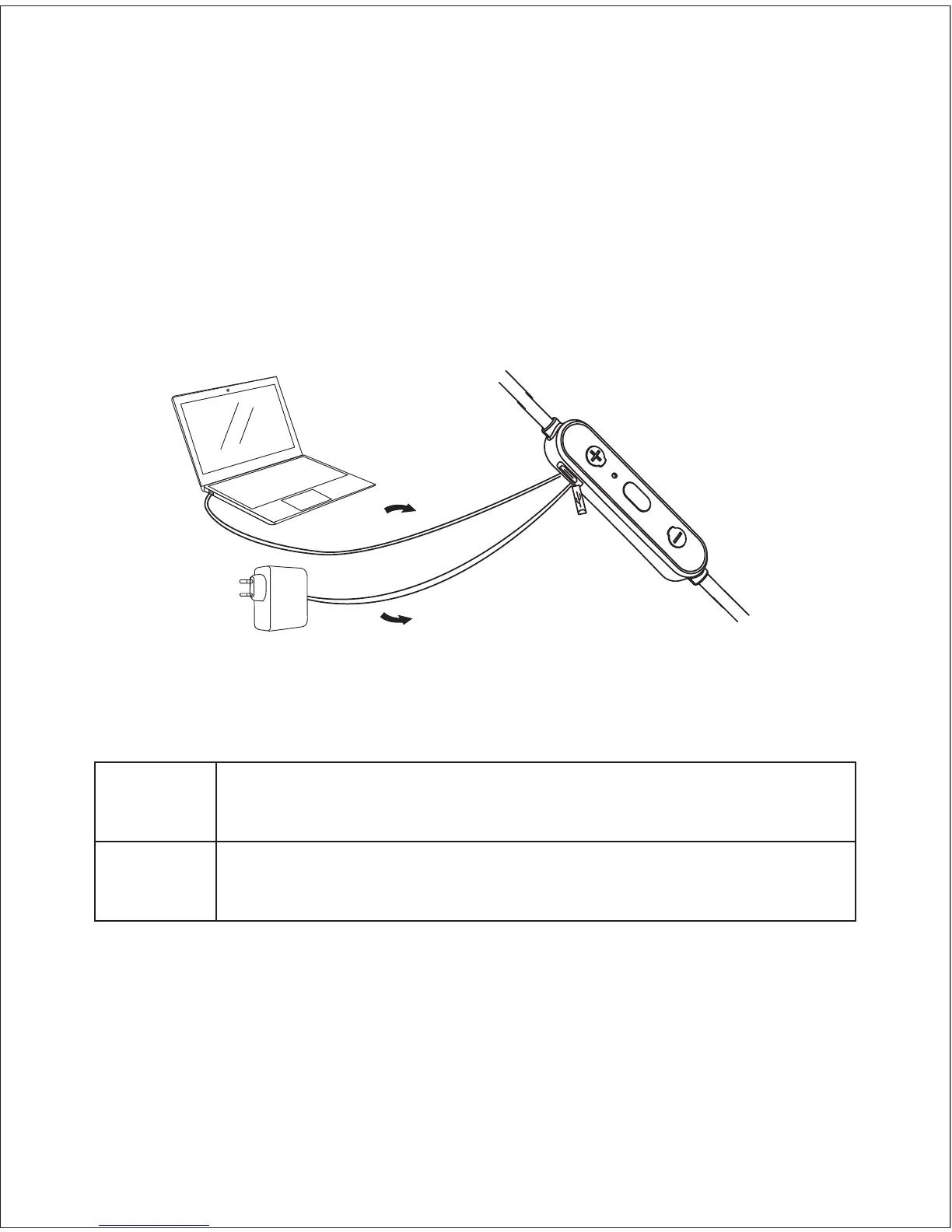
Fully charge your earbuds before first use. Before charging, make sure the
earbuds are turned off. To charge, simply connect one end of the
micro-USB cable to a USB charging port and the other end to the input
port on the earbuds. When the red LED indicator light turns blue, your earbuds
are fully charged and ready for use. Charging takes around 1.5 hours.
Turning On / Off
Turn On
Turn Off
Press and hold the multi-function button until the LED
indicator flashes blue, and you will hear an ascending tone
Press and hold the multi-function button until the LED
indicator flashes red, and you will hear a descending tone
Pairing
Starting with your earbuds powered off:
1. Press and hold the multi-function button until the LED flashes blue and
red alternately
a
b



 To Next Page