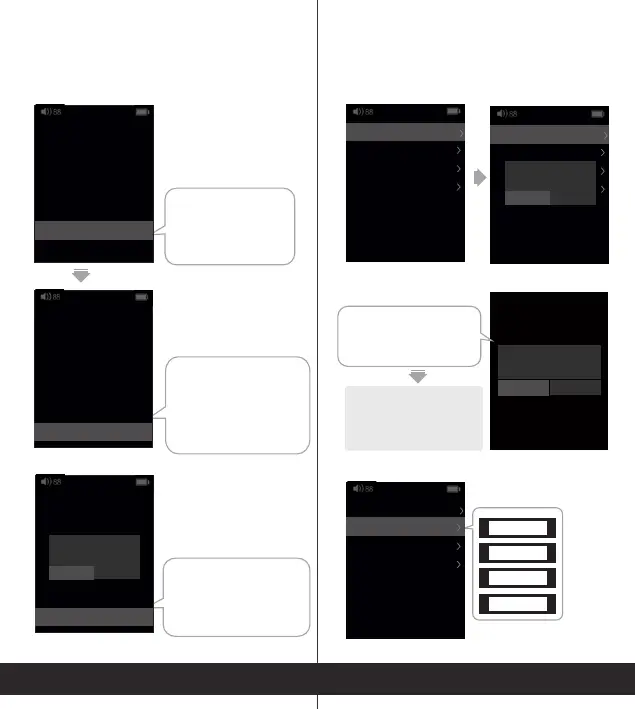
Fixedlineout/Variable
lineout.Pleasenotice
thevolumeofFixed
lineoutishigh.Be
carefulwhenyouuseit.
FactoryReset
FactoryReset:Deleteall
usersettings,recently
playedandsongsin
Favorites
8
9
Languages
English
SystemUpdate
SystemInfo
BluetoothSettings
SystemUpdate
SystemUpdate
Languages
SimplifiedChinese
TraditionalChinese
English
Japanese
After the update, if the screen displays
“failed to mount”, it means it failed
to update the song library. Please
insert the microSD card again.
New:1.00,update?
YES NO
After restart, the system will automatically
find the updatefile. Select "YES“ and the
update will start.
If you are sure to reset,
select YES, and there will
be a progress bar. Wait until
it finishes.
(BluetoothEditionOnly)
Settings
Settings
Start-up Auto Play
BacklightBrightness
Playmode
Filtermode
On
Repeatall
4
SLOW LD
Settings
Auto-Lock
Autopower-off
FacrytoReset
Never
Off
Fixedlineout Variable
Start-up Auto Play
BacklightBrightness
Playmode
Filtermode
On
Repeatall
4
SLOW LD
Settings
Auto-Lock
Autopower-off
FacrytoReset
Never
Off
Fixedlineout Variable
Start-up Auto Play
BacklightBrightness
Playmode
Filtermode
On
Repeatall
4
SLOW LD
Settings
BacklightTimer
Autopower-off
FacrytoReset
Never
Off
Fixedlineout Variable
FactoryReset
Settings
Languages
English
SystemUpdate
SystemInfo
BluetoothSettings
Settings
System Update
YES NO
Languages
English
SystemUpdate
SystemInfo
BluetoothSettings
Settings
Reset?
YES NO


 To Next Page