6
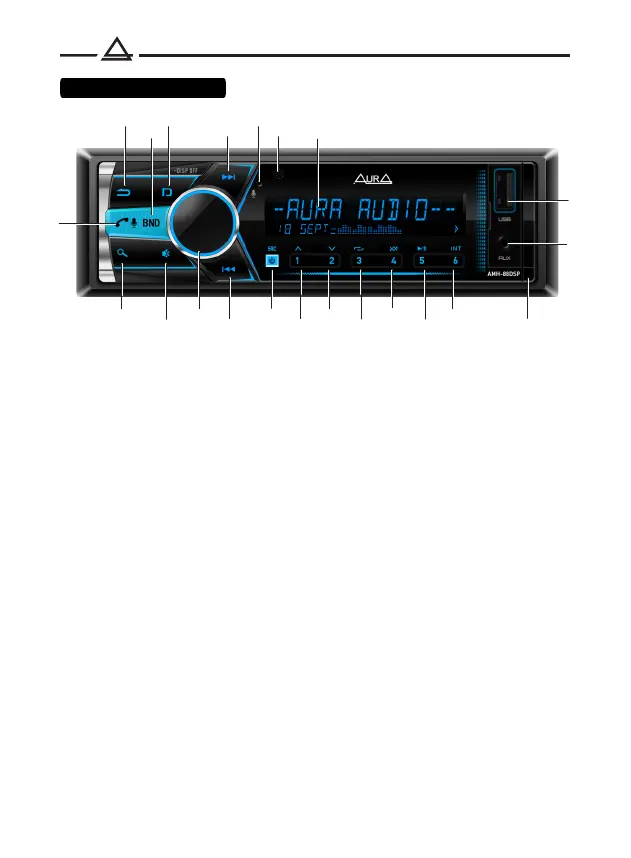
1. Return
2. Switching radio bands (FM1 / 2, FM3 (VHF), AM1 / 2)
3. Type of information on the display / Turn off the display
4. Next track / Fast forward / Radio tuning
5. Microphone
6. IR receiver
7. LCD display
8. Answering / ending a call / Voice assistant
9. Search
10. Muting the sound (Mute)
11. Adjust volume / Switch settings / Confirm selection
12. Previous track / Rewind / Radio tuning
13. Turn on / off device / Select source
14. Preset button 1 / Next folder
15. Preset button 2 / Previous folder
16.Preset Button 3 / Repeat Mode
17. Preset button 4 / Shuffle mode
18. Preset button 5 / Pause
19. Preset button 6 / Track scan mode
20. AUX input
21. USB connector
22. Front panel release button
6
5
2
3
7
9
12
8
1
13
4
11
14
15
16
17
18
19
21
20
10 22
Control elements



 To Next Page