18
Digital Display Functions
DIGITAL DISPLAY FUNCTIONS*
You can switch between modes on the digital screen by pressing
the menu button. There are 7 modes available on the digital screen.
These are;
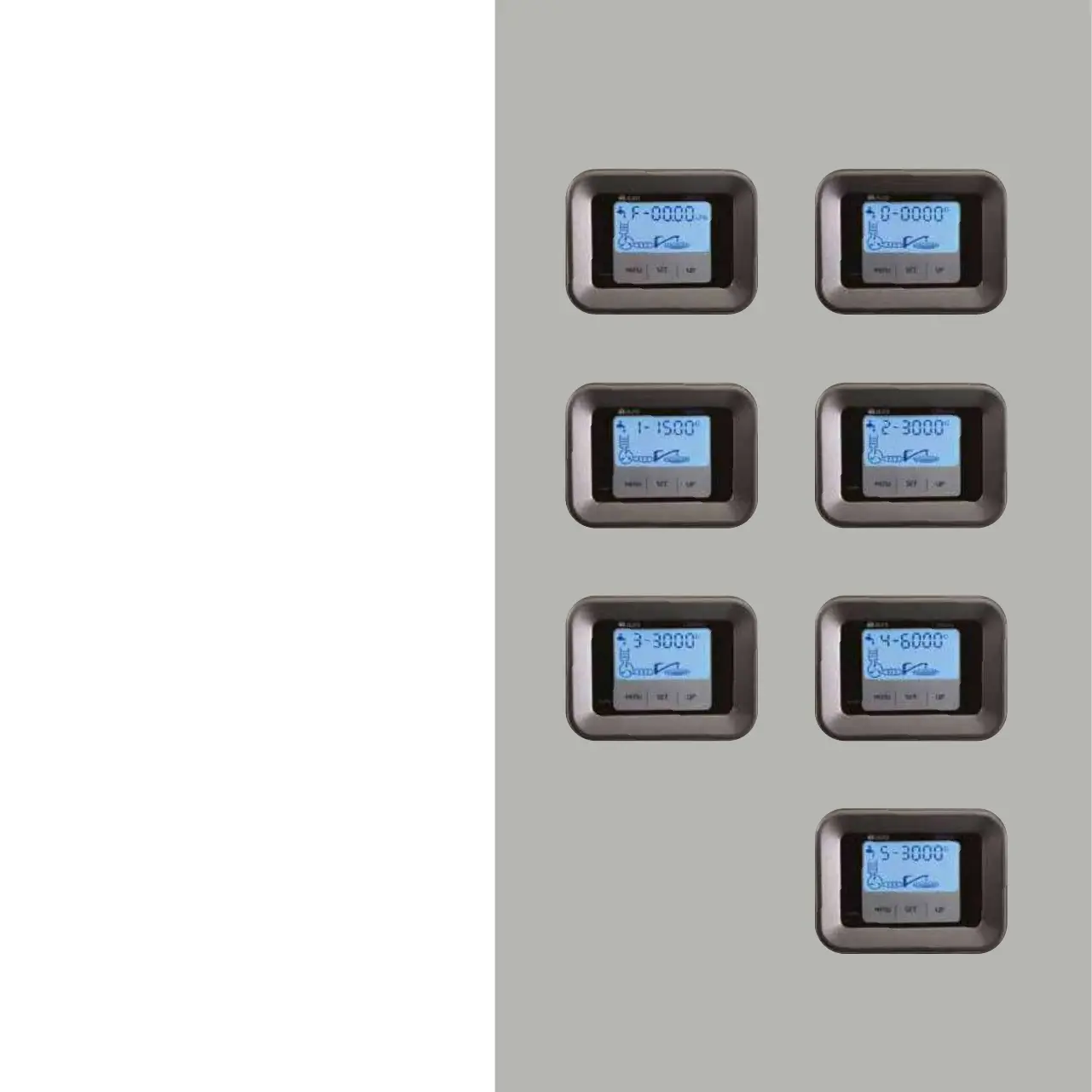
0 MODE: Shows the total water amount passing through the
appliance in gallon. As water passes through the appliance,
the value increases (Figure 11 b).
1 MODE: Shows the life of the 5 micron sediment filter in gallon. As
water passes through the appliance, the value decreases. (Figure 11 c),
2 MODE: Shows the life of GAC filter in gallon. As water passes through
the appliance, the value decreases. (Figure 11d),
3 MODE: Shows the life of the 1 micron sediment filter in gallon. As
water passes through the appliance, the value decreases. (Figure 11e).
5 MODE: Shows the life of the last mineral carbon filter in gallon. As
water passes through the appliance, the value decreases. (Figure 11g).
*Only available in 101 ME model.
F MODE: Shows the instant water flow in litre/min. (Figure 11 a).
4 MODE: Shows the life of RO membrane filter in gallon. As water
passes through the appliance, the value decreases. (Figure 11f).
Values in Figure 11 are sample values.
Figure 11 b
Figure 11 d
Figure. 11 f
Figure. 11 g
Figure. 11 e
Figure. 11 c
Figure. 11 a


 To Next Page